HarmonyOS ArkTS State Management: A Comprehensive Guide to Decorators
Overview
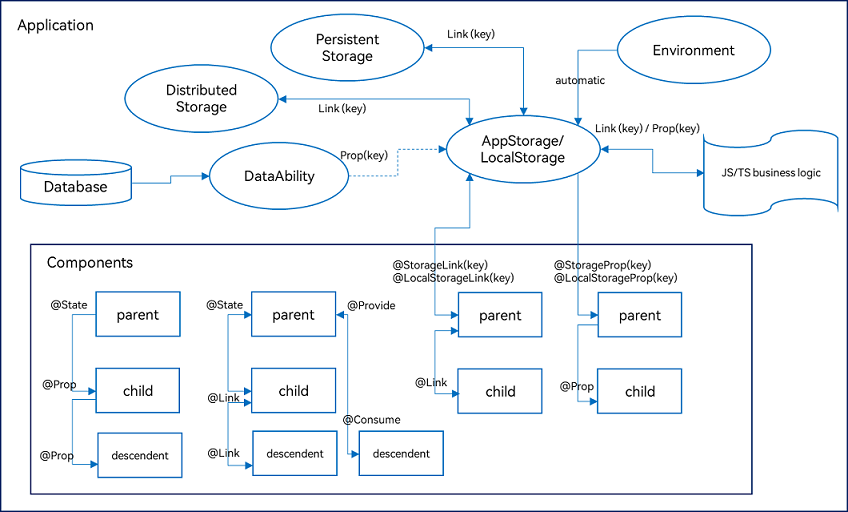
ArkUI provides a variety of decorators for state management, primarily divided into three categories: managing component-owned state, managing application-owned state, and other state management features. The following diagram illustrates the main decorators:
Managing Component-Owned State
| Decorator | Description | Use Case |
|---|---|---|
| @State | Manages state within a component. Serves as a data source for one-way and two-way synchronization with child components, triggering re-rendering. | Basic component state. |
| @Prop | Establishes one-way synchronization from parent to child. Changes in the child do not propagate back to the parent. | Passing initial values from parent to child. |
| @Link | Establishes two-way synchronization between parent and child. Changes in either component are reflected in the other. | Shared state that needs to be kept in sync. |
| @Provide/@Consume | Synchronizes state across component hierarchies without explicit parameter passing. | Cross-level state sharing. |
| @Observed | Decorates classes to enable deep observation of nested objects. Must be used with @ObjectLink or @Prop. | Observing changes in nested class properties. |
| @ObjectLink | Receives instances of @Observed classes for two-way synchronization with parent data sources. | Deep synchronization of nested objects. |
@State: Component Internal State
Characteristics:
- Private: @State variables are only accessible within the component.
- Initialization: Must be initialized locally with a type and value. Can be overridden by parent component via named parameters.
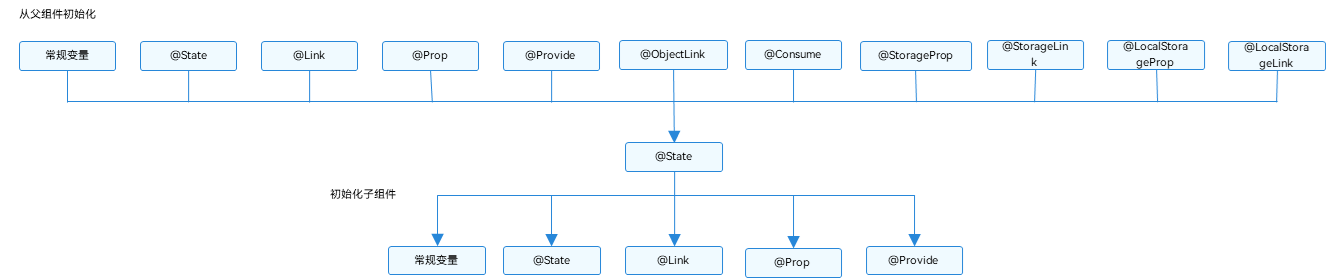
- Data Synchronization: Can establish one-way or two-way synchronization with @Prop, @Link, or @ObjectLink in child components.
- Lifecycle: Same as the lifecycle of the owning custom component.
Supported types: Object, class, string, number, boolean, enum, and arrays of these. Complex types like Date are not supported.
Parent-Child Initialization and Data Flow:
Change Detection Rules
- Simple types (boolean, string, number):
@State count: number = 0;
// Direct assignment is observed
this.count = 1;
- Class or Object types:
class ClassA {
  public value: string;
  constructor(value: string) {
    this.value = value;
  }
}

class Model {
  public value: string;
  public name: ClassA;
  constructor(value: string, a: ClassA) {
    this.value = value;
    this.name = a;
  }
}

@State title: Model = new Model('Hello', new ClassA('World'));

// Assigning a new object is observed
this.title = new Model('Hi', new ClassA('ArkUI'));

// Assigning a property is observed
this.title.value = 'Hi';

// Nested property assignment is NOT observed unless @Observed is used
this.title.name.value = 'ArkUI';
- Array types:
class Model {
  public value: number;
  constructor(value: number) {
    this.value = value;
  }
}

@State title: Model[] = [new Model(11), new Model(1)];

// Array replacement
this.title = [new Model(2)];

// Index assignment
this.title[0] = new Model(2);

// Array mutation methods
this.title.pop();
this.title.push(new Model(12));
Usage Scenarios
- Simple type:
@Entry
@Component
struct Counter {
  @State count: number = 0;

  build() {
    Button(`Clicked ${this.count} times`)
      .onClick(() => {
        this.count += 1;
      });
  }
}
- Other types:
class Model {
  public value: string;
  constructor(value: string) {
    this.value = value;
  }
}

@Entry
@Component
struct EntryComponent {
  build() {
    Column() {
      MyComponent({ count: 1, increaseBy: 2 })
      MyComponent({ title: new Model('Hello, World 2'), count: 7 })
    }
  }
}

@Component
struct MyComponent {
  @State title: Model = new Model('Hello World');
  @State count: number = 0;
  private increaseBy: number = 1;

  build() {
    Column() {
      Text(`${this.title.value}`)
      Button('Change Title').onClick(() => {
        this.title.value = (this.title.value === 'Hello ArkUI') ? 'Hello World' : 'Hello ArkUI';
      })
      Button(`Count=${this.count}`).onClick(() => {
        this.count += this.increaseBy;
      })
    }
  }
}
@Prop: One-Way Synchronization from Parent to Child
Characteristics:
- One-way sync: Parent changes are reflected in child; child changes do not affect parent.
- Local modification: @Prop variables can be modified locally, but changes are not sent back.
- Automatic update: When parent data source changes, @Prop variables are automatically updated.
- Overwrite: If child has already modified the @Prop variable, a subsequent parent update will overwrite the child's local change.
- Limitations: @Prop performs a deep copy for complex types, losing type information except for basic types, Map, Set, Date, and Array. @Prop cannot be used in an @Entry component.
Supported types: string, number, boolean, enum, and arrays of these. Complex types like any are not supported.
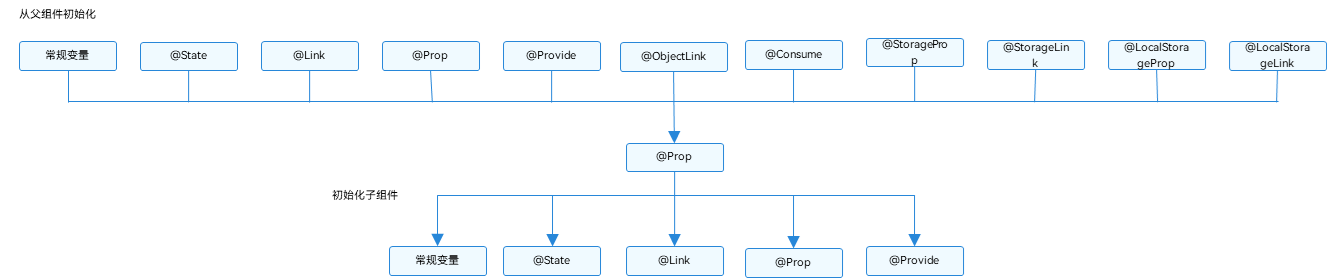
Data Flow Diagram:
Change Detection Rules
@Prop count: number;
this.count = 1; // Change is observed
For synchronization between @State and @Prop:
- Parent's @State initializes child's @Prop. When @State changes, @Prop is updated.
- Modifications to @Prop do not affect the parent's @State.
- Data source can also be @Link or @Prop, with the same synchronization mechanism.
- Data source and @Prop must have the same type.
Usage Scenarios
- Simple type synchronization from parent @State to child @Prop:
@Component
struct CountDownComponent {
  @Prop count: number;
  costOfOneAttempt: number = 1;

  build() {
    Column() {
      if (this.count > 0) {
        Text(`You have ${this.count} Nuggets left`)
      } else {
        Text('Game over!')
      }
      Button('Try again').onClick(() => {
        this.count -= this.costOfOneAttempt;
      })
    }
  }
}

@Entry
@Component
struct ParentComponent {
  @State countDownStartValue: number = 10;

  build() {
    Column() {
      Text(`Grant ${this.countDownStartValue} nuggets to play.`)
      Button('+1 - Nuggets in New Game').onClick(() => {
        this.countDownStartValue += 1;
      })
      Button('-1 - Nuggets in New Game').onClick(() => {
        this.countDownStartValue -= 1;
      })
      CountDownComponent({ count: this.countDownStartValue, costOfOneAttempt: 2 })
    }
  }
}
- Array item synchronization from parent @State to child @Prop:
@Component
struct NumberDisplay {
  @Prop value: number;

  build() {
    Text(`${this.value}`).fontSize(50).onClick(() => { this.value++; })
  }
}

@Entry
@Component
struct Index {
  @State arr: number[] = [1, 2, 3];

  build() {
    Row() {
      Column() {
        NumberDisplay({ value: this.arr[0] })
        NumberDisplay({ value: this.arr[1] })
        NumberDisplay({ value: this.arr[2] })
        Divider().height(5)
        ForEach(this.arr, item => NumberDisplay({ value: item }), item => item.toString())
        Text('Replace entire arr').fontSize(50).onClick(() => {
          this.arr = (this.arr[0] === 1) ? [3, 4, 5] : [1, 2, 3];
        })
      }
    }
  }
}
- Class property synchronization from parent @State to child @Prop:
class Book {
  public title: string;
  public pages: number;
  public readIt: boolean = false;

  constructor(title: string, pages: number) {
    this.title = title;
    this.pages = pages;
  }
}

@Component
struct ReaderComponent {
  @Prop title: string;
  @Prop readIt: boolean;

  build() {
    Row() {
      Text(this.title)
      Text(`... ${this.readIt ? 'I have read' : 'I have not read it'}`)
        .onClick(() => this.readIt = true)
    }
  }
}

@Entry
@Component
struct Library {
  @State book: Book = new Book('100 secrets of C++', 765);

  build() {
    Column() {
      ReaderComponent({ title: this.book.title, readIt: this.book.readIt })
      ReaderComponent({ title: this.book.title, readIt: this.book.readIt })
    }
  }
}
- @Prop with local initialization (not synced from parent):
@Component
struct MyComponent {
  @Prop customCounter: number;
  @Prop customCounter2: number = 5; // local default

  build() {
    Column() {
      Row() {
        Text(`From Main: ${this.customCounter}`).width(90).height(40).fontColor('#FF0010')
      }
      Row() {
        Button('Click to change locally!').width(180).height(60).margin({ top: 10 })
          .onClick(() => {
            this.customCounter2++
          })
      }.height(100).width(180)
      Row() {
        Text(`Custom Local: ${this.customCounter2}`).width(90).height(40).fontColor('#FF0010')
      }
    }
  }
}

@Entry
@Component
struct MainProgram {
  @State mainCounter: number = 10;

  build() {
    Column() {
      Button('Click to change number').width(480).height(60).margin({ top: 10, bottom: 10 })
        .onClick(() => {
          this.mainCounter++
        })
      MyComponent({ customCounter: this.mainCounter })
      MyComponent({ customCounter: this.mainCounter, customCounter2: this.mainCounter })
    }
  }
}
@Link: Two-Way Synchronization between Parent and Child
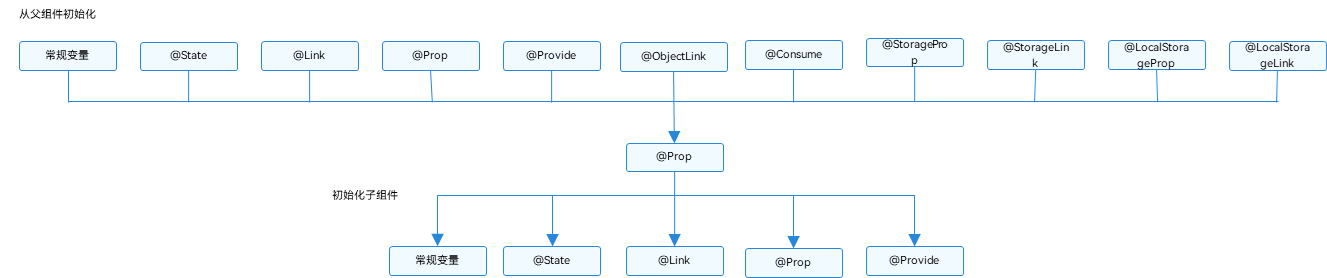
@Link can establish two-way data synchronization with parent's @State, @StorageLink, or @Link.
Supported types: string, number, boolean, enum, and arrays of these. Complex types like any are not supported.
Data Flow Diagram:
Change Detection Rules
- For boolean, string, number: value changes are observed.
- For class or Object: assignment and property assignment are observed (all properties returned by Object.keys).
- For array: additions, deletions, and element updates are observed.
Usage Scenarios
- Simple type and class object @Link:
class GreenButtonState {
  width: number = 0;
  constructor(width: number) {
    this.width = width;
  }
}

@Component
struct GreenButton {
  @Link greenButtonState: GreenButtonState;

  build() {
    Button('Green Button')
      .width(this.greenButtonState.width)
      .height(150.0)
      .backgroundColor('#00ff00')
      .onClick(() => {
        if (this.greenButtonState.width < 700) {
          this.greenButtonState.width += 125;
        } else {
          this.greenButtonState = new GreenButtonState(100);
        }
      })
  }
}

@Component
struct YellowButton {
  @Link yellowButtonState: number;

  build() {
    Button('Yellow Button')
      .width(this.yellowButtonState)
      .height(150.0)
      .backgroundColor('#ffff00')
      .onClick(() => {
        this.yellowButtonState += 50.0;
      })
  }
}

@Entry
@Component
struct ShufflingContainer {
  @State greenButtonState: GreenButtonState = new GreenButtonState(300);
  @State yellowButtonProp: number = 100;

  build() {
    Column() {
      Button('Parent: Set yellowButton').onClick(() => {
        this.yellowButtonProp = (this.yellowButtonProp < 700) ? this.yellowButtonProp + 100 : 100;
      })
      Button('Parent: Set GreenButton').onClick(() => {
        this.greenButtonState.width = (this.greenButtonState.width < 700) ? this.greenButtonState.width + 100 : 100;
      })
      GreenButton({ greenButtonState: $greenButtonState })
      YellowButton({ yellowButtonState: $yellowButtonProp })
    }
  }
}
- Array @Link:
@Component
struct Child {
  @Link items: number[];

  build() {
    Column() {
      Button('Push').onClick(() => {
        this.items.push(this.items.length + 1);
      })
      Button('Replace whole array').onClick(() => {
        this.items = [100, 200, 300];
      })
    }
  }
}

@Entry
@Component
struct Parent {
  @State arr: number[] = [1, 2, 3];

  build() {
    Column() {
      Child({ items: $arr })
      ForEach(this.arr, item => Text(`${item}`), item => item.toString())
    }
  }
}
@Provide/@Consume: Two-Way Synchronization with Descendant Components
Characteristics:
- Two-way data sync: @Provide and @Consume enable bidirectional data synchronization between ancestor and descendant components.
- Cross-level: They allow state sharing across multiple levels without explicit parameter passing.
- Binding: Multiple @Consume can bind to the same @Provide by matching variable name or alias.
- Limitation: Cannot have multiple @Provide with the same name or alias within the same component tree.
Supported types: string, number, boolean, enum, and arrays of these. Complex types like any are not supported.
Data Flow Diagram:
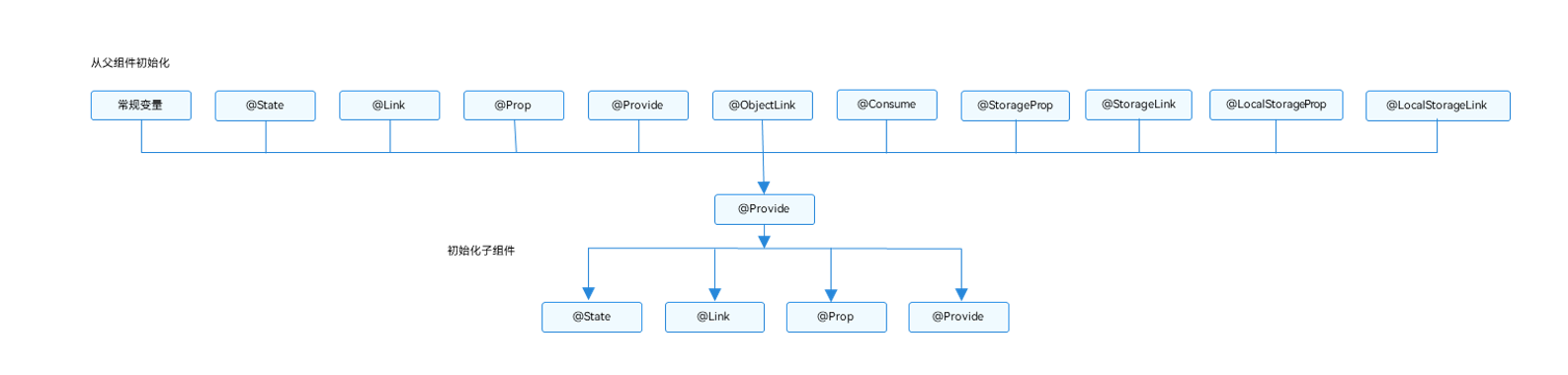
Change Detection Rules
- For boolean, string, number: value changes are observed.
- For class or Object: assignment and property assignment are observed (all properties returned by Object.keys).
- For array: additions, deletions, and element updates are observed.
Usage Scenario
@Component
struct DeepChild {
  @Consume reviewVotes: number;

  build() {
    Column() {
      Text(`reviewVotes(${this.reviewVotes})`)
      Button(`Give +1`).onClick(() => this.reviewVotes += 1)
    }.width('50%')
  }
}

@Component
struct MiddleChild {
  build() {
    Row({ space: 5 }) {
      DeepChild()
      DeepChild()
    }
  }
}

@Component
struct OuterChild {
  build() {
    MiddleChild()
  }
}

@Entry
@Component
struct Root {
  @Provide reviewVotes: number = 0;

  build() {
    Column() {
      Button(`reviewVotes(${this.reviewVotes}), +1`).onClick(() => this.reviewVotes += 1)
      OuterChild()
    }
  }
}
@Observed/@ObjectLink: Observing Changes in Nested Class Properties
Characteristics:
- Two-way data sync: @ObjectLink and @Observed work together for bidirectional synchronization in nested object or array scenarios.
- Observing property changes: @Observed decorated classes allow observation of property changes.
- Instance binding: @ObjectLink decorated variables in child components receive instances of @Observed classes, establishing two-way binding with the parent's corresponding state.
- Usage: @Observed alone has no effect; it must be used with @ObjectLink or @Prop.
- Limitation: @Observed changes the prototype chain of the class. @ObjectLink cannot be used in an @Entry component.
Type must be an @Observed decorated class. Can be used to initialize regular variables, @State, @Link, @Prop, @Provide.
Nested Class Data Flow Diagram:
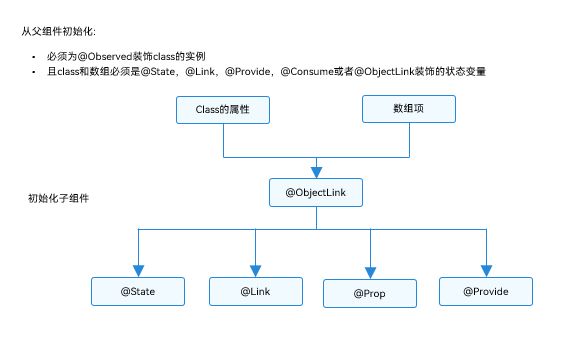
Change Detection Rules
class ClassA {
  public c: number;
  constructor(c: number) {
    this.c = c;
  }
}

@Observed
class ClassB {
  public a: ClassA;
  public b: number;
  constructor(a: ClassA, b: number) {
    this.a = a;
    this.b = b;
  }
}

// @ObjectLink b: ClassB
// Assignment to property is observed
this.b.a = new ClassA(5);
this.b.b = 5;

// Change in non-@Observed nested class property is NOT observed
this.b.a.c = 5;
Usage Scenarios
- Nested Object:
let NextID: number = 1;

@Observed
class ClassA {
  public id: number;
  public c: number;
  constructor(c: number) {
    this.id = NextID++;
    this.c = c;
  }
}

@Observed
class ClassB {
  public a: ClassA;
  constructor(a: ClassA) {
    this.a = a;
  }
}

@Component
struct ViewA {
  label: string = 'ViewA1';
  @ObjectLink a: ClassA;

  build() {
    Row() {
      Button(`ViewA [${this.label}] this.a.c=${this.a.c} +1`)
        .onClick(() => {
          this.a.c += 1;
        })
    }
  }
}

@Entry
@Component
struct ViewB {
  @State b: ClassB = new ClassB(new ClassA(0));

  build() {
    Column() {
      ViewA({ label: 'ViewA #1', a: this.b.a })
      ViewA({ label: 'ViewA #2', a: this.b.a })
      Button('ViewB: this.b.a.c += 1').onClick(() => {
        this.b.a.c += 1;
      })
      Button('ViewB: this.b.a = new ClassA(0)').onClick(() => {
        this.b.a = new ClassA(0);
      })
      Button('ViewB: this.b = new ClassB(ClassA(0))').onClick(() => {
        this.b = new ClassB(new ClassA(0));
      })
    }
  }
}
- Array of Objects:
@Component
struct ViewA {
  @ObjectLink a: ClassA;
  label: string = 'ViewA1';

  build() {
    Row() {
      Button(`ViewA [${this.label}] this.a.c = ${this.a.c} +1`)
        .onClick(() => {
          this.a.c += 1;
        })
    }
  }
}

@Entry
@Component
struct ViewB {
  @State arrA: ClassA[] = [new ClassA(0), new ClassA(0)];

  build() {
    Column() {
      ForEach(this.arrA, item => ViewA({ label: `#${item.id}`, a: item }), item => item.id.toString())
      ViewA({ label: `ViewA this.arrA[first]`, a: this.arrA[0] })
      ViewA({ label: `ViewA this.arrA[last]`, a: this.arrA[this.arrA.length - 1] })
      Button('ViewB: reset array').onClick(() => {
        this.arrA = [new ClassA(0), new ClassA(0)];
      })
      Button('ViewB: push').onClick(() => {
        this.arrA.push(new ClassA(0));
      })
      Button('ViewB: shift').onClick(() => {
        this.arrA.shift();
      })
      Button('ViewB: change item property in middle').onClick(() => {
        this.arrA[Math.floor(this.arrA.length / 2)].c = 10;
      })
      Button('ViewB: replace item in middle').onClick(() => {
        this.arrA[Math.floor(this.arrA.length / 2)] = new ClassA(11);
      })
    }
  }
}
- 2D Array:
@Observed
class StringArray extends Array<string> {}

@Component
struct ItemPage {
  @ObjectLink itemArr: StringArray;

  build() {
    Row() {
      Text('ItemPage').width(100).height(100)
      ForEach(this.itemArr, item => Text(item).width(100).height(100), item => item)
    }
  }
}

@Entry
@Component
struct IndexPage {
  @State arr: StringArray[] = [new StringArray(), new StringArray(), new StringArray()];

  build() {
    Column() {
      ItemPage({ itemArr: this.arr[0] })
      ItemPage({ itemArr: this.arr[1] })
      ItemPage({ itemArr: this.arr[2] })
      Divider()
      ForEach(this.arr, itemArr => ItemPage({ itemArr: itemArr }), itemArr => itemArr[0])
      Divider()
      Button('Update').onClick(() => {
        console.error('Update all items in arr');
        if (this.arr[0][0] !== undefined) {
          this.arr[0].push(`${this.arr[0].slice(-1).pop()}${this.arr[0].slice(-1).pop()}`);
          this.arr[1].push(`${this.arr[1].slice(-1).pop()}${this.arr[1].slice(-1).pop()}`);
          this.arr[2].push(`${this.arr[2].slice(-1).pop()}${this.arr[2].slice(-1).pop()}`);
        } else {
          this.arr[0].push('Hello');
          this.arr[1].push('World');
          this.arr[2].push('!');
        }
      })
    }
  }
}
Managing Application-Owned State
| Storage Type | Description |
|---|---|
| LocalStorage | Page-level UI state storage for sharing state within a UIAbility and across pages. |
| AppStorage | Singleton LocalStorage created by the UI framework at app startup for centralized storage. |
| PersistentStorage | Persists UI state to disk, usually used with AppStorage to ensure data survives app restarts. |
| Environment | Device environment parameters that sync to AppStorage. |
LocalStorage: Page-Level UI State Storage
Change Detection Rules
| Decorator | Description |
|---|---|
| @LocalStorageProp | One-way synchronization from LocalStorage to the component. |
| @LocalStorageLink | Two-way synchronization between LocalStorage and the component. |
| Limitation | The type of a named property cannot be changed after LocalStorage creation. Set must use the same type. LocalStorage is page-level; GetShared only works if windowStage.loadContent provided the instance. |
- Changes to @LocalStorageLink are synced back to LocalStorage.
- Changes to LocalStorage property are synced to all bound @LocalStorageLink and @LocalStorageProp variables.
- @LocalStorageLink changes trigger re-rendering of the component.
Usage Scenarios
- Using LocalStorage in application logic:
let storage = new LocalStorage({ 'PropA': 47 });
let propA = storage.get('PropA'); // propA == 47
let link1 = storage.link('PropA'); // link1.get() == 47
let link2 = storage.link('PropA'); // link2.get() == 47
let prop = storage.prop('PropA'); // prop.get() = 47
link1.set(48); // two-way sync: link1.get() == link2.get() == prop.get() == 48
prop.set(1); // one-way sync: prop.get()=1; but link1.get() == link2.get() == 48
link1.set(49); // two-way sync: link1.get() == link2.get() == prop.get() == 49
- Using LocalStorage from within UI:
let storage = new LocalStorage({ 'PropA': 47 });

@Component
struct Child {
  @LocalStorageLink('PropA') storLink2: number = 1;

  build() {
    Button(`Child from LocalStorage ${this.storLink2}`)
      .onClick(() => this.storLink2 += 1)
  }
}

@Entry(storage)
@Component
struct CompA {
  @LocalStorageLink('PropA') storLink1: number = 1;

  build() {
    Column({ space: 15 }) {
      Button(`Parent from LocalStorage ${this.storLink1}`)
        .onClick(() => this.storLink1 += 1)
      Child()
    }
  }
}
- One-way synchronization with @LocalStorageProp:
let storage = new LocalStorage({ 'PropA': 47 });

@Entry(storage)
@Component
struct CompA {
  @LocalStorageProp('PropA') storProp1: number = 1;

  build() {
    Column({ space: 15 }) {
      Button(`Parent from LocalStorage ${this.storProp1}`)
        .onClick(() => this.storProp1 += 1)
      Child()
    }
  }
}

@Component
struct Child {
  @LocalStorageProp('PropA') storProp2: number = 2;

  build() {
    Column({ space: 15 }) {
      Text(`Parent from LocalStorage ${this.storProp2}`)
    }
  }
}
- Two-way synchronization with @LocalStorageLink:
let storage = new LocalStorage({ 'PropA': 47 });
let linkToPropA = storage.link('PropA');

@Entry(storage)
@Component
struct CompA {
  @LocalStorageLink('PropA') storLink: number = 1;

  build() {
    Column() {
      Text('incr @LocalStorageLink variable')
        .onClick(() => this.storLink += 1)
      Text(`@LocalStorageLink: ${this.storLink} - linkToPropA: ${linkToPropA.get()}`)
    }
  }
}
- Synchronizing state between sibling components:
let storage = new LocalStorage({ countStorage: 1 });

@Component
struct Child {
  label: string = 'no name';
  @LocalStorageLink('countStorage') playCountLink: number = 0;

  build() {
    Row() {
      Text(this.label).width(50).height(60).fontSize(12)
      Text(`playCountLink ${this.playCountLink}: inc by 1`)
        .onClick(() => { this.playCountLink += 1 })
        .width(200).height(60).fontSize(12)
    }.width(300).height(60)
  }
}

@Entry(storage)
@Component
struct Parent {
  @LocalStorageLink('countStorage') playCount: number = 0;

  build() {
    Column() {
      Row() {
        Text('Parent').width(50).height(60).fontSize(12)
        Text(`playCount ${this.playCount} dec by 1`)
          .onClick(() => { this.playCount -= 1 })
          .width(250).height(60).fontSize(12)
      }.width(300).height(60)
      Row() {
        Text('LocalStorage').width(50).height(60).fontSize(12)
        Text(`countStorage ${this.playCount} incr by 1`)
          .onClick(() => { storage.set('countStorage', 1 + storage.get('countStorage')); })
          .width(250).height(60).fontSize(12)
      }.width(300).height(60)
      Child({ label: 'ChildA' })
      Child({ label: 'ChildB' })
      Text(`playCount in LocalStorage for debug ${storage.get<number>('countStorage')}`)
        .width(300).height(60).fontSize(12)
    }
  }
}
- Sharing LocalStorage from UIAbility to multiple views:
// EntryAbility.ts
import UIAbility from '@ohos.app.ability.UIAbility';
import window from '@ohos.window';

let para: Record<string, number> = { 'PropA': 47 };
let localStorage: LocalStorage = new LocalStorage(para);

export default class EntryAbility extends UIAbility {
  storage: LocalStorage = localStorage;

  onWindowStageCreate(windowStage: window.WindowStage) {
    windowStage.loadContent('pages/Index', this.storage);
  }
}
// Index.ets
let storage = LocalStorage.GetShared();

@Entry(storage)
@Component
struct CompA {
  @LocalStorageLink('PropA') varA: number = 1;

  build() {
    Column() {
      Text(`${this.varA}`).fontSize(50)
    }
  }
}
AppStorage: Application-Level Storage
(Detailed content continues...)
Note: This guide covers the core concepts of state management in ArkTS for HarmonyOS. For more advanced topics, refer to the official documentation.
