Download and install Pinia first: npm install pinia --save In Vue 3's main.js, initialize Pinia: import { createApp } from 'vue' import { createPinia } from 'pinia' import RootApp from './RootApp.vue' const storeInstance = createPinia() const vueApp = createApp(RootApp) vueApp.use(storeInstance) vue...
Most modern web applications, whether built with React or Vue3, can function effectively without a dedicated global state management library. However, achieving this in React demands advanced proficiency across multiple areas, whereas Vue3 simplifies the process significantly. Global state managemen...
In MATLAB App Designer, properties serve as the primary mechanism for exchanging information across callbacks and methods. Since every UI element automatically registers as a property, you can read or modify interface controls directly from any script block using the app.ControlName.PropertyName con...
Documentation Resources Chinese Documentation: http://docs.jinkan.org/docs/flask/ English Documentation: http://flask.pocoo.org/docs/0.11/ Requirements File Management In a virtual environment, generate dependencise with version numbers: pip freeze > requirements.txt Example requirements.txt cont...
LangGraph4J vs. LangChain4J LangChain4J provides a foundational toolkit for LLM interactions. It focuses on creating sequential "chains" that handle tasks like prompt templating, RAG pipelines, and basic LLM calling. It offers modular components akin to building blocks. LangGraph4J operate...
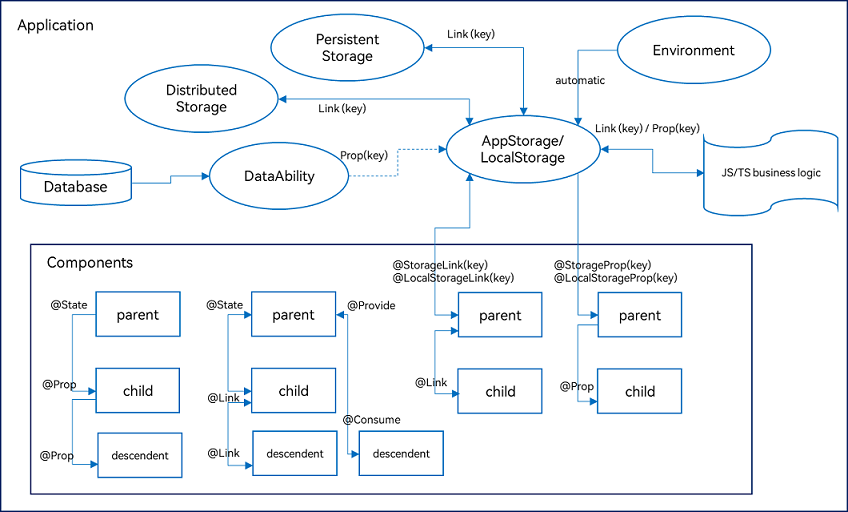
Overview ArkUI provides a variety of decorators for state management, primarily divided into three categories: managing component-owned state, managing application-owned state, and other state management features. The following diagram illustrates the main decorators: Managing Component-Owned State...
Project Structure Overview entry/src/main/ets/ |---ui-components | |---TabNav.ets // Bottom tab navigation panel | |---SpecSelector.ets // Product specification selection | |---PromoDialog.ets // Promotional overlay | |---ProductInfo.ets // Detailed product specs block | |---PriceTag.ets // Price di...
Setting Up the Environment Install required packages: npm install redux react-redux redux-thunk --save Create the store configuration in store/index.js and integrate it into the main entry point src/index.js. Set up a basic home page component with views/home/index.jsx and its corresponding UI layer...
Installation and Setup Install the package via npm: npm install vuex --save Initialize the plugin within your application entry point: import Vue from 'vue' import Vuex from 'vuex' Vue.use(Vuex) Create a centralized store instance to hold your application-level data: const store = new Vuex.Store({ s...