Overview During application development with HarmonyOS, encapsulating ArkUI components becomes essential for business reuse. Based on practical migration scenarios, three typical component encapsulation patterns have emerged: Public Component Encapsulation: Wrapping system components to provide unif...
Network Communication The network module enables applications to perform HTTP requests, establish WebSocket connections, and manage socket-based data transfers. Making HTTP Requetss To initiate an HTTP request: import http from '@ohos.net.http'; const client = http.createHttp(); client.request( 'htt...
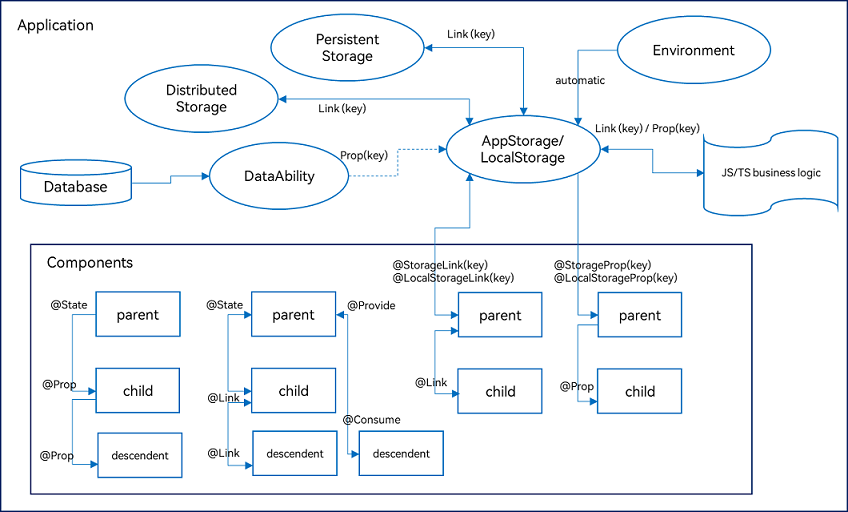
Overview ArkUI provides a variety of decorators for state management, primarily divided into three categories: managing component-owned state, managing application-owned state, and other state management features. The following diagram illustrates the main decorators: Managing Component-Owned State...
In HarmonyOS application development, routing and view switching are typically managed through state-decorated propertise and lifecycle-aware components. The following example demonstrates how to implement a tab-based interface using TabBar while isolating route state. @Entry @Component struct MainR...
Overview This implemantation demonstrates QR code scanning using camera capture and media library integration. It supports real-time decoding from the camera feed and parsing QR codes from images selected from the device’s photo gallery. Key Features Real-time QR code detection via camera stream Man...
Demonstrates creation and control of primary and secondary windows, immersive mode, picture-in-picture playback, system bar queries, and configurable touch regions using HarmonyOS window management APIs. Functional Scenarios Video Window Playback Launch app and navigate to video screen. Tap video ar...
Project Structure Overview entry/src/main/ets/ |---ui-components | |---TabNav.ets // Bottom tab navigation panel | |---SpecSelector.ets // Product specification selection | |---PromoDialog.ets // Promotional overlay | |---ProductInfo.ets // Detailed product specs block | |---PriceTag.ets // Price di...
This example demonstrates a multi-user restaurant ordreing application leveraging HarmonyOS’s distributed data capabilities. Users on different devices within the same network can collaboratively view and update an order in real time without requiring QR codes or external services. Project Structure...
Navigate to a Details Page Here is a DetailsPage component that displays an image and allows its width to be adjusted. The page provides a way to navigate back to the home screen. import { router } from '@ohos.router'; @Entry @Component struct DetailsPage { @State currentImageWidth: number = 150; bu...
The Node-API functon napi_create_async_work facilitates the execution of tasks in background threads, allowing long-running operations to avoid blocking the main thread. This approach involves defining two callback functions: one for background execution and another for completion handling on the ma...