Understanding LangChain: A Comprehensive Guide to the Popular LLM Framework
LangChain is an innovative framework that is revolutionizing how we develop applications powered by language models. By introducing advanced principles, LangChain is redefining the limits of what traditional APIs can achieve. Moreover, LangChain applications feature intelligent agents, enabling language models to interact with and adapt to their environment.
LangChain is composed of multiple modules. As its name suggests, the primary purpose of LangChain is to chain these modules together. This means we can connect each module in a sequence and invoke the entire chain at once.
What is LangChain?
LangChain is an innovative framework that is revolutionizing how we develop applications powered by language models. By introducing advanced principles, LangChain is redefining the limits of what traditional APIs can achieve. Moreover, LangChain applications feature intelligent agents, enabling language models to interact with and adapt to their environment.
LangChain is composed of multiple modules. As its name suggests, the primary purpose of LangChain is to chain these modules together. This means we can connect each module in a sequence and invoke the entire chain at once.
Modules of LangChain
Model
Models primarily cover Large Language Models (LLMs). LLMs are neural networks with a large number of parameters trained on vast amounts of unlabeled text. Major tech companies have introduced various LLMs such as:
- Google's BERT
- OpenAI's GPT-3
- Google LaMDA
- Google PaLM
- Meta AI's LLaMA
- OpenAI's GPT-4
With LangChain, interacting with LLMs becomes more convenient. It provides interfaces and features that help integrate the power of LLMs into your working applications easily. LangChain uses the asyncio library to provide asynchronous support for LLMs.
For network-bound scenarios that require concurrent calls to multiple LLMs, LangChain also offers asynchronous support. By releasing the thread processing a request, the server can assign it to other tasks until the response is ready, maximizing resource utilization.
Currently, LangChain supports asynchronous support for models like OpenAI, PromptLayerOpenAI, ChatOpenAI, and Anthropic, with plans to expand to other LLMs. You can use the agenerate method to call OpenAI LLMs asynchronously. Additionally, you can write custom LLM wrappers beyond the supported models.
Example using OpenAI:
from langchain.llms import OpenAI

# Initialize the LLM with the text-ada-001 model
llm = OpenAI(model_name="text-ada-001", n=2, best_of=2)

# Ask a question
response = llm("Tell me a joke")
print(response)
Output:
'\n\nWhy did the chicken cross the road?\n\nTo get to the other side.'
Another example:
llm_result = llm.generate(["Tell me a poem"] * 15)
print(llm_result.generations[0][0].text)
Output:
'\n\nWhat if love neverspeech...'
Prompt
Prompts are inputs provided to the system to fine-tune the answer acccording to the use case. In many cases, we need not just text but more structured information. Many new object detection and classification algorithms based on contrastive pre-training and zero-shot learning use prompts as effective inputs for prediction. For example, OpenAI's CLIP and META's Grounding DINO use prompts as inputs.
In LangChain, we can set prompt templates as needed and chain them with the main chain for output prediction. LangChain also provides output parsers to further refine results. Output parsers guide the formatting of the model's output and parse it into the desired format (including retries if necessary).
We can provide prompt templates as input. Templates are specific formats or blueprints for desired answers. LangChain offers pre-designed prompt templates for different tasks, but we can also create custom templates.
Example:
from langchain import PromptTemplate

# Template as a blueprint for the prompt
template = """I want you to act as a naming consultant for new companies.
What is a good name for a company that makes {product}?"""

prompt = PromptTemplate(
    input_variables=["product"],
    template=template,
)
formatted_prompt = prompt.format(product="colorful socks")
print(formatted_prompt)
# Output: I want you to act as a naming consultant for new companies.
# What is a good name for a company that makes colorful socks?
Memory
By default, chains and agents in LangChain run in a stateless mode, processing each query independently. However, for applications like chatbots, retaining previous interactions is crucial for both short-term and long-term context. This is where memory comes in.
LangChain provides two forms of memory components. First, it offers utilities for managing and manipulating previous chat messages, designed to be modular and use-case agnostic. Second, it provides a simple way to integrate these utilities into chain structures, making them flexible and adaptable.
Example:
from langchain.memory import ChatMessageHistory

history = ChatMessageHistory()
history.add_user_message("hi!")
history.add_ai_message("whats up?")
print(history.messages)
Output:
[HumanMessage(content='hi!', additional_kwargs={}),
 AIMessage(content='whats up?', additional_kwargs={})]
Chain
Chains provide a way to combine various components into a unified application. For example, you can create a chain that takes user input, formats it using a PromptTemplate, and then passes the formatted reply to an LLM. By integrating multiple chains with other components, you can build more complex chain structures.
LLMChain is one of the most common methods for querying LLMs. It formats the provided input key values and memory key values (if any) according to the prompt template, sends the formatted string to the LLM, which generates and returns the output.
After calling the language model, you can follow a series of steps, potentially involving multiple model calls. This is valuable when you want to use the output of one call as input to another. In this chain sequence, each chain has an input and output, with one step's output serving as input to the next.
Example:
from langchain.chat_models import ChatOpenAI
from langchain.prompts.chat import (
    ChatPromptTemplate,
    HumanMessagePromptTemplate,
)
from langchain import LLMChain

human_message_prompt = HumanMessagePromptTemplate(
    prompt=PromptTemplate(
        template="What is a good name for a company that makes {product}?",
        input_variables=["product"],
    )
)
chat_prompt_template = ChatPromptTemplate.from_messages([human_message_prompt])
chat = ChatOpenAI(temperature=0.9)

# Final chain
chain = LLMChain(llm=chat, prompt=chat_prompt_template)
print(chain.run("colorful socks"))
Agent
Some applications may require not only a predetermined sequence of LLM/other tool calls but also an uncertain order depending on user input. This involves an agent that has access to multiple tools. Based on user input, the agent may decide whether to use these tools and determine the input for each call.
According to the documentation, the high-level pseudo-code of an agent is as follows:
- Receive user input.
- The agent decides whether to use a tool and what the tool's input should be.
- Call the tool and record the observation (the output from calling the tool with the given input).
- Pass the history of tool calls, inputs, and observations back to the agent, which decides the next step.
- Repeat until the agent decides not to use any more tools, then respond directly to the user.
Example:
from langchain.agents import load_tools, initialize_agent, AgentType
from langchain.llms import OpenAI

llm = OpenAI(temperature=0)

tools = load_tools(["serpapi", "llm-math"], llm=llm)

agent = initialize_agent(
    tools, llm, agent=AgentType.ZERO_SHOT_REACT_DESCRIPTION, verbose=True
)

agent.run("Who is Leo DiCaprio's girlfriend? What is her current age raised to the 0.43 power?")
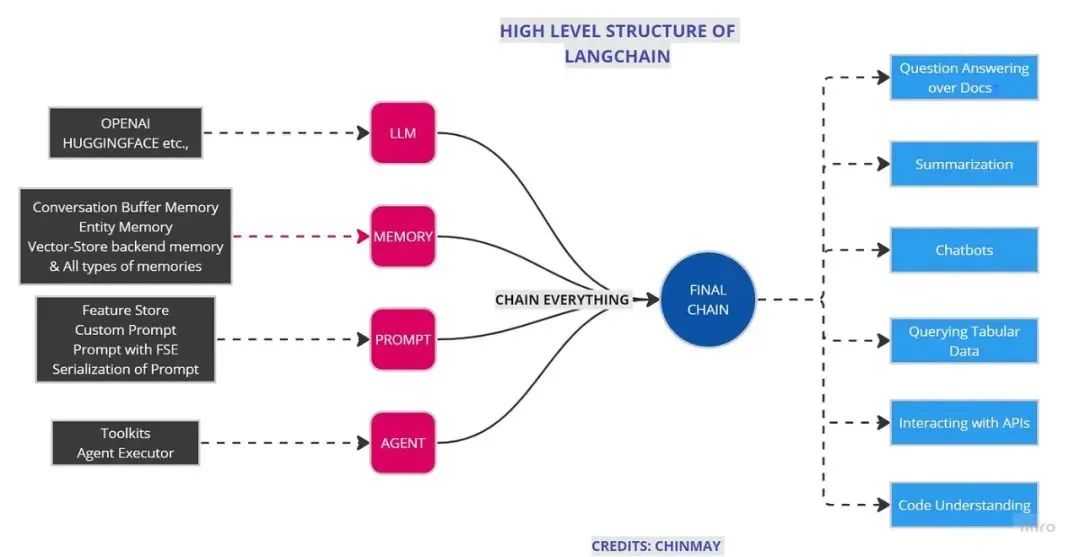
This diagram summarizes the modules:
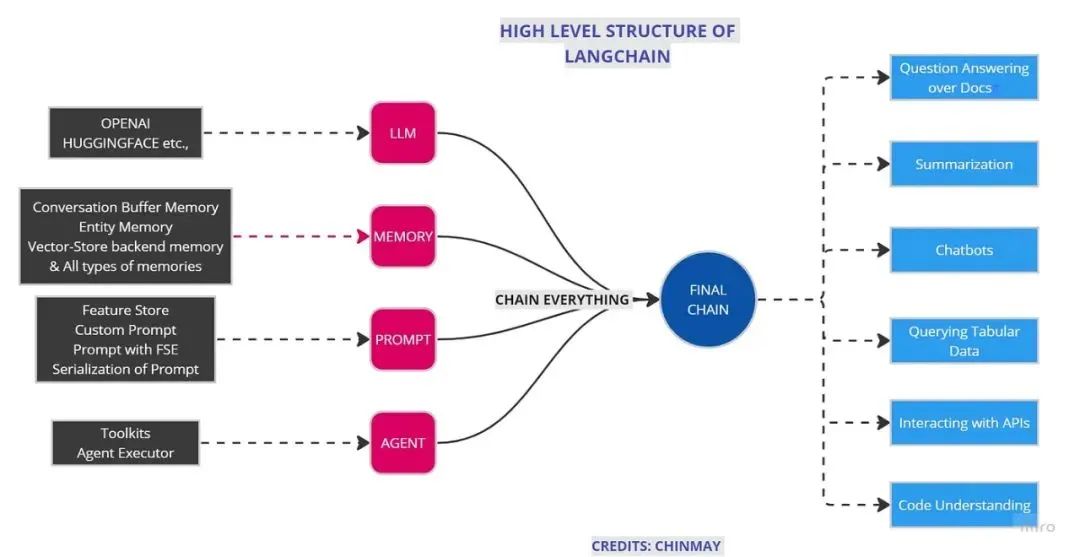
Understanding all modules and chaining is essential for building LLM pipeline applications with LangChain. This is just a brief introduction.
Practical Application of LangChain
Let's build a simple application using LangChain. One interesting application is creating a question-answering bot on custom data.
Disclaimer: This code is for demonstration only. Its not optimized and may require improvements for specific problems.
Importing modules:
# IMPORTS
from langchain.embeddings.openai import OpenAIEmbeddings
from langchain.vectorstores import Chroma, FAISS
from langchain.text_splitter import CharacterTextSplitter
from langchain.chains import ConversationalRetrievalChain
from langchain.vectorstores import ElasticVectorSearch, Pinecone, Weaviate
from PyPDF2 import PdfReader
from langchain import OpenAI, VectorDBQA
from langchain.prompts import PromptTemplate
from langchain.chains import ConversationChain
from langchain.document_loaders import TextLoader, DirectoryLoader
from langchain.chains.question_answering import load_qa_chain
from langchain import LLMChain
from langchain.chains.conversation.memory import ConversationBufferMemory
py2PDF is used for reading PDF files. There are different types of memory, such as ConversationBufferMemory and ConversationBufferWindowMemory, each with specific functions.
Setting up environment:
Get your OpenAI API key from OpenAI API page.
import os
os.environ["OPENAI_API_KEY"] = "sk-YOUR_API_KEY"
We'll use the most cost-effective model gpt-3.5-turbo. Temperature controls randomness.
from langchain.chat_models import ChatOpenAI

llm = ChatOpenAI(temperature=0, model_name="gpt-3.5-turbo")
Loading custom data:
# Custom data
pdf_loader = PdfReader(r'Your PDF location')

# For other formats:
# excel_loader = DirectoryLoader('./Reports/', glob="/*.txt")
# word_loader = DirectoryLoader('./Reports/', glob="/*.docx")
Preprocessing:
# Extract text from PDF
raw_text = ''
for i, page in enumerate(pdf_loader.pages):
    text = page.extract_text()
    if text:
        raw_text += text

# Split text into chunks
text_splitter = CharacterTextSplitter(
    separator="\n",
    chunk_size=1000,
    chunk_overlap=200,
    length_function=len,
)
texts = text_splitter.split_text(raw_text)
Creating embeddings:
Embeddings convert text into numerical vectors. We'll use FAISS vector store.
embeddings = OpenAIEmbeddings()
vectorstore = FAISS.from_texts(texts, embeddings)
Setting up prompt template:
prompt_template = """Use the following pieces of context to answer the question at the end. If you don't know the answer, just say GTGTGTGTGTGTGTGTGTG, don't try to make up an answer.
{context}
Question: {question}
Helpful Answer:"""
QA_PROMPT = PromptTemplate(
    template=prompt_template,
    input_variables=['context', 'question']
)
Creating the chain:
from langchain.chat_models import ChatOpenAI

qa = ConversationalRetrievalChain.from_llm(
    ChatOpenAI(temperature=0.8),
    vectorstore.as_retriever(),
    qa_prompt=QA_PROMPT
)
Building a simple web app with Gradio:
import gradio as gr

with gr.Blocks() as demo:
    gr.Markdown("## Grounding DINO ChatBot")
    chatbot = gr.Chatbot()
    msg = gr.Textbox()
    clear = gr.Button("Clear")
    chat_history = []

    def user(user_message, history):
        print("Type of use msg:", type(user_message))
        # Get response from QA chain
        response = qa({"question": user_message, "chat_history": history})
        # Append user message and response to chat history
        history.append((user_message, response["answer"]))
        print(history)
        return gr.update(value=""), history

    msg.submit(user, [msg, chatbot], [msg, chatbot], queue=False)
    clear.click(lambda: None, None, chatbot, queue=False)

if __name__ == "__main__":
    demo.launch(debug=True)
This will create a local link where you can ask questions. The chat history will be maintained.
This is a simple introduction showing how to connect different modules to create a final chain. By adjusting modules and code, you can achieve many different functions. As Albert Einstein said, "Play is the highest form of research."
Tokens and Models in LangChain
Tokens
Tokens can be considered as components of words. Before processing a prompt, the API splits the input into tokens. Token boundaries are not necessarily at word boundaries; they may also include trailing spaces or subwords.
In NLP, we often tokenize paragraphs into sentences or words. Here, we split sentences and paragraphs into small word chunks.
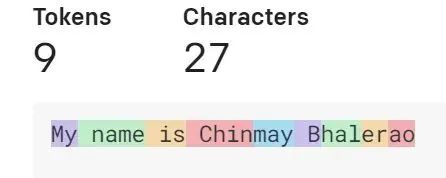
The image shows how text is split into tokens. Different colors represent different tokens. A rule of thumb: one token is approximately 4 characters in common English text. So 100 tokens correspond to about 75 words.
You can check token count for a specific text using OpenAI's Tokenizer or the tiktoken library.
import tiktoken

def num_tokens_from_string(string: str, encoding_name: str) -> int:
    """Returns the number of tokens in a text string."""
    encoding = tiktoken.encoding_for_model(encoding_name)
    num_tokens = len(encoding.encode(string))
    return num_tokens
Example usage:
prompt = []
for i in data:
    prompt.append(num_tokens_from_string(i['prompt'], "davinci"))

completion = []
for j in data:
    completion.append(num_tokens_from_string(j['completion'], "davinci"))

res_list = []
for i in range(len(prompt)):
    res_list.append(prompt[i] + completion[i])

no_of_final_token = sum(res_list)
print("Number of final token:", no_of_final_token)
Output:
Number of final token: 2094
Different model choices are influenced by token count.
Models
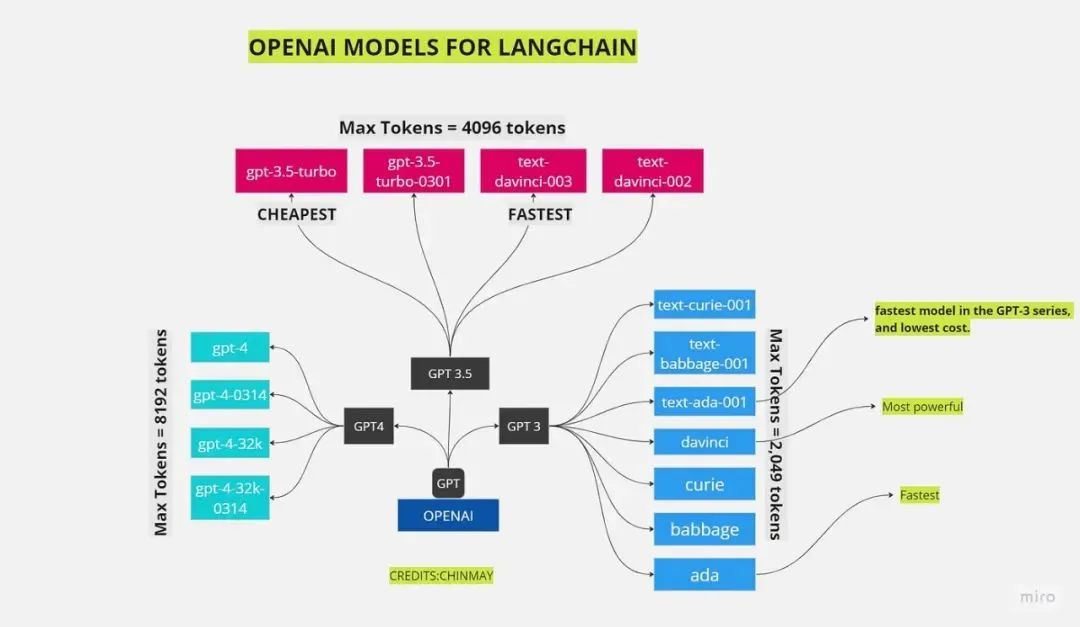
GPT's power comes from training on large datasets. OpenAI offers multiple models (also called engines) to balance power and cost.
- Davinci: Largest and most powerful, can perform all tasks. Higher cost.
- Babbage: Second most powerful.
- Curie: Mid-range.
- Ada: Least powerful but fastest and cheapest.
With GPT evolution, there are many models available, around 50+ in the GPT series.
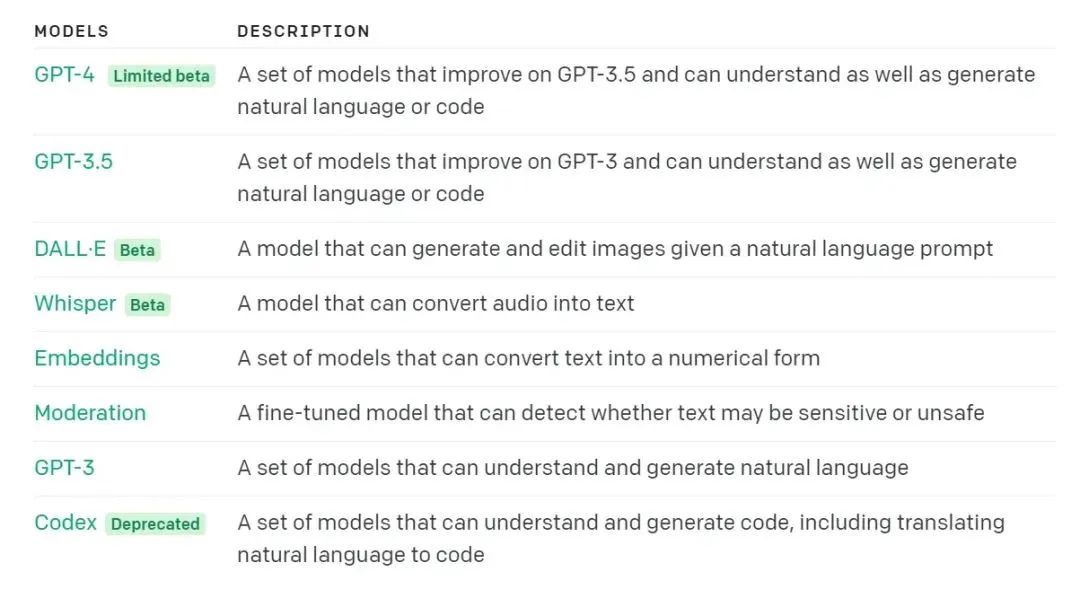
As shown, there are three main families: GPT-3, GPT-3.5, and GPT-4. GPT-4 is currently limited to authorized users, so most people use GPT-3 and GPT-3.5.
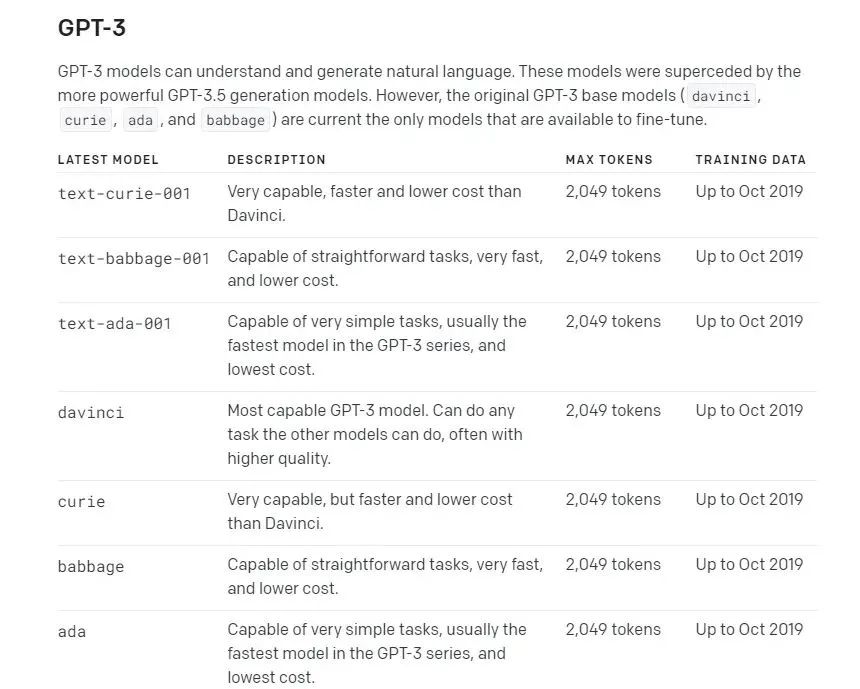
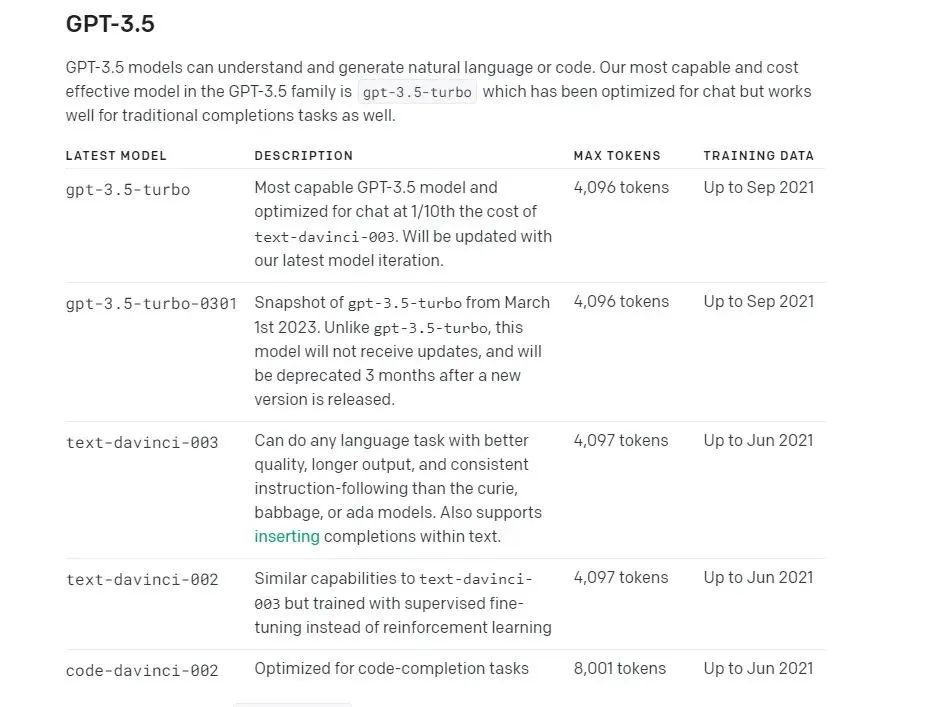
The "Max tokens" column limits the total tokens (prompt + completion) per request. GPT-3 based models have 2049 max tokens, while GPT-3.5 models have 4096.
Pricing:
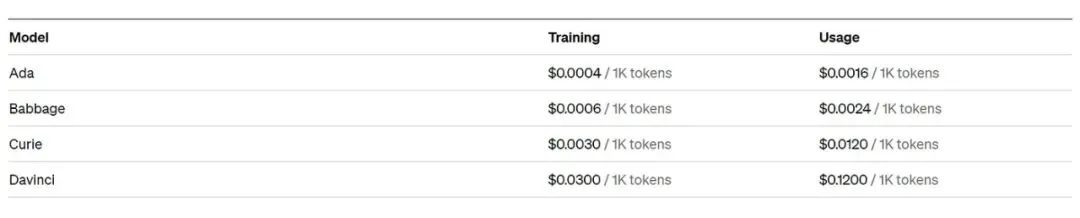
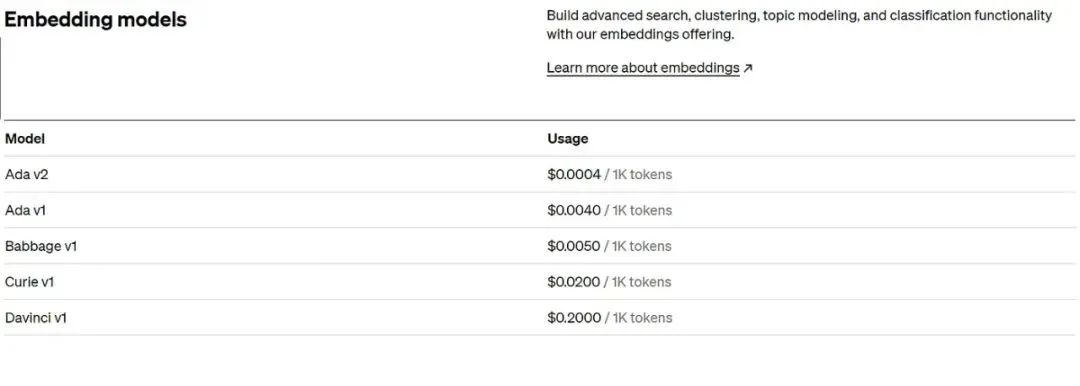
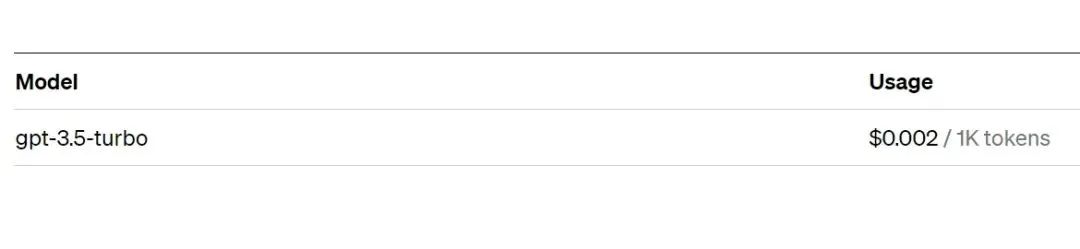
For example, with gpt-3.5-turbo, 5000 words ≈ 6667 tokens. At $0.002 per 1000 tokens, it costs about $0.0133. Proper preprocessing (removing noise, extra spaces) can reduce token usage and cost.
Summary
Tokens are crucial for question answering and other LLM tasks. How you preprocess data to use cheaper models is a game changer. The model choice depends on the trade-off you want: Davinci for higher speed and accuracy but higher cost, GPT-3.5 Turbo for lower cost but slower.