Unity StateMachineBehaviour: Adding State Logic in Animator
Unity StateMachineBehaviour Overview
In Unity's Animator, you can add custom behavior to individual animation clips by clicking Add Behaviour. This attaches scripted logic that executes during that specific animation state.
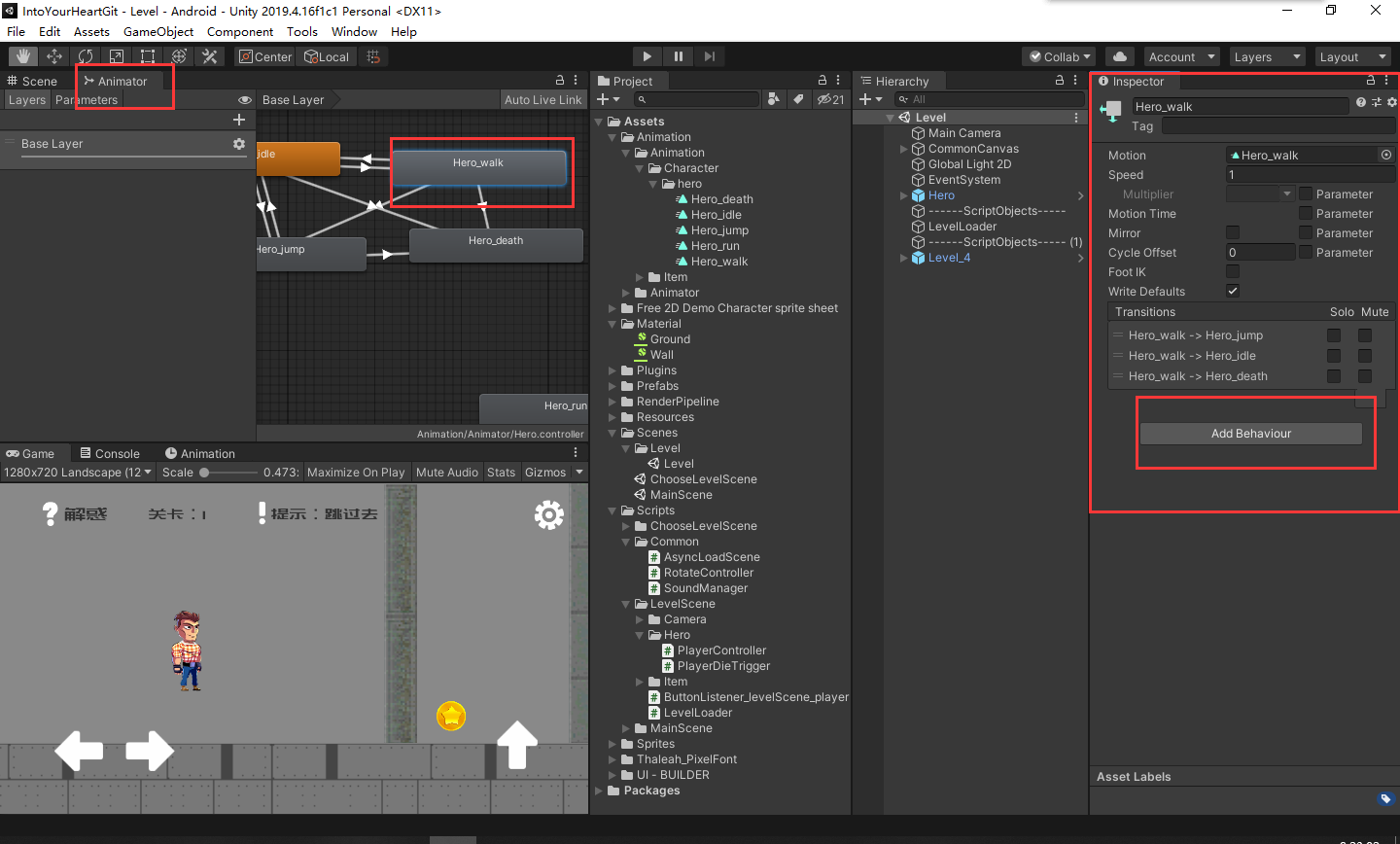
Once created, the default script structure looks like this:
using System.Collections;
using System.Collections.Generic;
using UnityEngine;

public class Hero_walk : StateMachineBehaviour
{
    // OnStateEnter is called when a transition starts and the state machine starts to evaluate this state
    //override public void OnStateEnter(Animator animator, AnimatorStateInfo stateInfo, int layerIndex)
    //{
    //
    //}

    // OnStateUpdate is called on each Update frame between OnStateEnter and OnStateExit callbacks
    //override public void OnStateUpdate(Animator animator, AnimatorStateInfo stateInfo, int layerIndex)
    //{
    //
    //}

    // OnStateExit is called when a transition ends and the state machine finishes evaluating this state
    //override public void OnStateExit(Animator animator, AnimatorStateInfo stateInfo, int layerIndex)
    //{
    //
    //}

    // OnStateMove is called right after Animator.OnAnimatorMove()
    //override public void OnStateMove(Animator animator, AnimatorStateInfo stateInfo, int layerIndex)
    //{
    //    // Implement code that processes and affects root motion
    //}

    // OnStateIK is called right after Animator.OnAnimatorIK()
    //override public void OnStateIK(Animator animator, AnimatorStateInfo stateInfo, int layerIndex)
    //{
    //    // Implement code that sets up animation IK (inverse kinematics)
    //}
}
StateMachineBehaviour Metadata
Here is the underlying class dfeinition from Unity's animation module:
#region Assembly UnityEngine.AnimationModule, Version=0.0.0.0, Culture=neutral, PublicKeyToken=null
// D:\WorkTools\Unity\2019.4.16f1c1\Editor\Data\Managed\UnityEngine\UnityEngine.AnimationModule.dll
#endregion

using UnityEngine.Animations;
using UnityEngine.Scripting;

namespace UnityEngine
{
    //
    // Summary:
    //     StateMachineBehaviour is a component that can be added to a state machine state.
    //     It's the base class every script on a state derives from.
    [RequiredByNativeCode]
    public abstract class StateMachineBehaviour : ScriptableObject
    {
        protected StateMachineBehaviour();

        public virtual void OnStateEnter(Animator animator, AnimatorStateInfo stateInfo, int layerIndex);
        public virtual void OnStateEnter(Animator animator, AnimatorStateInfo stateInfo, int layerIndex, AnimatorControllerPlayable controller);
        public virtual void OnStateExit(Animator animator, AnimatorStateInfo stateInfo, int layerIndex);
        public virtual void OnStateExit(Animator animator, AnimatorStateInfo stateInfo, int layerIndex, AnimatorControllerPlayable controller);
        public virtual void OnStateIK(Animator animator, AnimatorStateInfo stateInfo, int layerIndex);
        public virtual void OnStateIK(Animator animator, AnimatorStateInfo stateInfo, int layerIndex, AnimatorControllerPlayable controller);

        //
        // Summary:
        //     Called on the first Update frame when making a transition to a state machine.
        //     This is not called when making a transition into a state machine sub-state.
        public virtual void OnStateMachineEnter(Animator animator, int stateMachinePathHash);
        public virtual void OnStateMachineEnter(Animator animator, int stateMachinePathHash, AnimatorControllerPlayable controller);

        //
        // Summary:
        //     Called on the last Update frame when making a transition out of a StateMachine.
        //     This is not called when making a transition into a StateMachine sub-state.
        public virtual void OnStateMachineExit(Animator animator, int stateMachinePathHash);
        public virtual void OnStateMachineExit(Animator animator, int stateMachinePathHash, AnimatorControllerPlayable controller);

        public virtual void OnStateMove(Animator animator, AnimatorStateInfo stateInfo, int layerIndex);
        public virtual void OnStateMove(Animator animator, AnimatorStateInfo stateInfo, int layerIndex, AnimatorControllerPlayable controller);
        public virtual void OnStateUpdate(Animator animator, AnimatorStateInfo stateInfo, int layerIndex);
        public virtual void OnStateUpdate(Animator animator, AnimatorStateInfo stateInfo, int layerIndex, AnimatorControllerPlayable controller);
    }
}
This approach makes it very convenient to attach per-state logic directly within the Animator window. I found this technique quite useful during development.
