Configuring Aliases in Vue Projects: Auto-Resolution, IntelliSense, and Differences Between Vue CLI Versions
Aliases in Vue Projects
Today, while examining a project, I noticed that a newly scaffolded Vue project now includes a jsconfig.json file in the root directory. Its default configuration looks like this:
{
  "compilerOptions": {
    "target": "es5",
    "module": "esnext",
    "baseUrl": "./",
    "moduleResolution": "node",
    "paths": {
      "@/*": [
        "src/*"
      ]
    },
    "lib": [
      "esnext",
      "dom",
      "dom.iterable",
      "scripthost"
    ]
  }
}
I recall older projects lacked this file, and to use the @ alias, you had to explicitly define it in vue.config.js, like this:
configureWebpack: {
  resolve: {
    alias: {
      '@': path.resolve('src'),
    }
  }
}
However, my current project doesn't have this configuration in vue.config.js, yet the @ alias still works, and moreover, IntelliSense provides autocompletion when importing files using the alias. This made me curious: what enables this seamless experience?
After some investigation, I found two key reasons:
-
Default
@alias in Vue CLI 3+ – In Vue CLI 3 and above, the@alias is already pre-configured to point to thesrc/directory. You don't need to define it manually invue.config.js. This explains why the alias works out of the box. -
jsconfig.jsonfor IntelliSense – Vue CLI 3+ automatically generates ajsconfig.jsonfile in the project root. This file, with the default contents shown above, provides the editor (e.g., VS Code) with path mapping information. It tells the editor that@/*maps tosrc/*, enabling autocomplete and navigation when using the alias.
(I likely upgraded Vue CLI to version 5+ when learning Vue 3.)
Additional Notes:
Check Vue version:
vue -Vorvue --version– Many online resources claim the former shows the Vue version and the latter shows the Vue CLI version. However, in my experience, both commands return the same value:PS D:\work\dorado\fcproject> vue --version 2.9.6 PS D:\work\dorado\fcproject> vue -V 2.9.6Check Vue CLI version: An indirect method is to run
npm list vue, which dsiplays all Vue-related packages and their dependency trees. Example output:fcproject@0.1.0 D:\work\dorado\fcproject ├─┬ @vue/cli-plugin-babel@5.0.8 │ └─┬ @vue/babel-preset-app@5.0.8 │ ├─┬ @vue/babel-preset-jsx@1.4.0 │ │ └── vue@2.7.16 deduped │ └── vue@2.7.16 deduped ├─┬ ant-design-vue@1.7.8 │ ├─┬ @ant-design/icons-vue@2.0.0 │ │ └── vue@2.7.16 deduped │ └── vue@2.7.16 deduped ├── vue@2.7.16 └─┬ vuex@3.6.2 └── vue@2.7.16 dedupedI haven't found a direct way to check the Vue CLI version. If you know one, please share!
Vue Project Directory Structure
The typical directory structure of a Vue project looks like this:
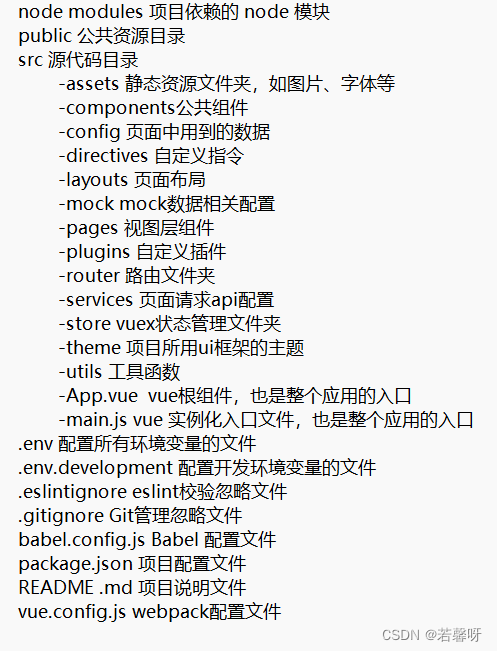
Feel free to correct me if I'm wrong. Thank you!
