Understanding Code Splitting Code splitting is a bundling strategy that breaks down a large application codebase into smaller, manageable chunks. Instead of delivering one massive file to the browser, the application loads only the necessary code initially, deferring the rest until it is explicitly...
To begin configuring the build environment, note that standard Create React App setups hide webpack configurations within node_modules/react-scripts. To customize alias resolution and preprocessors, the configuration must be exposed. Build Configuration and Aliases After exposing the build scripts,...
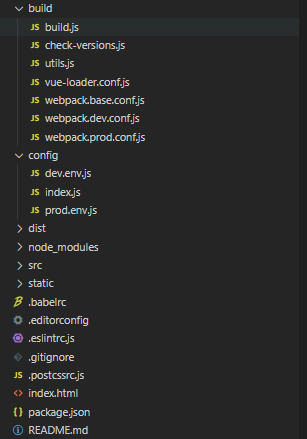
Introduction When developing Vue projects, we typically use the vue init webpack my_project command to create a project. The generated project can be quite complex, with many files that can be difficult to grasp. To day, I've decided to thoroughly understand all the files generated by vue init webpa...
Introduction Modern front-end project development relies heavily on build tools. With numerous options available, selecting the most suitable tool for your specific use case requires understanding not just configuration, but also the evolution of build tools and their underlying mechanisms. This kno...
Problem Overview During applicasion development, projects often depend on numerous third-party npm packages. While many of these libraries utilize modern ECMAScript syntax, their publication state varies—some are transpiled using tools like Babel, TypeScript compiler, or esbuild before release, whil...
When building applications with webpack, importing modules statically is the standard approach. However, there are scenarios where you need to load multiple files dynamical based on certain patterns. This is where webpack's require.context comes into play. The Problem with Manual Imports Consider a...
Understanding Webpack's Architecture Webpack operates as a sophisticated module bundler that transforms diverse assets into optimized deployment bundles. Mastering its foundational principles empowers developers to construct efficient build pipelines tailored to modernn web applications. Five Founda...
Evolution of JavaScript Module Systems Modern web applications have evolved from simple static pages to complex single-page applications (SPAs) resembling desktop software. This shift demands sophisticated JavaScript handling, challenging traditional development approaches. The Problem with Script T...
Removing Console Logs with Babel Plugin Install the plugin using: npm i babel-plugin-transform-remove-console -D Configure it in babel.config.js: // Plugins for production environment only const prodPlugins = [] if (process.env.NODE_ENV === 'production') { prodPlugins.push('transform-remove-console'...
Path Resolution Utility Node.js includes the built-in path module to handle file system paths consistently across different operating systems. Creating a dedicated resolver function eliminates relative path confusion during build configuration. const path = require('path'); const buildPath = (relati...