Deploying Baidu Table Recognition Service Locally with Hub Serving
This article explains how to deploy Baidu's table recognition service local using Docker and Baidu Hub Serving.
Main references:
- PaddleOCR Service Deployment (Based on PaddleHub Serving)
- HubServing official documentation
Prerequisites
This guide focuses solely on Paddle-related operations. For issues with Docker, Python, pip, etc., please consult other resources.
Installing paddlepaddle 2.5.2 and paddlehub 2.1.0
Use the official paddlepaddle:2.5.2 image to create and enter a container.
- Start the container:
docker run -p 9997:9997 --name ppocr -itd -v $PWD:/paddle registry.baiduce.com/paddlepaddle/paddle:2.5.2 /bin/bash
- Enter the container:
docker attach ppocr
The Docker image only contains PaddlePaddle. Install PaddleHub 2.1.0. Avoid using Baidu's package source.
pip3 install paddlehub==2.1.0
If you encounter errors (e.g., missing modules), they are usually due to version mismatches. Manually install the required modules step by step:
pip install typing-extensions==4.6.1
pip install protobuf==3.20.2
pip install paddlenlp==2.5.2
Reference: PaddleNLP Installation Troubleshooting
Installing PaddleOCR 2.6.0
Clone the PaddleOCR repository from Gitee and switch to the v2.6.0 branch:
cd /home
git clone https://gitee.com/paddlepaddle/PaddleOCR.git
After cloning, go into the directory and install dependencies:
cd /home/PaddleOCR
pip install -r requirements.txt
Configuring hub serving
Download and Extract Models
Download the latest models and extract them. Model download URLs:
- PaddleOCR
- PP-Structure
Example download commands (choose as needed):
wget https://paddleocr.bj.bcebos.com/PP-OCRv4/chinese/ch_PP-OCRv4_det_infer.tar && tar -xf ch_PP-OCRv4_det_infer.tar

wget https://paddleocr.bj.bcebos.com/PP-OCRv4/chinese/ch_PP-OCRv4_rec_infer.tar && tar -xf ch_PP-OCRv4_rec_infer.tar

wget https://paddleocr.bj.bcebos.com/dygraph_v2.0/ch/ch_ppocr_mobile_v2.0_cls_infer.tar && tar xf ch_ppocr_mobile_v2.0_cls_infer.tar

wget https://paddleocr.bj.bcebos.com/ppstructure/models/slanet/ch_ppstructure_mobile_v2.0_SLANet_infer.tar && tar xf ch_ppstructure_mobile_v2.0_SLANet_infer.tar
Service Configuration and Installation
Service parameters are set in ./PaddleOCR/deploy/hubserving/<system_name>/param.py. Adjust according to the system you are using.
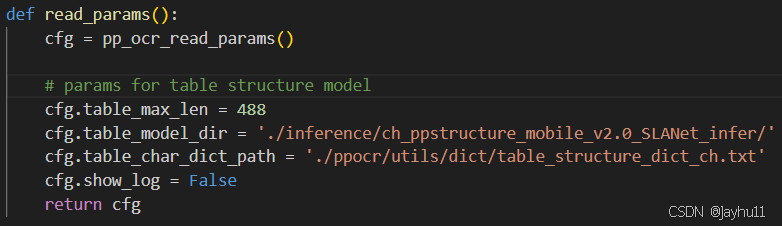
After configuration, install services using the following commands. If errors occur, manually install the missing modules via pip as shown in the error logs.
cd /home/PaddleOCR
hub install deploy/hubserving/ocr_system
hub install deploy/hubserving/structure_table
Start the Services
# Start ocr_system and structure_table services in the background with multiprocessing
nohup hub serving start -m ocr_system structure_table -p 9997 --use_multiprocess &

# View startup logs
tail -f nohup.out
Note: Local testing showed no performance improvement with multi-core. Further investigation is needed.
Testing and API Access
Use the official test script. Refer to the official documentation at the beginning of this article for parameter descriptions.
python tools/test_hubserving.py --server_url=http://127.0.0.1:9997/predict/structure_table --image_path=/home/PaddleOCR/test1.jpg --visualize=true
