ThreadLocal: Principles and Usage
Basic Concepts
ThreadLocal is called a thread variable, meaning that the variable filled in a ThreadLocal object belongs to the current thread. Through this variable, we can set an independent copy for the current thread. This copy is isolated from other threads, and each thread can only access its own internal copy.
Data Structure
Example Code
@Data
@Slf4j
public class ThreadLocalExample {
    private String content;

    private static ThreadLocal<Long> threadIdLocal = new ThreadLocal<>();
    private static ThreadLocal<String> threadNameLocal = new ThreadLocal<>();

    public static void main(String[] args) throws InterruptedException {
        ThreadLocalExample example = new ThreadLocalExample();

        for (int i = 0; i < 3; i++) {
            new Thread(() -> {
                threadIdLocal.set(Thread.currentThread().getId());
                threadNameLocal.set(Thread.currentThread().getName());
                log.info("ThreadId: {}, ThreadName: {}", threadIdLocal.get(), threadNameLocal.get());
            }).start();
        }
    }
}
Output

Code Diagram (open in new tab for clarity)
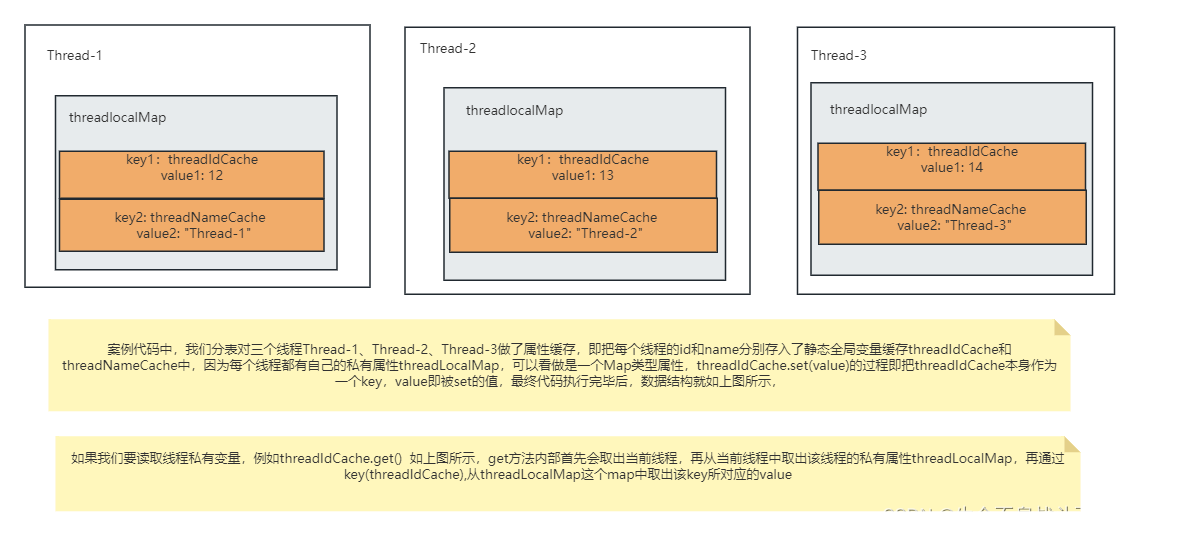
Note: To truly master, you need the example code, its diagram, and read the source code (preferably debug it yourself).
set method source code:
public void set(T value) {
    Thread t = Thread.currentThread();
    ThreadLocalMap map = getMap(t);
    if (map != null) {
        map.set(this, value);
    } else {
        createMap(t, value);
    }
}
get method source code:
public T get() {
    Thread t = Thread.currentThread();
    ThreadLocalMap map = getMap(t);
    if (map != null) {
        ThreadLocalMap.Entry e = map.getEntry(this);
        if (e != null) {
            @SuppressWarnings("unchecked")
            T result = (T)e.value;
            return result;
        }
    }
    return setInitialValue();
}
Thread Privacy Example
Example 1
@Data
@Slf4j
public class ThreadDemo {
    private String content;

    public static void main(String[] args) throws InterruptedException {
        ThreadDemo threadDemo = new ThreadDemo();

        for (int i = 0; i < 5; i++) {
            new Thread(() -> {
                // Write to threadDemo
                threadDemo.setContent("Thread: " + Thread.currentThread().getName() + " set value");
                // Read from threadDemo
                System.out.println("Thread: " + Thread.currentThread().getName() + " get value: " + threadDemo.getContent());
            }).start();
        }
    }
}
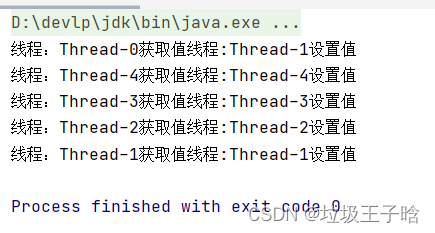
Because threadDemo is a shared variable among the five threads, and the for loop executes almost instantaneously, the five threads run concurrently. Concurrent reading and writing cause inconsistency:
Example 2: Using ThreadLocal makes it thread-safe
public class ThreadDemo {
    private static ThreadLocal<String> threadLocal = new ThreadLocal<>();
    private String content;

    public void setContent(String content) {
        threadLocal.set(content);
    }

    public String getContent() {
        return threadLocal.get();
    }

    public static void main(String[] args) throws InterruptedException {
        ThreadDemo threadDemo = new ThreadDemo();
        for (int i = 0; i < 5; i++) {
            new Thread(() -> {
                threadDemo.setContent("Thread: " + Thread.currentThread().getName() + " set value");
                System.out.println("Thread: " + Thread.currentThread().getName() + " get value: " + threadDemo.getContent());
            }).start();
        }
    }
}
Although using threadDemo as a lock object could achieve similar results:
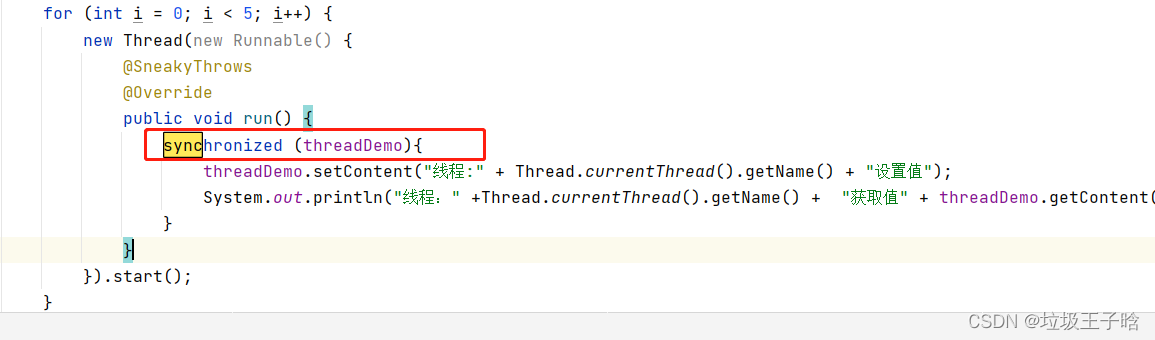
The difference is:
synchronizedis for data sharing between threads. It works by locking the shared variable, e.g., locking the relveant code block, so that the five threads access sequentially, modifying the shared variable one by one. This is time-for-space approach with low concurrency.ThreadLocalis for data isolation betwean threads. It provides an independent copy for each thread. The five threads concurrently access their own copies, avoiding thread safety issues. This is space-for-time approach with high concurrency.
Memory Safety
ThreadLocal's remove method releases memory associated with the current thread for that ThreadLocal object. As long as we call remove promptly after use, no memory issues occur. Source code:
public void remove() {
    ThreadLocalMap m = getMap(Thread.currentThread());
    if (m != null) {
        m.remove(this);
    }
}
Continuing with the ThreadDemo example, here's a memory diagram for the static threadIdCache reference. The green dashed lines indicate that ThreadLocal keys are stored as weak references in ThreadLocalMap. For more on weak vs strong references, refer to: JAVA Basics - Strong, Weak, Soft, Phantom References.
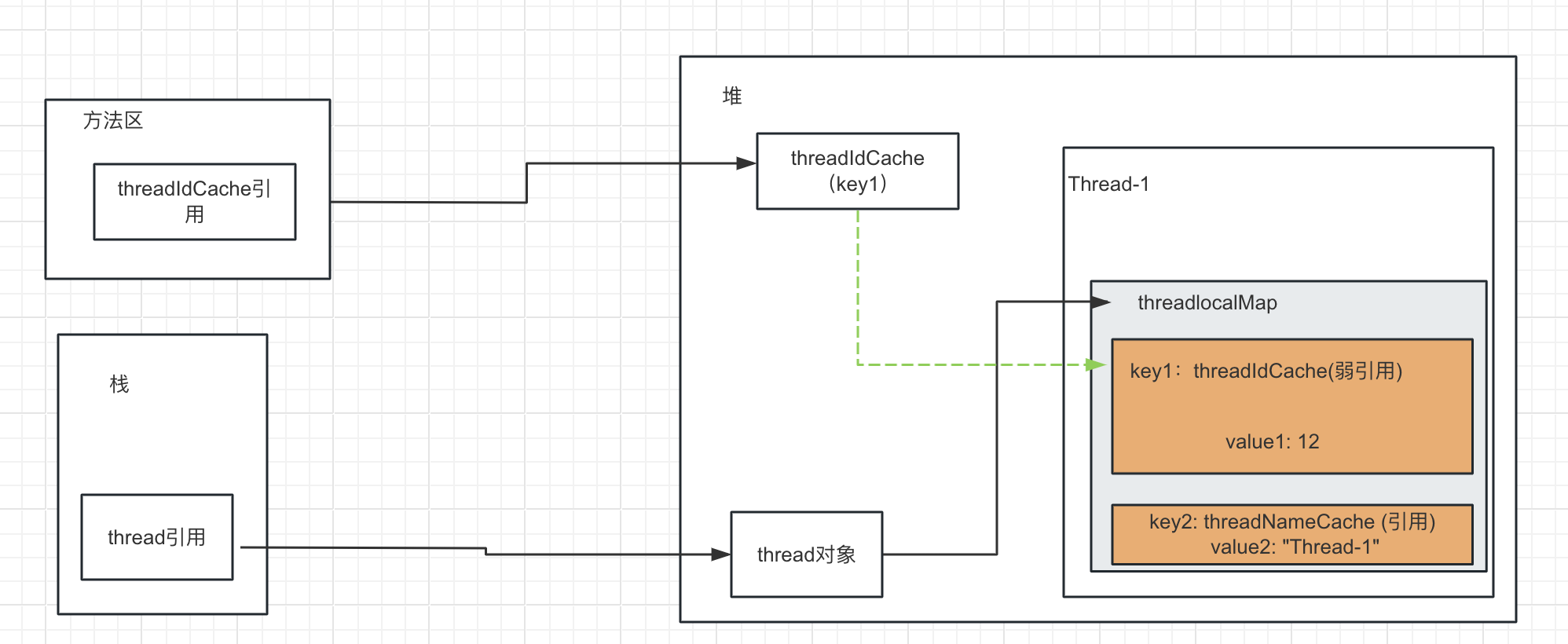
Analyzing ThreadLocal memory leaks requires considering both ThreadLocal and Thread usage.
First, if a thread is used as a local variable, its lifecycle is short. After execution, the thread is reclaimed. Even without calling remove, no memory leak occurs:
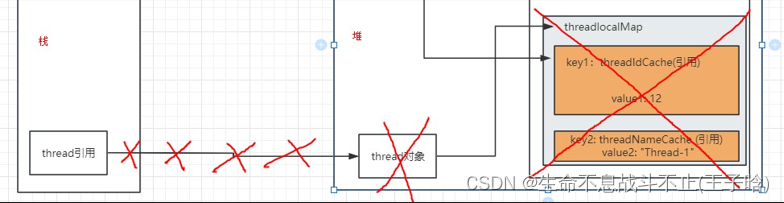
But in practice, we often use thread pools (e.g., Spring Boot web development). In that case, threads live for the entire application runtime.
Assuming a thread pool with 500 threads, there are two scenarios for ThreadLocal usage:
ThreadLocal as a local variable A method creates a ThreadLocal, sets a value for the current thread, and executes 1 million times. This creates 1 million ThreadLocal objects, each thread having about 2,000 associated entries.
When the method ends, the strong reference to the ThreadLocal goes out of scope. Only the weak reference in the Entry remains. During GC, the ThreadLocal object is collected, leaving an Entry with a null key. This becomes an Entry(null, value), and the value becomes inaccessible, causing a memory leak. Example:
import java.util.concurrent.ExecutorService;
import java.util.concurrent.Executors;

public class ThreadLocalTest {
    public static void main(String[] args) {
        ExecutorService executorService = Executors.newFixedThreadPool(500);
        for (int i = 0; i < 1000000; i++) {
            executorService.execute(() -> {
                ThreadLocal<Integer> threadLocal = new ThreadLocal<>();
                threadLocal.set((int)(Math.random() * 1000));
                System.out.println(Thread.currentThread().getName() + " : " + threadLocal.get());
                // No remove
            });
        }
        executorService.shutdown();
        while (!executorService.isTerminated()) {
            // Wait for all tasks to finish
        }
        System.out.println("All tasks completed");
    }
}
However, does each thread really accumulate 2,000 Entry(null, value)? ThreadLocal has a safety mechanism: when set() creates a new Entry and the ThreadLocalMap size exceeds the threshold (default 2/3 of capacity), it calls expungeStaleEntries() to remove all null-keyed entries, preventing OOM.
ThreadLocal as a static variable
If ThreadLocal is static, its lifecycle matches the application. The strong reference from the method area prevents GC from collecting it, so there are no Entry(null, value).
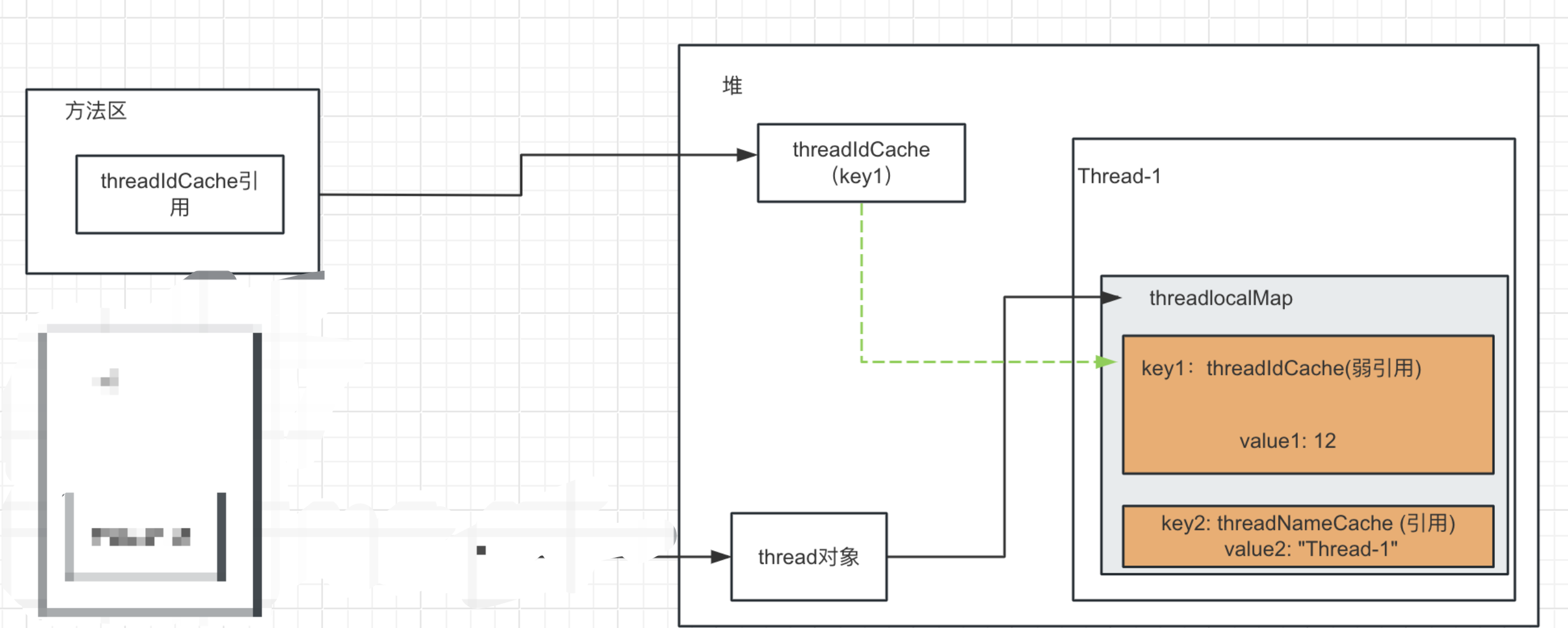
Does this cause severe memory leak? Since the number of static ThreadLocals is limited (e.g., 10), and thread pool size is around 500, the maximum number of stale entries is 5,000. This may not be severe in memory usage, but there is a risk of reading outdated cached values when threads are reused. Therefore, always call remove after use.
What if ThreadLocal keys were strong references? In that case, even after the local variable goes out of scope, the Entry would still hold a strong reference to the ThreadLocal, preventing both from being collected. Over time, with millions of ThreadLocal objects created, this would cause memory leaks and eventually OOM.
Summary
ThreadLocal's memory safety mechanisms provide robust fallback protection. Nevertheless, we should actively release memory by calling remove within a finally block to avoid potential leaks.
Common Scenarios
Thread Safety Application - Spring Transactions
/*
1. To ensure all operations either succeed or fail: use database transactions.
2. To ensure all operations are in the same transaction: all must use the same Connection.
3. To ensure all operations use the same Connection: since operations are usually in the same thread, bind one Connection per thread.
4. Use ThreadLocal to prevent a thread from obtaining multiple Connection objects (ThreadLocal is thread-local).
 */
class JDBCUtils {
    private static DataSource dlSource = null;
    private static ThreadLocal<Connection> conns = new ThreadLocal<>();

    static {
        Properties pros = new Properties();
        InputStream is = JDBCUtils.class.getClassLoader().getResourceAsStream("Druid.properties");
        try {
            pros.load(is);
            dlSource = DruidDataSourceFactory.createDataSource(pros);
        } catch (Exception e) {
            e.printStackTrace();
        }
    }

    public static Connection getDlConnection() {
        Connection conn = conns.get();
        if (conn == null) {
            try {
                conn = dlSource.getConnection();
                conns.set(conn);
                conn.setAutoCommit(false);
            } catch (SQLException e) {
                e.printStackTrace();
            }
        }
        return conn;
    }
}
Cross-Layer Data Passing and Thread-Safe Local Cache
ThreadLocal essentially acts as a map container. Although the class itself does not hold a map, its core APIs operate on ThreadLocalMap. It is often used as a local cache. For example, in an interceptor for user authentication (similar to a gateway), after authentication, some user info (like visitor ID) can be cached and used in the service layer. ThreadLocal is ideal for binding a unique copy of the current visitor's info to the current thread.
