What is BFC? What problems does it solve? When to enable BFC?
Table of Contents
- Inline Boxes and Block Boxes
- What is BFC?
- When to enable BFC?
- How to enable BFC?
- Code Demonstration
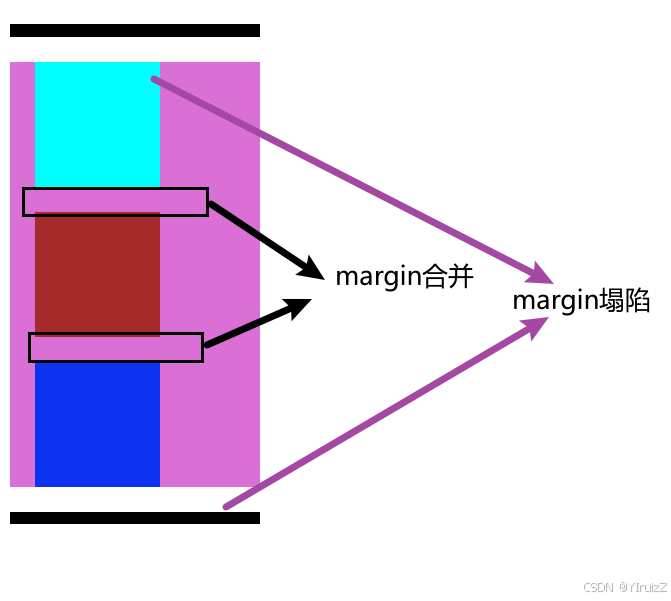
- Margin Collapse
- Margin Merging
- How to solve margin merging and margin collapse
- Height Collapse
Before explaining BFC, let's briefly talk about inline boxes and block boxes.
1. Inline Boxes and Block Boxes
What are inline boxes? Tags like <span> and <a> are typically rendered horizontally on the page after browser rendering, with the following characteristics:
- Cannot set width and height.
- Padding works horizontally, but vertically does not occupy actual space.
- Borders behave similarly.
- Margins behave similarly.
What are block boxes? Tags like <div>, <h1>, <table>, <ul> are typically rendered vertically on the page after browser rendering. Width, height, borders, padding, and margins all take effect.
According to HTML semantics, inline elements are generally used to display specific content, while block elements are used for layout planning. In a certain area, element arrangement may encounter various problems. How to solve them? This leads to the concept of BFC.
2. What is BFC?
Official explanation: Block Formatting Context (BFC) is a part of the visual CSS rendering of a web page. It is the region where block-level boxes are laid out, and also the region where floating elements interact with other elements.
In simple terms, you can think of BFC as an independent area. Elements inside this area are not affected by elements outside it.
3. When to enable BFC?
As we know, regular block boxes are arranged vertically one after another, which leads to several inevitable problems:
- Adjacent margins of sibling elements merge (margin merging).
- The first or last child element inside a container may cause margin collapse with the parent.
- Floating child elements are ignored by the parent, causing height collapse.
BFC is introduced to solve thece problems.
4. How to enable BFC?
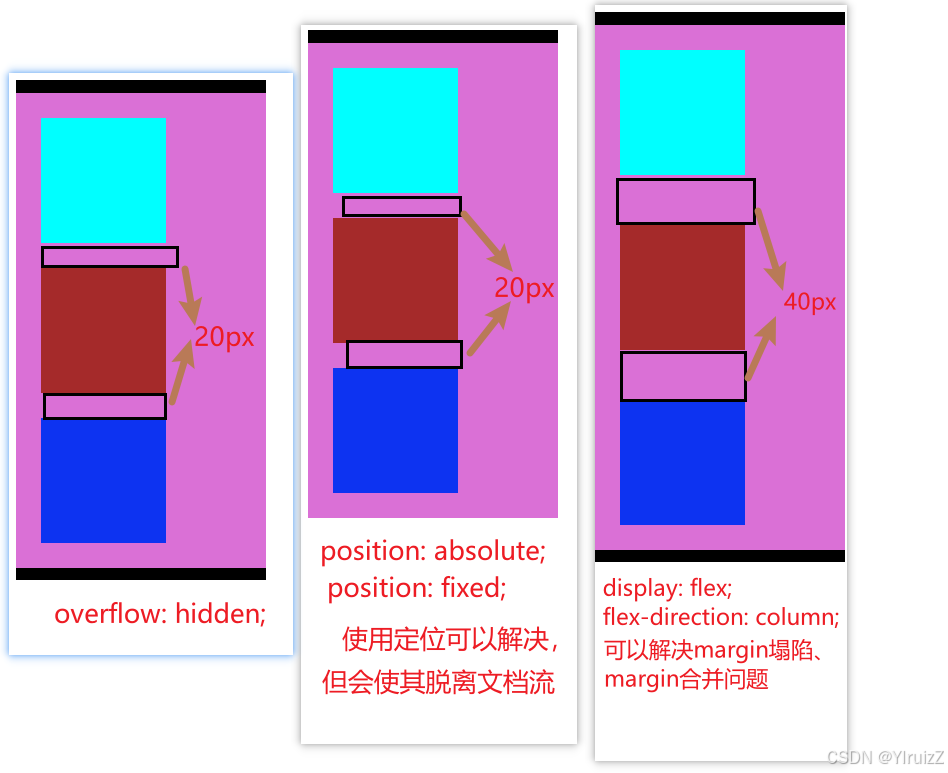
overflow: hidden;display: flex;- The element becomes a flex item.
position: absolute;position: fixed;- The root element (
<html>) itself creates a BFC.
5. Code Demonstration
Below is a code example to demonstrate the issues and their solutions.
<!DOCTYPE html>
<html lang="en">
<head>
  <meta charset="UTF-8">
  <meta name="viewport" content="width=device-width, initial-scale=1.0">
  <title>BFC Demo</title>
  <style>
    .container {
      width: 200px;
      background-color: orchid;
      display: flex;
      flex-direction: column;
      /* Note: These properties enable BFC but should be used based on actual context.
         For demonstration only.
         overflow: hidden;
         Using position enables BFC but removes the element from the normal flow.
         position: absolute;
         position: fixed;
         The above only solve margin collapse. Below can solve both collapse and merging.
         display: flex;
         flex-direction: column; */
    }

    .item {
      width: 100px;
      height: 100px;
      margin: 20px;
    }

    .box1 { background-color: aqua; }
    .box2 { background-color: brown; }
    .box3 { background-color: rgb(13, 51, 241); }

    .external {
      width: 200px;
      height: 10px;
      background-color: black;
    }
  </style>
</head>
<body>
  <div class="external"></div>
  <div class="container">
    <div class="item box1"></div>
    <div class="item box2"></div>
    <div class="item box3"></div>
  </div>
  <div class="external"></div>
</body>
</html>
Margin Collapse
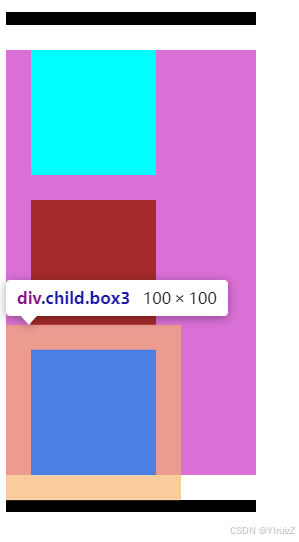
In the code above, when we set margins on child elements, the first and last child cause the parent's margin to collapse outward, not expanding the parent's height. Inspecting the elements confirms this.
Margin Merging
When two adjacent sibling elements both have margins, the browser takes the maximum of the two margins instead of addding them. So, in the image, the margin between adjacent elements is 20px, not 40px.
How to Solve Margin Merging and Margin Collapse
Add overflow: hidden;, position: absolute;, position: fixed;, or display: flex; flex-direction: column; to the .container. Alternatively, make the container a flex item.
Height Collapse: Code Demonstration
<!DOCTYPE html>
<html lang="en">
<head>
  <meta charset="UTF-8">
  <meta name="viewport" content="width=device-width, initial-scale=1.0">
  <title>Height Collapse Demo</title>
  <style>
    .container {
      width: 500px;
      background-color: orchid;
    }

    .item {
      width: 100px;
      height: 100px;
      float: left;
    }

    .box1 { background-color: aqua; }
    .box2 { background-color: brown; }
    .box3 { background-color: rgb(13, 51, 241); }

    .external {
      width: 200px;
      height: 10px;
      background-color: black;
    }
  </style>
</head>
<body>
  <div class="container">
    <div class="item box1"></div>
    <div class="item box2"></div>
    <div class="item box3"></div>
  </div>
</body>
</html>
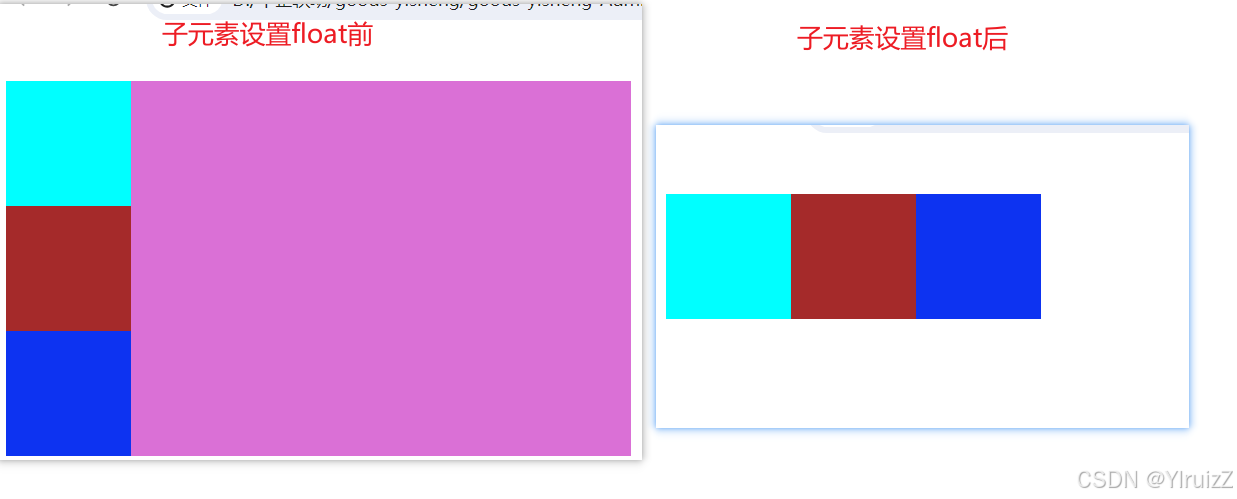
Why does height collapse happen? When child elements are floated, they are removed from the normal flow. The parent no longer accounts for their height, so its height becomes 0 (it doesn't disappear, just has zero height). Enabling BFC solves this problem. Since the children are floated, they won't stack vertically. Alternatively, you can use a pseudo-element to clear floats. Note that the pseudo-element is inline by default, so set display: block;.