Python Set Essentials
Python Sets
In Python, a set is an unordered collection of unique elements. It is primarily used for mathematical set operations like union, intersection, difference, and symmetric difference. Sets are defined using curly braces {}, but note that you cannot include mutable types (e.g., lists) as elements, and an empty pair of braces {} is interpreted as an empty dictionary, not a set. To create an empty set, you must use set().
Defining Sets
You can define a set directly using curly braces (remember: no mutable elements and no empty braces for a set):
my_set = {1, 2, 3, 4, 5}  # A set of integers
# Caution: {} creates an empty dictionary, not an empty set
Using the set() function:
my_set = set([1, 2, 2, 3, 4])  # Duplicates are automatically removed
empty_set = set()              # This creates an empty set
Set Characteristics
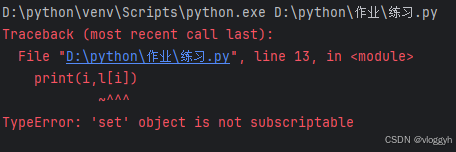
Sets are unordered and do not support indexing. You cannot access elements by position:
s = {1, 2, 3, 4}
for i in range(len(s)):
    print(i, s[i])  # Error: 'set' object is not subscriptable
Sets contain no duplicates, making them useful for removing duplicates from a collection:
s = {1, 2, 3, 4}
s2 = {1, 3, 7, 9, 11}
s.update(s2)
print(s)  # Output could be {1, 2, 3, 4, 7, 9, 11} (order may vary)

When a set contains numbers, they may appear sorted in ascending order when printed (but this is an implementation detail, not guaranteed):
s = {1, 2, 3, 4, 7, 6, 5, 9, 11}
print(s)  # May display {1, 2, 3, 4, 5, 6, 7, 9, 11}

Sets are mutable; you can add or remove elements:
s = {1, 2, 3, 4, 5, 6, 7}
s.add(9)
print(s)  # Output: {1, 2, 3, 4, 5, 6, 7, 9}

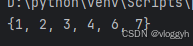
s = {1, 2, 3, 4, 5, 6, 7}
s.remove(5)
print(s)  # Output: {1, 2, 3, 4, 6, 7}
Mathematical Set Opertaions
- Union (
|orunion()): elements in either set. - Intersection (
&orintersection()): elemants common to both sets. - Difference (
-ordifference()): elements in the first set but not in the second. - Symmetric difference (
^orsymmetric_difference()): elements in exactly one of the sets.
set1 = {1, 2, 3, 4}
set2 = {3, 4, 5, 6}

print(set1 | set2)  # Union: {1, 2, 3, 4, 5, 6}
print(set1 & set2)  # Intersection: {3, 4}
print(set1 - set2)  # Difference: {1, 2}
print(set1 ^ set2)  # Symmetric difference: {1, 2, 5, 6}
