Python Syntax Basics: User Interaction and Operators
1. Program and User Interaction
1.1 What is User Interaction?
User interaction refers to the process where a user inputs data into a computer, and the computer prints/outputs the results.
1.2 Why User Interaction?

To enable computers to communicate with users like humans do. For example, withdrawing money from an ATM requires the user to input account details, and the machine outputs the result.
1.3 How to Interact with Users?

The essence of interaction is input and output.
1.3.1 Input
# In Python 3, input() waits for user input, stores it as a string, and assigns to variable.
>>> name = input('Enter your name: ')
Enter your name: john # name = "john"
>>> password = input('Enter your password: ')
Enter your password: 123 # password = "123"

# Legacy: In Python 2, raw_input() works like Python 3 input, while input() evaluates the input as Python code.
# Example (Python 2):
# >>> l = input('Enter something: ')
# Enter something: [1,2,3]
# >>> type(l)
# <type 'list'>
1.3.2 Output
>>> print('hello world')             # Single value
hello world
>>> print('first', 'second', 'third')  # Multiple values separated by commas
first second third

# The print function has an 'end' parameter (default '\n' newline). You can change it.
print("aaaa", end='')
print("bbbb", end='&')
print("cccc", end='@')
# Output: aaaabbbb&cccc@
1.4 Formatted Output
Formatted output replaces placeholders in a string with actual values.
1.4.1 % Formatting
# %s accepts any type; %d only numbers.

# 1) Positional mapping: one tuple element per %s
print('%s asked %s to do something' % ('john', 'jane'))
# 2) Dictionary mapping: break position restriction
print('My name is %(name)s, age %(age)d.' % {'name': 'john', 'age': 25})
# 3) Using keyword arguments via dictionary unpacking
info = {'name': 'john', 'age': 25}
print('My name is %(name)s, age %(age)d.' % info)
1.4.2 str.format()
# 1) Positional arguments
print('My name is {} and age is {}.'.format('john', 25))
# 2) Index reuse
print('{0}{0}{1}'.format('A', 'B'))  # Output: AAB
# 3) Keyword arguments
print('My name is {name}, age {age}.'.format(name='john', age=25))
# 4) Unpacking dictionary
info = {'name': 'john', 'age': 25}
print('My name is {name}, age {age}.'.format(**info))

# Additional features:
# Padding and alignment: {0:*<10} left align, total width 10, fill with *
print('{0:*<10}'.format('Start'))  # Output: Start*****
# Right align: {0:*>10}
print('{0:*>10}'.format('Start'))  # Output: *****Start
# Center align: {0:*^10}
print('{0:*^10}'.format('Start'))  # Output: **Start***

# Precision and number formats
print('{salary:.3f}'.format(salary=1232132.12351))  # 1232132.124
print('{0:b}'.format(123))  # 1111011 (binary)
print('{0:o}'.format(9))    # 11 (octal)
print('{0:x}'.format(15))   # f (hexadecimal)
print('{0:,}'.format(99812939393931))  # 99,812,939,393,931
1.4.3 f-strings (Python 3.6+)
# 1) Variable names inside {}
name = 'john'
age = 25
print(f'{name} {age}')  # john 25

# 2) Arbitrary expressions
print(f'{3*3/2}')  # 4.5
2. Basic Operators
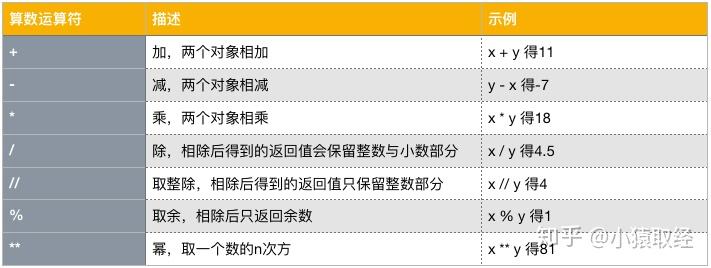
2.1 Arithmetic Operators
Assume x=9, y=2.
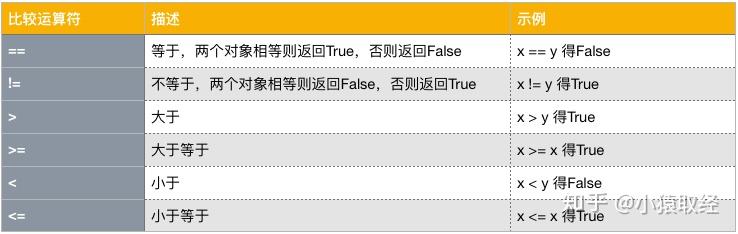
2.2 Comparison Operators
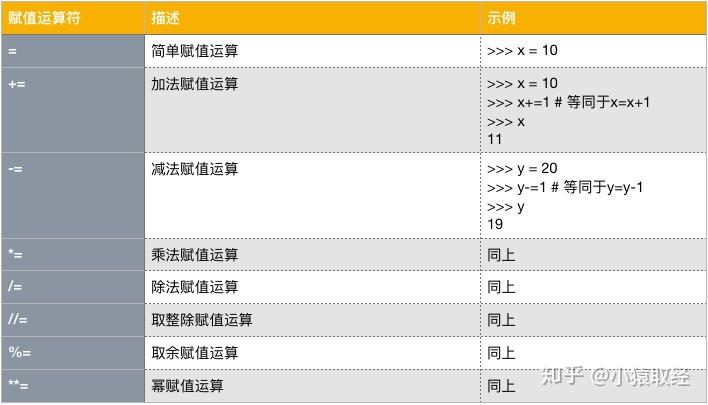
2.3 Assignment Operators
Basic assignment =, plus incremental, chained, cross, and unpacking assignments.
2.3.1 Incremental Assignment
2.3.2 Chained Assignment
x = y = z = 10
print(x, y, z)  # (10, 10, 10)
2.3.3 Cross Assignment
a = 10
b = 20
a, b = b, a
print(a, b)  # (20, 10)
2.3.4 Unpacking Assignment
nums = [11, 22, 33, 44, 55]
a, b, c, d, e = nums
print(a, b, c, d, e)  # (11, 22, 33, 44, 55)

# Using * to capture remaining elements
x, y, z, *_ = [111, 222, 333, 444, 555]
print(x, y, z)  # 111 222 333
print(_)        # [444, 555]

*_, x, y = [111, 222, 333, 444, 555]
print(x, y)     # 444 555

head, *middle, tail = [111, 222, 333, 444, 555]
print(head, middle, tail)  # 111 [222, 333, 444] 555

# Unpacking dictionaries gives keys
x, y, z = {'a':1, 'b':2, 'c':3}
print(x, y, z)  # a b c
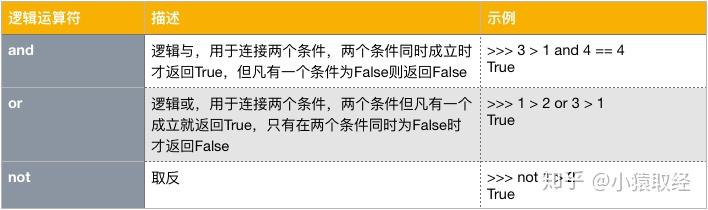
2.4 Logical Operators
2.4.1 Multiple and
All conditions must be True; evaluation stops at first False.
>>> 2 > 1 and 1 != 1 and True and 3 > 2
False
2.4.2 Multiple or
At least one True stops evaluation.
>>> 2 > 1 or 1 != 1 or True or 3 > 2
True
2.4.3 Precedence: not > and > or
# Use parentheses to clarify
>>> (3 > 4 and 4 > 3) or (1 == 3 and 'x' == 'x') or 3 > 3
False

# Short-circuit evaluation returns the last evaluated value
>>> result = 10 and 0 or '' and 0 or 'abc' or 'egon' == 'dsb' and 333 or 10 > 4
>>> result
'abc'
2.5 Membership Opreators
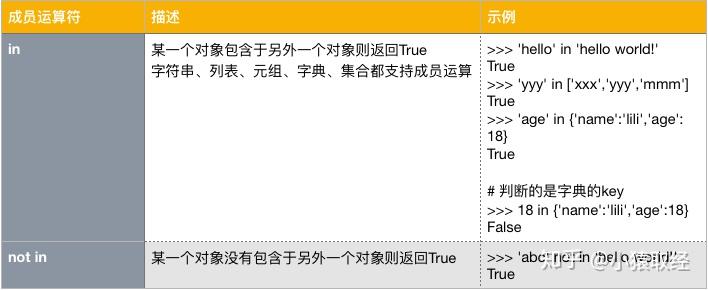
>>> 'lili' not in ['jack', 'tom', 'robin']
True
2.6 Identity Operators
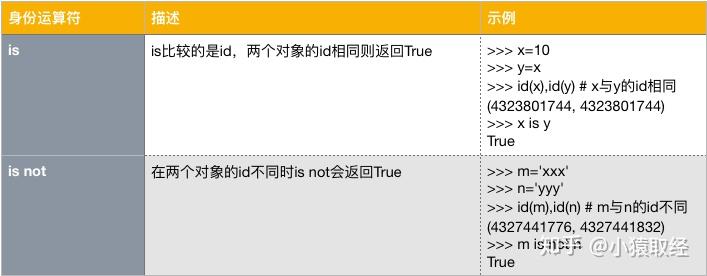
# == compares value; is compares identity (id)
x = 'Info Tony:18'
y = 'Info Tony:18'
print(x == y)  # True
print(x is y)  # False (different objects)
