Core Database Concepts and Optimization Techniques
Transactions
Transaction Definition and ACID Properties
- Definition: A sequence of database operations that must either all succeed or all fail, serving as an indivisible unit of work.
- ACID Properties:
- Atomicity: All operations within a transaction are completed successfully; otherwise, none are applied.
- Consistency: The transaction ensures the database transitions from one consistent state to another. Constraints (e.g., primary key, foreign key, check constraints) remain intact before and after the transaction. For example, in a bank transfer, the total balance across accounts must remain unchanged.
- Isolation: Concurrent transactions do not interfere with eachother, preventing anomalies like dirty reads, non-repeatable reads, and phantom reads.
- Durability: Once committed, changes are permanently stored, even in the event of system failure.
Data Inconsistencies Caused by Concurrent Operations
- Lost Update: T1 modifies data; T2 later overwrites it, causing T1's changes to be lost.
- Dirty Read: T1 modifies data; T2 reads it before T1 commits. If T1 rolls back, T2 has read invalid data.
- Non-Repeatable Read: T1 reads data; T2 modifies it; T1 reads again and sees different values.
- Phantom Read: T1 reads a range of rows; T2 inserts or deletes rows within that range; T1 re-reads and sees a different number of rows.
Difference Between Non-Repeatable Read and Phantom Read
- Non-Repeatable Read: Same condition, same data value changes on re-read.
- Phantom Read: Same condition, number of records differs on re-read.
Transaction Isolation Levels and Their Effects
| Isolation Level | Avoids | Notes |
|---|---|---|
| Read Uncommitted | None | High risk of anomalies; visible to uncommitted changes. |
| Read Committed | Dirty Read | Still susceptible to non-repeatable reads and phantom reads. |
| Repeatable Read | Dirty Read, Non-Repeatable Read | Vulnerable to phantom reads. |
| Serializable | All | Enforces strict serial execution via locking. |
MySQL’s default isolation level is Repeatable Read.
Viewing and Setting MySQL Isolation Level
-- View global isolation level
SELECT @@global.tx_isolation;

-- View session isolation level
SELECT @@transaction_isolation;

-- Set global isolation level
SET GLOBAL TRANSACTION ISOLATION LEVEL REPEATABLE READ;

-- Set session isolation level
SET SESSION TRANSACTION ISOLATION LEVEL REPEATABLE READ;
Choosing the Right Isolation Level
- Favor higher consistency at the database layer, allowing upstream applications to adapt.
- Spring-managed transactions override MySQL settings. If the specified isolation level is unsupported, Spring transaction won’t activate.
- Read Committed and Repeatable Read are most commonly used.
Current Read vs Snapshot Read in MySQL
- Current Read:
SELECT ... FOR UPDATE— reads the latest version, applies locks (write-blocking), uses pessimistic locking. - Snapshot Read:
SELECT— non-blocking, concurrent read using MVCC. In serializable mode, it behaves like current read.
Snapshot read is a key feature of MVCC, enabling high concurrency without blocking.
How MySQL Prevents Phantom Reads
- For Snapshot Read: Uses MVCC. In repeatable read, the transaction sees a consistent snapshot throughout its lifetime. Even if new rows are inserted, they’re invisible to the transaction.
- For Current Read: Uses Next-Key Locks (record lock + gap lock). When
SELECT ... FOR UPDATEis executed, it acquires next-key locks. Any insert attempt within the locked range is blocked, preventing phantom reads.
InnoDB Row Lock Types
- Record Lock: Locks a specific index entry.
- Gap Lock: Locks gaps between index entries (or before first/after last). Only exists in Repeatable Read to prevent phantom reads.
- Next-Key Lock: Combines record and gap locks, protecting both data and gaps.
Multi-Version Concurrency Control (MVCC)
MVCC resolves read-write conflicts without locks, enabling non-blocking reads and writes. It supports high concurrency while avoiding dirty reads, non-repeatable reads, and phantom reads—but cannot solve lost updates.
InnoDB implements MVCC through four components:
- Hidden fields
- Undo logs
- Read view
- Visibility algorithm
Hidden Fields
- DB_ROW_ID: 6-byte hidden primary key. Used to create clustered indexes when no explicit PK is defined.
- DB_TRX_ID: 6-byte ID of the transaction that created or last modified the row.
- DB_ROLL_PTR: 7-byte pointer to the previous version of the row (in undo log).
Undo Logs
- Log the inverse of current operations. An
INSERTgenerates a correspondingDELETE, and anUPDATEgenerates a reversedUPDATE. - Multiple versions form a version chain per row.
Read View
- Created during a snapshot read, capturing the system’s active transaction IDs at that moment.
- Key elements:
creator_trx_id: Transaction ID that created the read view.m_ids: Active transaction IDs at creation time.min_trx_id: Minimum transaction ID inm_ids.max_trx_id: Next expected transaction ID.
Visibility Algorithm
Determine which version of a row is visible to the current transaction:
- If
DB_TRX_ID = creator_trx_id: Visible (current transaction owns it). - If
DB_TRX_ID < min_trx_id: Visible (committed before view creation). - If
DB_TRX_ID >= max_trx_id: Not visible (created after view creation). - If
min_trx_id ≤ DB_TRX_ID < max_trx_id:- If in
m_ids: Not visible (still active). - Else: Visible (already committed).
- If in
Read Committed: Re-generates read view on every query. Repeatable Read: Uses the initial read view for the entire transaction.
MySQL Locking Mechanisms
By Granularity
- Row-Level Lock: Fine-grained, lowest conflict probability, highest concurrency. Slow to acquire, may cause deadlocks.
- Table-Level Lock: Coarse-grained, high conflict likelihood, low concurrency. Fast to acquire, no deadlocks.
LOCK TABLES table_name READ; LOCK TABLES table_name WRITE; - Global Lock: Locks entire database. Minimal overhead, no deadlocks.
FLUSH TABLES WITH READ LOCK;
InnoDB defaults to row-level locking; MyISAM uses table-level.
By Type
- Exclusive Lock (X): Write lock. Only the owning transaction can read/write. Others cannot access until released.
SELECT ... FOR UPDATE; - Shared Lock (S): Read lock. Allows multiple readers but blocks writers.
SELECT ... FOR SHARE;
By Strategy
- Pessimistic Locking: Assumes conflicts are likely. Acquires locks early and holds them throughout. Ensures exclusivity.
- Optimistic Locking: Assumes conflicts are rare. No locks during read. Checks for conflicts only at commit time. Uses version numbers or timestamps.
InnoDB Row Lock Implementation
- Intention Locks (internal table locks):
- Intention Shared Lock (IS): Indicates intent to set shared locks on rows.
- Intention Exclusive Lock (IX): Indicates intent to set exclusive locks on rows.
- Lock Compatibility Matrix:
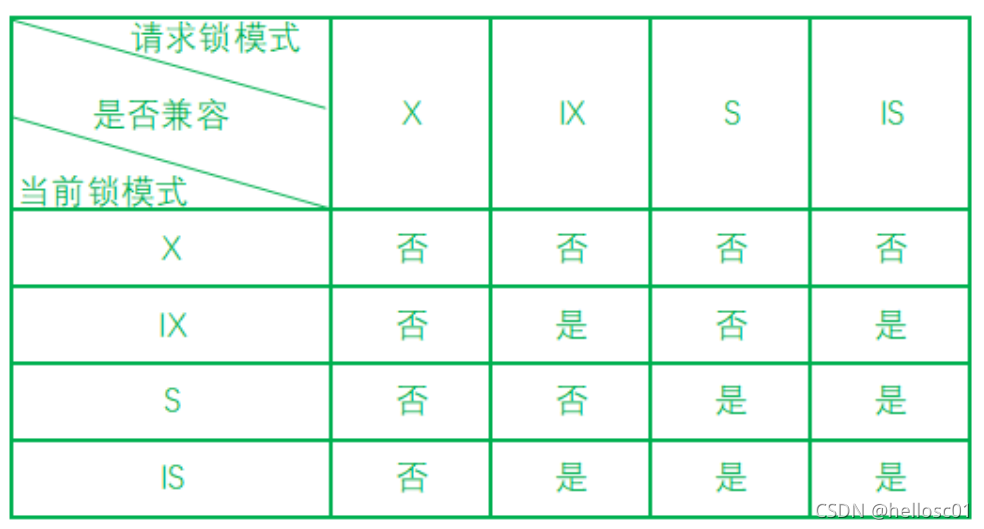
Row locks are implemented on indexed columns. Without an index, InnoDB uses a hidden clustered index.
Indexes
What Are Indexes?
- Sorted structures on one or more columns, improving query speed but consuming space and slowing DML.
- Common types: B+ Tree and Hash indexes.
Pros and Cons
- Pros: Converts random I/O into sequential I/O; faster retrieval.
- Cons: Space overhead; maintenance cost during inserts/updates.
Index Types
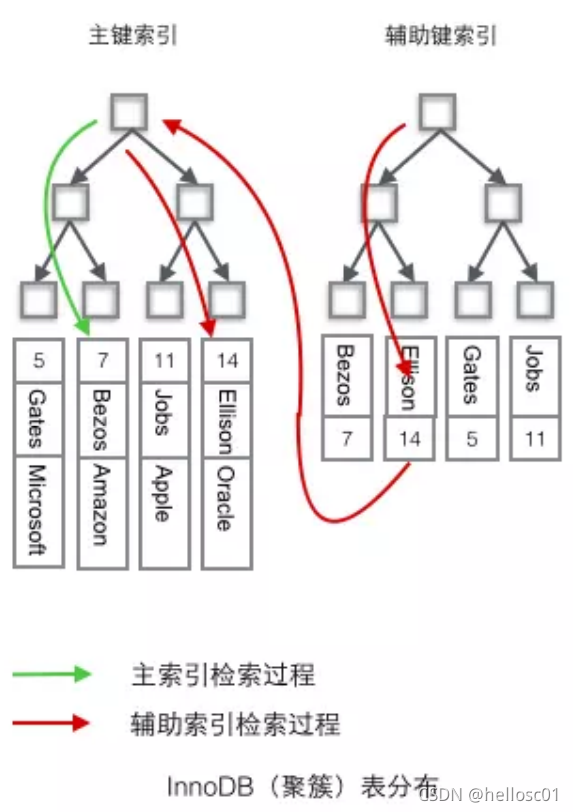
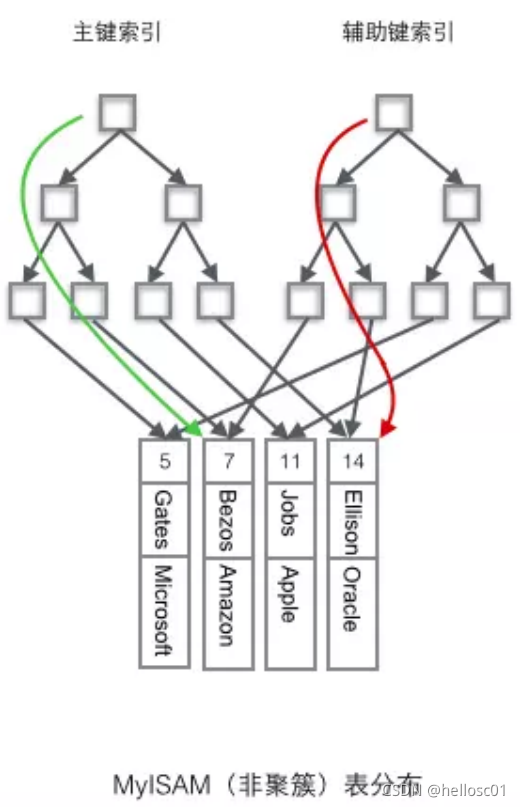
- Clustered Index: Determines physical storage order. Leaf nodes contain full data.
- Non-Clustered Index: Separates index from data. Leaf nodes store pointers to data.
- Unique Index: Prevents duplicate values. NULL allowed.
- Primary Key Index: Clustered, unique, non-NULL.
- Secondary Index (Auxiliary Index): Stores index key + primary key. May avoid "back-to-table" lookup if covered.
- Covering Index: Query data is entirely available in the index, eliminating back-to-table access.
Index Field Selection Guidelines
- Use frequently queried columns (in WHERE clauses).
- Consider join columns.
- Prefer smaller fields (reduces I/O).
- Choose high-cardinality fields (use
COUNT(DISTINCT)to assess). - Avoid NULLs; use default values instead.
- Fixed-length types (e.g.,
CHAR) over variable (TEXT). - Use composite indexes for multi-column queries.
- Avoid indexing tables with heavy write load.
- Small tables (<300 rows): Full scan may be faster.
- Large tables: Consider partitioning.
B-Trees
- Each node holds multiple key-value pairs, sorted left-to-right.
- M-order B-tree: Root ≥ 2 children; internal nodes ≥ M/2 children; all leaves at same level.
- Low height enables fast lookups. One disk I/O loads a full node (pre-fetching).
- 3-level B-tree can hold ~1 billion records with <3 disk reads.
B+ Trees vs Hash Indexes
B+ Tree
- Variant of B-tree.
- Non-leaf nodes store only keys; leaf nodes form sorted linked list.
- Advantages:
- Smaller height → faster queries.
- Stable performance (all paths same length).
- Native sorting → efficient range scans.
Hash Index
- Based on hash tables.
- O(1) lookup for exact matches.
- Disadvantages:
- No support for sorting, grouping, or range queries.
- Cannot handle partial matches (e.g.,
LIKE %abc). - Collision issues degrade performance.
Prefix Index
- Index only the first N characters of a string.
- Useful when prefix has high cardinality.
ALTER TABLE table_name ADD KEY(column_name(prefix_length));
To determine optimal prefix length:
-- Full column cardinality
SELECT COUNT(DISTINCT column_name) / COUNT(*) FROM table_name;

-- With prefix
SELECT COUNT(DISTINCT LEFT(column_name, prefix_length)) / COUNT(*) FROM table_name;
Leftmost Matching Principle
- For composite indexes (a,b,c), matching must start from the left.
- Stops at first range condition (
<,>,BETWEEN,LIKE).
Examples:
- ✅
WHERE a=1 AND b=2 AND c=3→ uses index. - ❌
WHERE b=2 AND c=3→ skips index. - ⚠️
WHERE a=1 AND c=3→ onlyauses index (b skipped). - ⚠️
WHERE a > 1 AND b = 2→ onlyauses index (range stops match). - ✅
WHERE a BETWEEN 2 AND 8 AND b = 2→ both a and b use index. - ✅
WHERE name LIKE 'j%' AND age = 22→ both use index due to ordered prefix.
When Indexes Fail
- Violation of leftmost principle.
- Function usage on indexed columns:
WHERE ABS(a) = 1. - Expression on indexed column:
WHERE a + 1 = 2. - Implicit type conversion:
WHERE phone = 1300000001ifphoneis VARCHAR. - Using
ORwith non-indexed columns. - Leading or trailing
LIKE %patterns. - Using
!=,NOT IN,<>,IS NULL,IS NOT NULL.
InnoDB vs MyISAM Index Differences
| Feature | InnoDB | MyISAM |
|---|---|---|
| Primary Key | Clustered index (stores full data) | Non-clustered (stores row addresses) |
| Secondary Index | Stores primary key | Stores row addresses |
| Storage | B+ tree | B+ tree |
Creating and Dropping Indexes
-- Create index
CREATE INDEX idx_name ON table_name(column_list);

-- During table creation
CREATE TABLE user (
    id INT PRIMARY KEY,
    information TEXT,
    FULLTEXT(information)
);

-- Alter table
ALTER TABLE table_name ADD INDEX idx_name(column_list);

-- Drop index
ALTER TABLE table_name DROP INDEX idx_name;
ALTER TABLE table_name DROP PRIMARY KEY;
Database Systems
Relational vs NoSQL
Relational
- Pros:
- Easy to understand (table-based).
- Standard SQL.
- Strong ACID guarantees reduce redundancy and inconsistency.
- Cons:
- Poor scalability under high write load.
- Difficult horizontal scaling due to JOINs.
NoSQL
- Pros:
- High performance (key-value storage).
- Easily scalable horizontally.
- Cons:
- Weak transaction support.
- Some lack durability.
When to Use Which
- Relational: Structured data (user accounts, addresses), complex queries, strong consistency.
- NoSQL: Unstructured data (articles, comments), massive scale, simple key-based access.
Challenges of Relational Databases at Scale
- Transactions: Two-phase commit protocol is slow and fragile.
- JOINs: Often avoided in favor of denormalization to improve performance.
- Performance: B+ trees less efficient than LSM-trees for write-heavy workloads.
SQL Execution Order
Write Order:
SELECT DISTINCT
    select_list
FROM
    left_table
LEFT JOIN
    right_table ON join_condition
WHERE
    where_condition
GROUP BY
    group_by_list
HAVING
    having_condition
ORDER BY
    order_by_condition
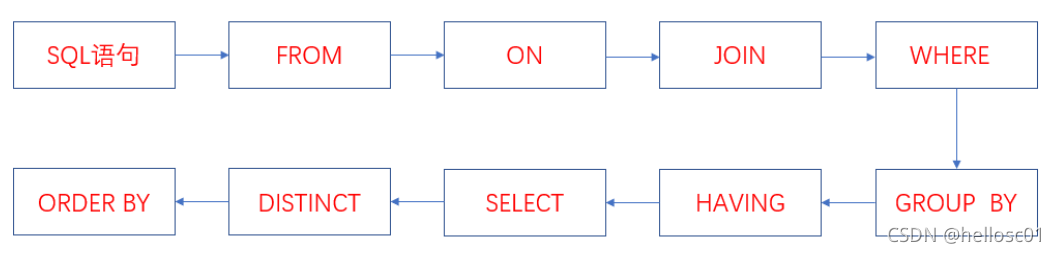
Execution Order:
- FROM: Cartesian product of tables → virtual table V1.
- ON: Filter V1 → V2.
- JOIN: Add filtered left table → V3.
- WHERE: Filter V3 → V4.
- GROUP BY: Group V4 → V5.
- HAVING: Filter V5 → V6.
- SELECT: Project V6 → V8 (DISTINCT optional if GROUP BY used).
- ORDER BY: Sort V8.
Pooling Design and Connection Pools
- Pooling: Pre-allocate resources (e.g., connections) to avoid repeated setup costs.
- Database Connection Pool: Reuses existing socket connections instead of creating new ones.
- Why Needed? Creating connections is expensive. Pooling reduces latency and resource usage.
Normal Forms (1NF, 2NF, 3NF)
- 1NF: Atomic attributes (no nested sets).
- 2NF: Eliminate partial dependency on composite keys.
- 3NF: Eliminate transitive dependency.
Example: Splitting student data to remove dependencies on department via class.
JOIN Types
| Join Type | Description |
|---|---|
| INNER JOIN | Returns matching rows only. |
| LEFT JOIN | Left table fully shown; right table shows common rows (nulls for unmatched). |
| RIGHT JOIN | Right table fully shown; left table shows common rows (nulls for unmatched). |
| FULL JOIN | Returns all rows from both tables (deduplicated). |
SQL Injection
- Attack: Inject malicious SQL via input parameters.
- Example: Login with password
' OR '1'='1→ always returns true.
Prevention
- Frontend: Validate input (regex, length limits).
- Backend: Use prepared statements (e.g.,
PreparedStatementin Java). Parameters are bound separately from SQL logic.
Prepared Statements: Parameterize SQL—parse once, execute many times. Prevents injection.
MyBatis: #{} vs ${}
| Syntax | Behavior | Security |
|---|---|---|
#{} |
Parameterized placeholder; auto-quoting; prevents injection. | ✅ Safe |
${} |
Direct string substitution; vulnerable to injection. | ❌ Unsafe |
<select id="findByName" parameterType="String" resultMap="studentResultMap">
    SELECT * FROM user WHERE username='${value}'
</select>
Use
#{}unless you need dynamic column names (e.g.,ORDER BY ${column}).
MySQL Query Execution Process
- Client request.
- Connection Manager: Authenticate, assign permissions.
- Query Cache: Return cached result if present; else proceed.
- Parser: Lexical and syntactic analysis.
- Optimizer: Choose best execution plan (index selection).
- Executor: Check privileges, call storage engine.
- Storage Engine: Retrieve data; cache result if enabled.
MySQL Architecture
Split into two layers:
- Server Layer: Handles connection, caching, parsing, optimization, execution, binlog, built-in functions.
- Storage Engine Layer: Manages data storage. Pluggable (InnoDB, MyISAM). InnoDB has redo log and undo log.
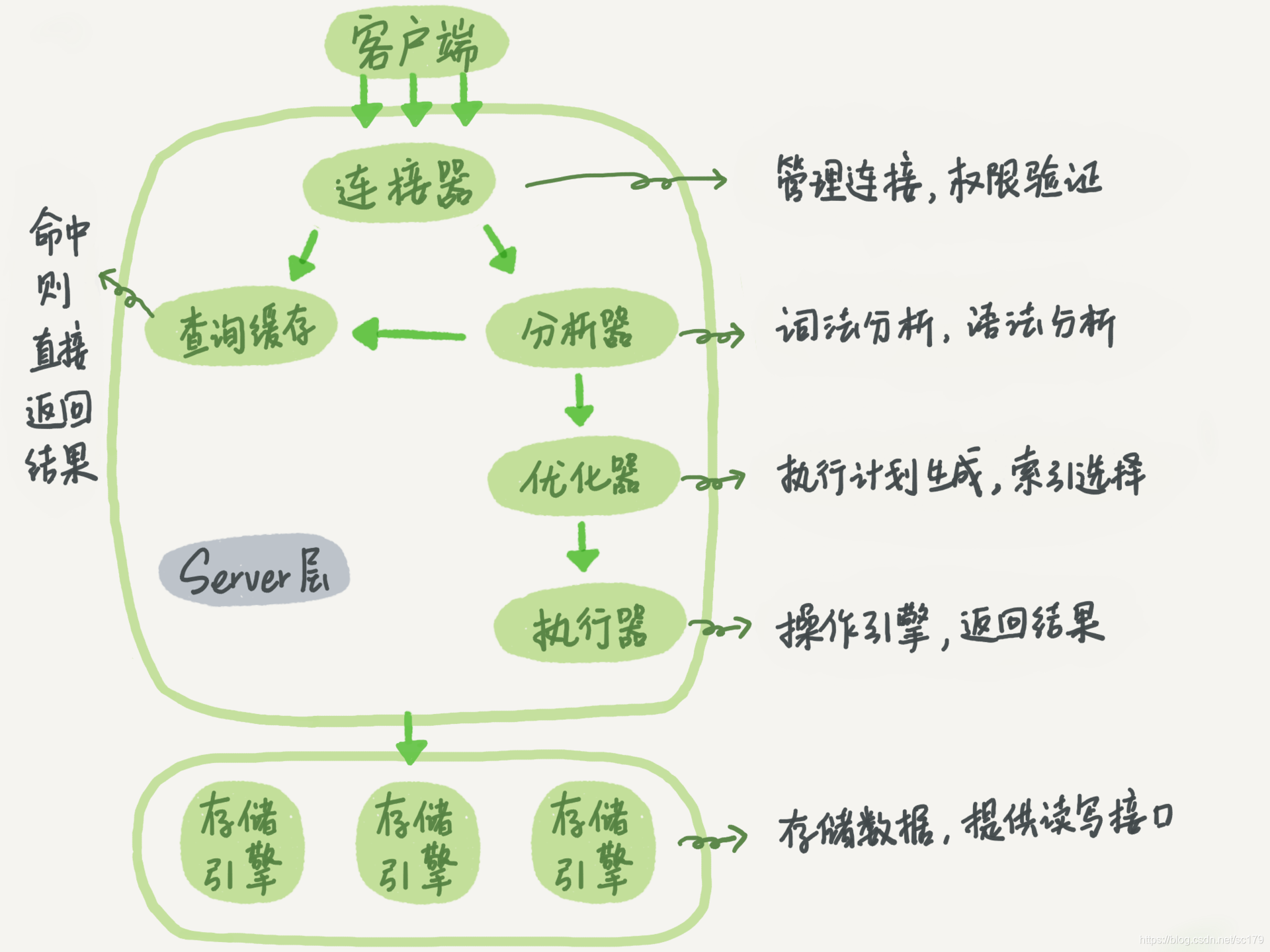
Log Types: Binlog, Redo Log, Undo Log
| Log | Purpose | Location | Crash-Safe? |
|---|---|---|---|
| Binlog | Logical log of all changes (DDL/DML); used for replication and recovery. | Server layer | ❌ Alone |
| Redo Log | Physical log of data modifications; ensures crash recovery. | InnoDB | ✅ |
| Undo Log | Records old values for rollback; supports MVCC. | InnoDB | ✅ |
Key Insight: Both binlog and redo log are needed for crash-safe recovery. Binlog alone cannot guarantee persistence.
MySQL Update Statement Workflow
UPDATE tb_student SET age = '19' WHERE name = '张三';
- InnoDB reads row, updates in memory, logs to redo log.
- Redo log enters
PREPAREstate. - Executor logs to binlog.
- Redo log commits.
Two-Phase Commit prevents data loss during crashes.
Why Rollback Mechanism?
- Undo logs enable rollback on error or
ROLLBACK. Must be written before data to ensure recovery.
InnoDB vs MyISAM
| Feature | InnoDB | MyISAM |
|---|---|---|
| Transactions | Yes | No |
| MVCC | Yes | No |
| Lock Granularity | Row & Table | Table only |
| Index Structure | Clustered (PK) | Non-clustered |
| Primary Key | Required | Optional |
| Foreign Keys | Supported | Not supported |
Character Sets and Collations
- Character Set: Mapping from binary to symbols.
- Collation: Rules for comparing characters within a charset.
- Inheritance: Database → Table → Column.
CHAR vs VARCHAR
| Feature | CHAR | VARCHAR |
|---|---|---|
| Length | Fixed | Variable |
| Storage | 1 byte per char (EN), 2 bytes (CN) | 2 bytes per char (EN/CN) |
| Max Size | 255 bytes | 65,535 bytes |
| Use Case | Fixed-length (gender, birthday) | Variable-length (name, description) |
Optimal VARCHAR(n) Size
- Set
nto maximum expected length. - Avoid overly large values to save space and improve performance.
- Use
CHARfor fixed-length strings.
DELETE, TRUNCATE, DROP
| Command | Behavior | Rollback? | Restart ID |
|---|---|---|---|
| DELETE | Row-by-row removal | ✅ | Continues |
| TRUNCATE | Removes all rows | ❌ | Starts at 1 |
| DROP | Deletes table | ❌ | N/A |
Use
DELETEfor partial deletion,TRUNCATEto clear data,DROPto remove table.
UNION vs UNION ALL
| Operation | Behavior | Performance |
|---|---|---|
| UNION | Removes duplicates, sorts results | Slower |
| UNION ALL | Returns all rows, no deduplication | Faster |
Use
UNION ALLunless deduplication is required.
Temporary Tables
- Created during query execution for intermediate results.
- Visible only to current session.
- Types: Memory (MEMORY), Disk (MyISAM/InnoDB).
When Created:
- Subqueries in
FROMclause. DISTINCTwithORDER BY.ORDER BYandGROUP BYdiffer.UNIONoperations.
Slow Query Logging
- Parameters:
slow_query_log: Enable/disable.long_query_time: Threshold (default 10s).log_queries_not_using_indexes: Log unused index queries.log_output:FILEorTABLE.
Optimization Tips:
- Analyze execution plans (
EXPLAIN).- Normalize schema or add intermediate tables.
- Optimize
LIMITpagination.
Backup Methods and Strategies
Backup Types
- Hot Backup: Database remains online.
- Warm Backup: Reads allowed, writes blocked.
- Cold Backup: Database offline.
Strategies
- File Copy: Simple for small databases.
- mysqldump + Binlog: Complete backup + incremental via binlog.
mysqldumpexports structure and data as SQL.- Binlog stores change history.
Why InnoDB Uses Auto-Increment Primary Keys
- Random non-auto-increment keys (e.g., UUID) cause frequent page splits and fragmentation.
- Auto-increment ensures sequential insertion → minimal page movement and better performance.
Why NOT NULL?
NULLaffectsCOUNT()(excluded from count).- B+ trees don’t store
NULL→ indexing fails. NOT INqueries return empty result if any value isNULL.- Comparisons involving
NULLrequire special handling.
Slow SQL Causes
- Intermittent slowness: Lock contention or redo log flush.
- Consistent slowness: Missing or ineffective index.
MySQL Replication
Purpose: Scale read-heavy workloads.
Benefits:
- Read Scaling: Offload reads to slaves.
- High Availability: Slave can become master on failure.
- Backup: Data replicated to slaves.
Replication Flow:
- Master writes to binlog.
- Master sends binlog to slave via
Log Dumpthread. - Slave writes to relay log via
IO Thread. - Slave replays relay log via
SQL Thread.
Replication Lag: Slave data lags behind master. Core operations (e.g., payments) should go to master.
Database Optimization
Schema Optimization
- Break 3NF rules to reduce JOINs.
- Use intermediate tables.
- Vertical Partitioning: Split by columns (hot/cold data, large fields).
- Horizontal Partitioning: Split by rows (sharding).
- Prefer auto-increment primary keys.
SQL Optimization
- Avoid
SELECT *; specify columns. - Use
LIMIT 1for single-row queries. - Prevent index misuse (
EXPLAINhelps).
Large Table Optimization
- Limit data scope.
- Implement read/write splitting.
- Apply vertical/horizontal partitioning.
Sharding
- Vertical: Split by columns (common, rare, large fields).
- Horizontal: Split by rows (same schema, different shards).
Challenges: Cross-shard transactions, complex joins, hard to expand.
Handling IDs After Sharding
- Use distributed ID generators (e.g., Snowflake).
Textbook Questions
Locking
- Locking: Request before modifying; others blocked until released.
- Types: X (exclusive), S (shared).
Livelock
- Cause: Priority skew (e.g., T3/T4 get priority over T2).
- Solution: First-Come-First-Served (FCFS).
Deadlock
- Cause: Circular wait (T1 waits for T2, T2 waits for T1).
- Prevention:
- One-Step Locking: Acquire all locks at once.
- Order Locking: Define a global lock order.
Deadlock Detection and Resolution
- Detection: Timeout method (may cause false positives).
- Resolution: Abort the least costly transaction.
Keys and Attributes
- Super Key: Uniquely identifies tuples.
- Candidate Key: Minimal super key.
- Primary Key: Chosen candidate key.
- Prime Attribute: Part of any candidate key.
- Non-Prime Attribute: Not part of any candidate key.
Why Primary Key?
- Enables precise identification of rows for updates/deletes.
Auto-Increment vs UUID
- Auto-Increment:
- ✅ Smaller size, ordered, efficient indexing.
- ❌ Exposes business volume; hard to merge.
- UUID:
- ✅ Global uniqueness, no exposure, generated at app layer.
- ❌ Larger size, random I/O, slower comparisons.
Recommendation: Use auto-increment unless sharding requires UUID.
Integrity Constraints
- Entity Integrity: PK must be unique and non-null.
- Referential Integrity: FK must be null or match referenced PK.
Why Can FK Be Null?
- Indicates pending assignment.
- Only allowed if FK is not part of PK.
Ensuring Consistency
- Database Level: ACID properties.
- Application Level: Code-level validation before commit.
