Storing Web Scraped Data in Python: TXT, JSON, and CSV Formats
1. TXT File Storage
Saving data to plain text files is straightforward, and TXT files are compatible with nearly all platforms. However, a significant drawback is their poor suitability for data retrieval and structured queries. If search functionality and complex data structures are not priorities, and simpllicity is key, TXT files are a viable option. This section demonstrates how to save data to TXT files using Python.
Code Example:
import csv
import requests
from pyquery import PyQuery as pq

url = 'https://www.zhihu.com/explore'
headers = {
    'user-agent': 'Mozilla/5.0 (Windows NT 10.0; Win64; x64) AppleWebKit/537.36 (KHTML, like Gecko) Chrome/98.0.4758.82 Safari/537.36'
}
html = requests.get(url, headers=headers).text

# Parse HTML with PyQuery
doc = pq(html)
items = doc('.ExploreCollectionCard-contentItem').items()

def save_to_txt():
    for item in items:
        link = item.find('.ExploreCollectionCard-contentTitle').attr('href')
        excerpt = item.find('.ExploreCollectionCard-contentExcerpt').text()
        tag_text = item.find('.ExploreCollectionCard-contentTags').find('span').filter(
            '.ExploreCollectionCard-contentCountTag').text()

        data = [link, excerpt, tag_text]
        with open('data.txt', 'a', encoding='utf-8') as file:
            file.write(', '.join(data) + '\n')

if __name__ == '__main__':
    save_to_txt()

2. JSON File Storage
JSON (JavaScript Object Notaiton) is a lightweight data interchange format that uses a combination of objects and arrays to repreesnt data. It is highly structured yet concise. This section explains how to save data to JSON files in Python.
Code Example:
import requests
from pyquery import PyQuery as pq
import json

url = 'https://www.zhihu.com/explore'
headers = {
    'user-agent': 'Mozilla/5.0 (Windows NT 10.0; Win64; x64) AppleWebKit/537.36 (KHTML, like Gecko) Chrome/98.0.4758.82 Safari/537.36'
}
html = requests.get(url, headers=headers).text

# Parse HTML with PyQuery
doc = pq(html)
items = doc('.ExploreCollectionCard-contentItem').items()

def save_to_json():
    scraped_data = []
    for item in items:
        link = item.find('.ExploreCollectionCard-contentTitle').attr('href')
        excerpt = item.find('.ExploreCollectionCard-contentExcerpt').text()
        tag_text = item.find('.ExploreCollectionCard-contentTags').find('span').filter(
            '.ExploreCollectionCard-contentCountTag').text()

        data_entry = {
            "url": link,
            "content_excerpt": excerpt,
            "tag_text": tag_text
        }
        scraped_data.append(data_entry)

    with open('data.json', 'w', encoding='utf-8') as file:
        json.dump(scraped_data, file, ensure_ascii=False, indent=2)

if __name__ == '__main__':
    save_to_json()
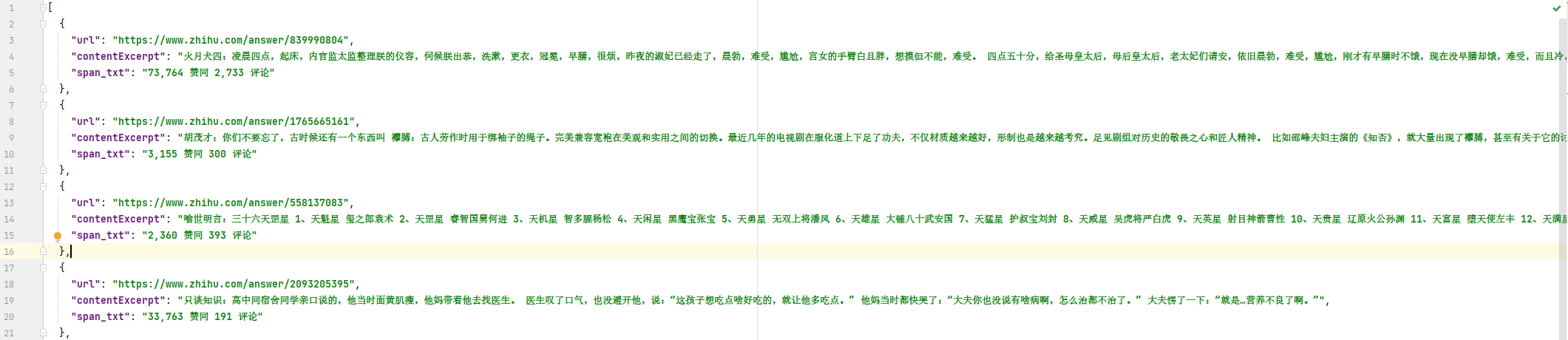
3. CSV File Storage
CSV (Comma-Separated Values) files store tabular data in plain text format, using commas or other delimiters to separate values.
Code Example:
import csv
import requests
from pyquery import PyQuery as pq

url = 'https://www.zhihu.com/explore'
headers = {
    'user-agent': 'Mozilla/5.0 (Windows NT 10.0; Win64; x64) AppleWebKit/537.36 (KHTML, like Gecko) Chrome/98.0.4758.82 Safari/537.36'
}
html = requests.get(url, headers=headers).text

# Parse HTML with PyQuery
doc = pq(html)
items = doc('.ExploreCollectionCard-contentItem').items()

def save_to_csv():
    with open('data.csv', 'w', encoding='utf-8', newline='') as file:
        writer = csv.writer(file)
        writer.writerow(['URL', 'Content Excerpt', 'Tag Text'])  # Write header

        for item in items:
            link = item.find('.ExploreCollectionCard-contentTitle').attr('href')
            excerpt = item.find('.ExploreCollectionCard-contentExcerpt').text()
            tag_text = item.find('.ExploreCollectionCard-contentTags').find('span').filter(
                '.ExploreCollectionCard-contentCountTag').text()

            writer.writerow([link, excerpt, tag_text])

if __name__ == '__main__':
    save_to_csv()
