Getting Started with Django: Project Creation and Directory Structure
1. Creating a Project
1.1 Installation
Official documentation: https://www.djangoproject.com/download/
pip install Django==5.1.3
1.2 Creating a Project
# Navigate to the target directory for your project
django-admin startproject project_name
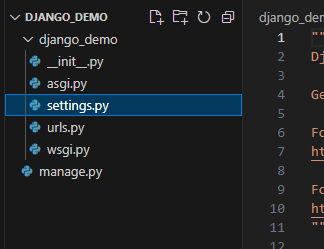
2. Directory Structure Overview
First Level: Project Package and manage.py
- init.py: Marks the directory as a Python package
- settings.py: Django project configuration file, including database connections, static file settings, and app configurations
- urls.py: URL mapping configuration file that defines relationships between URLs and view functions
- wsgi.py: Entry point for deploying the project to WSGI servers (e.g., Apache, Nginx)
- asgi.py: Configures ASGI servers to run Django applications, providing asynchronous request/response handling capabilities
manage.py:
Typically not modified directly. Key functions include project management, startup, app creation, and data management. Common commands:
manage.py runserver: Starts the development server for local Django project executionmanage.py makemigrations: Creates migration files based on model changes for database updatesmanage.py migrate: Applies migration files to update the databasecreatesuperuser: Creates a superuser for Django admin interface managementcollectstatic: Gathers static files (CSS, JavaScript, images) into designated static folders for deploymentpython manage.py --help: Displays all available commands and options
Second Level: Inside the Project Package
asgi.py:
Typically not modified directly. This file serves as the entry point for ASGI applications. ASGI (Asynchronous Server Gateway Interface) enables asynchronous HTTP request/response handling, supporting real-time web applications and long-polling requests with asynchronous backend communication capabilities.
Purpose: Configures ASGI servers to run Django applications with asynchronous processing capabilities. The file defines an application variable that serves as the Django application entry point for ASGI servers.
wsgi.py:
Typically not modified directly. This Web Server Gateway Interface file defines a WSGI application object that handles HTTP requests and routes them to the Django application.
Purpose: Facilitates communication between web servers and web applications. The file loads Django project settings and creates a WSGI application object that passes HTTP requests to Django framework processing. During deployment, web servers forward requests to wsgi.py, which routes them to appropriate Django view functions based on URL patterns.
urls.py:
Purpose: Defines URL routing for the project by specifying which view functions handle specific URL requests. The file contains URL pattern lists where each pattern maps a URL to a corresponding view function.
settings.py:
The Django project configuration file storing all project settings:
- DATABASES: Database connection configuration
- DEBUG: Debug mode setting for development phase
- ALLOWED_HOSTS: List of permitted hosts for security restrictions
- INSTALLED_APPS: List of installed Django applications
- MIDDLEWARE: Middleware configuration for request/response processing
- TEMPLATES: Template settings including engine and path configurations
- STATIC_URL and STATIC_ROOT: Static file URL and storage path settings
- MEDIA_URL and MEDIA_ROOT: Media file URL and storage path settings
- LANGUAGE_CODE and TIME_ZONE: Language and timezone configurations
Editing this file allows customization of database connections, debug mode, static/media file handling, and other project behaviors.
Detailed reference: https://blog.csdn.net/zhouruifu2015/article/details/129646086
1.3 Creating an Application Module
python manage.py startapp app_name
Additional Setup Commands
Initialize Database
# Create migrations
python manage.py makemigrations

# Apply migrations
python manage.py migrate
Create Superuser
python manage.py createsuperuser
Configure Language and Timezone (settings.py)
LANGUAGE_CODE = 'zh-hans'
TIME_ZONE = 'Asia/Shanghai'
