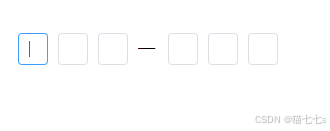
Implementing an App-like Phone Verification Code Input Component with Vue 3 and Element Plus
Template Section (<template>)
<template>
  <div class="verification-code-container">
    <div class="input-fields-wrapper" ref="inputWrapperRef">
      <el-input
        v-for="(digit, idx) in verificationDigits"
        :key="idx"
        v-model="digit.value"
        style="width: 30px"
        maxlength="1"
        @keyup.delete="processBackspace(idx)"
        @input="processInput(idx)"
        @paste="processPaste($event, idx)"
        :class="{ 'input-focused': digit.isFocused }"
        ref="inputElements"
      />
      <div class="separator-line">—</div>
    </div>
  </div>
</template>
v-for: Iterates over theverificationDigitsarray, creating anel-inputfield for each verification code digit.v-model: Establishes two-way data binding between the input field value and thevalueproperty of the corresponding element in theverificationDigitsarray.maxlength="1": Restricts each input field to accept only one character.@keyup.delete: Listens for the delete key event, invoking theprocessBackspacefunction to handle deletion logic.@input: Listens for input events, calling theprocessInputfunction to manage input handling.@paste: Listens for paste events, triggering theprocessPastefunction to process pasted content.:class="{ 'input-focused': digit.isFocused }": Dynamically adds theinput-focusedclass based on theisFocusedproperty for styling changes.ref="inputElements": Sets a refeernce for accessing DOM elements in the script section.
Script Section (<script setup>)
<script setup>
import { reactive, ref, onMounted, nextTick } from 'vue'

const inputWrapperRef = ref(null)
const inputElements = ref([])
const verificationDigits = reactive([
  { value: '', isFocused: false },
  { value: '', isFocused: false },
  { value: '', isFocused: false },
  { value: '', isFocused: false },
  { value: '', isFocused: false },
  { value: '', isFocused: false }
])

onMounted(() => {
  // Automatically focus the first input field on component mount
  setFocus(0)
})

// Function to focus on a specific input field by index
const setFocus = (index) => {
  nextTick(() => {
    const inputField = inputElements.value[index].$el.querySelector('input')
    inputField.focus()
    verificationDigits.forEach((digit, i) => {
      digit.isFocused = i === index
    })
  })
}

// Handle backspace key events
const processBackspace = (index) => {
  if (verificationDigits[index].value === '' && index > 0) {
    setFocus(index - 1)
  } else {
    verificationDigits[index].value = ''
  }
}

// Handle input events
const processInput = (index) => {
  if (verificationDigits[index].value.length > 0 && index < 5) {
    setFocus(index + 1)
  }
}

// Handle paste events
const processPaste = (event, index) => {
  event.preventDefault()
  const pastedNumbers = event.clipboardData.getData('text').match(/\d/g)
  if (pastedNumbers && pastedNumbers.length <= 6) {
    pastedNumbers.forEach((num, i) => {
      verificationDigits[i].value = num
      if (i < 5) {
        setFocus(i + 1)
      }
    })
  }
}
</script>
reactive: Creates reactive dataverificationDigitsto store each digit of the verification code along with its focus state.ref: Creates referencesinputWrapperRefandinputElementsfor accessing the DOM elements of the input wrapper and individual input fields.onMounted: After the component is mounted, automatically focuses on the first input field.setFocus: Function to focus on the input field at the specified index and update theisFocusedstate.processBackspace: Function to handle deletion logic; if the current input field is empty and not the first one, focus shifts to the previous field; otherwise, clears the current field.processInput: Function to manage input logic; if the current field has content and is not the last, focus moves to the next field.processPaste: Function to process paste events, extracting numbers from clipboard text, populating the input fields, and managing focus states.
Style Section (<style scoped lang="scss">)
.input-fields-wrapper {
  position: relative;
  .el-input {
    margin-right: 10px;
    &.input-focused {
      border-color: #409eff;
    }
  }
  :deep(.el-input:nth-child(3)) {
    margin-right: 40px;
  }
  .separator-line {
    position: absolute;
    top: 3px;
    left: 120px;
  }
}
Final result: