Training and Visualizing PointNet++ on the S3DIS Dataset Using MMDetection3D
S3DIS Dataset
First, here is a link to the S3DIS dataset: htps://pan.baidu.com/s/13_MtdvoYWj1a358QoLecNg Extraction code: AJZY
Modifying the indoor3d_util.py Function
Update the indoor3d_util.py function as follows:
def export(annotation_path, output_filename):
    """Convert raw dataset files into point cloud, semantic segmentation label, and instance segmentation mask files.
    Points from all instances in the same room are aggregated.

    Args:
        annotation_path (str): Path to annotation files, e.g., Area_1/office_2/Annotations/
        output_filename (str): Path to save point cloud and labels
    Note:
        The point cloud is shifted during processing, so saved points have minimum coordinates at the origin (no negative values).
    """
    point_collection = []
    instance_counter = 1  # Instance labels start from 1, so points with label 0 are unannotated

    # Example of `annotation_path`: Area_1/office_1/Annotations
    # Contains .txt files with point clouds for each instance object in the room
    for file in glob.glob(osp.join(annotation_path, '*.txt')):
        # Determine class name of this instance
        class_name = osp.basename(file).split('_')[0]
        if class_name not in class_names:  # Some rooms have 'stairs' class objects
            class_name = 'clutter'
        points = np.loadtxt(file)
        semantic_labels = np.ones((points.shape[0], 1)) * class_to_label[class_name]
        instance_labels = np.ones((points.shape[0], 1)) * instance_counter
        instance_counter += 1
        point_collection.append(np.concatenate([points, semantic_labels, instance_labels], axis=1))

    combined_data = np.concatenate(point_collection, axis=0)  # [N, 8], (points, rgb, semantic, instance)
    # Align point cloud to origin
    min_coords = np.amin(combined_data, axis=0)[0:3]
    combined_data[:, 0:3] -= min_coords

    np.save(f'{output_filename}_point.npy', combined_data[:, :6].astype(np.float32))
    np.save(f'{output_filename}_sem_label.npy', combined_data[:, 6].astype(np.int64))
    np.save(f'{output_filename}_ins_label.npy', combined_data[:, 7].astype(np.int64))
In this code, we read all point cloud instances from Annotations/, merge them to obtain the full room point cloud, and generate semantic and instance segmentation labels. After extracting data for each room, point cloud, semantic segmentation, and instance segmentation label files are saved in .npy format.
Execution Steps
-
Data Extraction: Run the following command to extract S3DIS data.
python collect_indoor3d_data.pyAfter extraction, the directory structure is as follows:
mmdetection3d ├── mmdet3d ├── tools ├── configs ├── data │ ├── s3dis │ │ ├── meta_data │ │ ├── Stanford3dDataset_v1.2_Aligned_Version │ │ │ ├── Area_1 │ │ │ │ ├── conferenceRoom_1 │ │ │ │ ├── office_1 │ │ │ │ ├── ... │ │ │ ├── Area_2 │ │ │ ├── Area_3 │ │ │ ├── Area_4 │ │ │ ├── Area_5 │ │ │ ├── Area_6 │ │ ├── indoor3d_util.py │ │ ├── collect_indoor3d_data.py │ │ ├── README.md -
Dataset Creation: Execute the following command to create the dataset.
python tools/create_data.py s3dis --root-path ./data/s3dis --out-dir ./data/s3dis --extra-tag s3disThis command reads point cloud, semantic segmentation, and instance segmentation label files stored in
.npyformat and saves them in.binformat. Additionally, information files in.pklformat for each area are saved.The directory structure after preprocessing is:
s3dis ├── meta_data ├── indoor3d_util.py ├── collect_indoor3d_data.py ├── README.md ├── Stanford3dDataset_v1.2_Aligned_Version ├── s3dis_data ├── points │ ├── xxxxx.bin ├── instance_mask │ ├── xxxxx.bin ├── semantic_mask │ ├── xxxxx.bin ├── seg_info │ ├── Area_1_label_weight.npy │ ├── Area_1_resampled_scene_idxs.npy │ ├── Area_2_label_weight.npy │ ├── Area_2_resampled_scene_idxs.npy │ ├── Area_3_label_weight.npy │ ├── Area_3_resampled_scene_idxs.npy │ ├── Area_4_label_weight.npy │ ├── Area_4_resampled_scene_idxs.npy │ ├── Area_5_label_weight.npy │ ├── Area_5_resampled_scene_idxs.npy │ ├── Area_6_label_weight.npy │ ├── Area_6_resampled_scene_idxs.npy ├── s3dis_infos_Area_1.pkl ├── s3dis_infos_Area_2.pkl ├── s3dis_infos_Area_3.pkl ├── s3dis_infos_Area_4.pkl ├── s3dis_infos_Area_5.pkl ├── s3dis_infos_Area_6.pklpoints/xxxxx.bin: Extracted point cloud data.instance_mask/xxxxx.bin: Instance labels for each point cloud, ranging from [0, ${number of instances}], where 0 indicates unannotated points.semantic_mask/xxxxx.bin: Semantic labels for each point cloud, ranging from [0, 12].s3dis_infos_Area_1.pkl: Data information for Area 1, with details for each room including:info['point_cloud']: {'num_features': 6, 'lidar_idx': sample_idx}.info['pts_path']: Path to the point cloud filepoints/xxxxx.bin.info['pts_instance_mask_path']: Path to the instance label fileinstance_mask/xxxxx.bin.info['pts_semantic_mask_path']: Path to the semantic label filesemantic_mask/xxxxx.bin.
seg_info: Information files generated to support semantic segmentation tasks.Area_1_label_weight.npy: Weight coefficients for each semantic category. Since point counts vary significantly across classes in S3DIS, label re-weighting is commonly applied during loss calculation to improve segmentation performance.Area_1_resampled_scene_idxs.npy: Resampling labels for each scene (room). During training, scenes are resampled based on point counts to ensure balanced training data.
-
Training Command:
python tools/train.py configs/pointnet2/pointnet2_ssg_2xb16-cosine-50e_s3dis-seg.py -
Testing Command:
python tools/test.py configs/pointnet2/pointnet2_ssg_2xb16-cosine-50e_s3dis-seg.py work_dirs/pointnet2_ssg_2xb16-cosine-50e_s3dis-seg/epoch_50.pth -
Visualization Command:
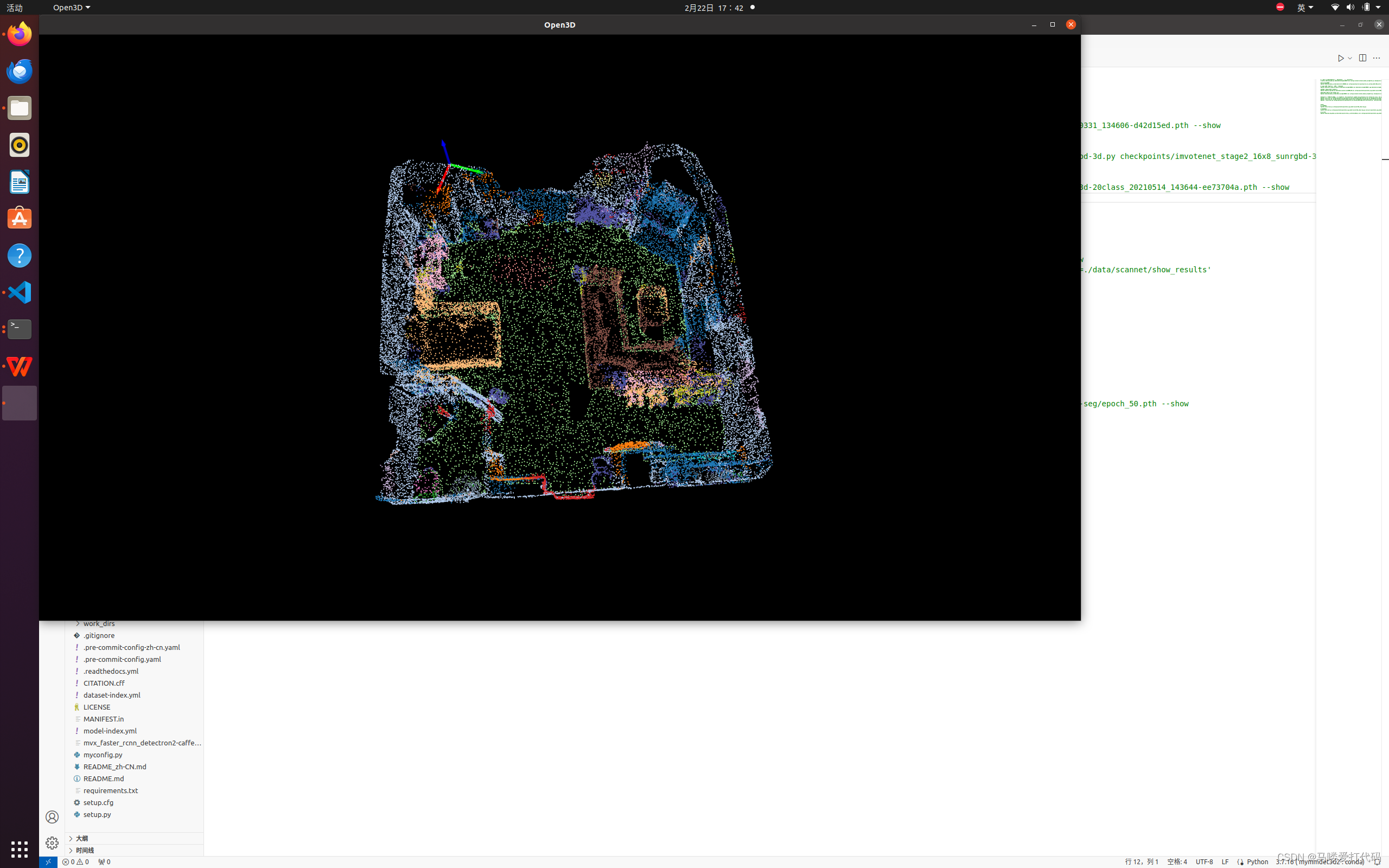
python demo/pcd_seg_demo.py data/s3dis/points/Area_1_conferenceRoom_1.bin configs/pointnet2/pointnet2_ssg_2xb16-cosine-50e_s3dis-seg.py work_dirs/pointnet2_ssg_2xb16-cosine-50e_s3dis-seg/epoch_50.pth --showThe data for testing is randomly selected; I used a
.binfile from thepointsdirectory for testing.Example visualization: