Implementing Sparse Arrays and Queues for Efficient Data Storage
Problem Context
In developing a Gomoku game program, features like undo/redo moves are essential. Typically, a 2D array represents the board state, but this approach stores many default values (e.g., 0 for empty cells), leading to inefficient memory usage. Sparse arrays can address this issue.
Sparse Arrays
Introduction
A sparse array is used when most elements in an array are zero or share the same value. It compresses the aray by storing only non-default values, reducing memory footprint.
Processing Approach:
- Record the array dimensions and count of distinct values.
- Store the row, column, and value of each distinct element in a smaller array, minimizing program size.
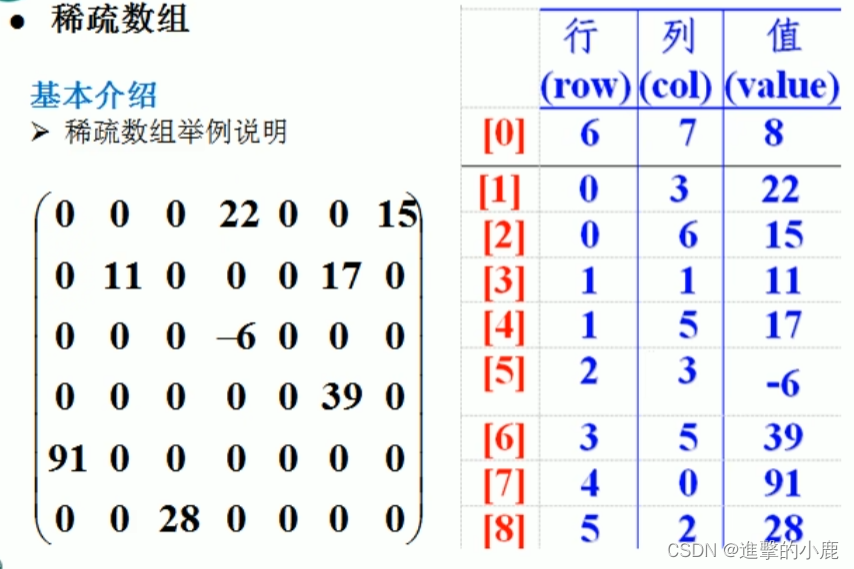
Implementation Strategy
Converting a 2D Array to a Sparse Array
- Traverse the original 2D array to count non-zero elements (sum).
- Create a sparse array:
sparseArr[sum + 1][3]. - Store non-zero data into the sparse array.
Converting a Sparse Array Back to a 2D Array
- Read the first row of the sparse array to determine original dimensions (e.g.,
originalArr[rows][cols]). - Read subsequent rows and assign values to the original 2D array.
Code Example
public class SparseArrayProcessor {
    public static void main(String[] args) {
        // Original 11x11 board: 0=empty, 1=black, 2=white
        int[][] board = new int[11][11];
        board[1][2] = 1;
        board[2][3] = 2;

        System.out.println("Original Board:");
        printArray(board);

        // Convert to sparse array
        int nonZeroCount = 0;
        for (int[] row : board) {
            for (int cell : row) {
                if (cell != 0) nonZeroCount++;
            }
        }

        int[][] sparseArray = new int[nonZeroCount + 1][3];
        sparseArray[0][0] = 11; // rows
        sparseArray[0][1] = 11; // columns
        sparseArray[0][2] = nonZeroCount; // non-zero count

        int index = 0;
        for (int i = 0; i < board.length; i++) {
            for (int j = 0; j < board[i].length; j++) {
                if (board[i][j] != 0) {
                    index++;
                    sparseArray[index][0] = i;
                    sparseArray[index][1] = j;
                    sparseArray[index][2] = board[i][j];
                }
            }
        }

        System.out.println("\nSparse Array:");
        printArray(sparseArray);

        // Restore original array
        int[][] restoredBoard = new int[sparseArray[0][0]][sparseArray[0][1]];
        for (int i = 1; i < sparseArray.length; i++) {
            restoredBoard[sparseArray[i][0]][sparseArray[i][1]] = sparseArray[i][2];
        }

        System.out.println("\nRestored Board:");
        printArray(restoredBoard);
    }

    private static void printArray(int[][] arr) {
        for (int[] row : arr) {
            for (int val : row) {
                System.out.printf("%d\t", val);
            }
            System.out.println();
        }
    }
}
Queues
- A queue is an ordered list implementing FIFO (First-In-First-Out) principle.
- Can be implemented using arrays or linked lists.
- Example: Bank排队 system.
- Front pointer typical points to the first element, rear to the last.
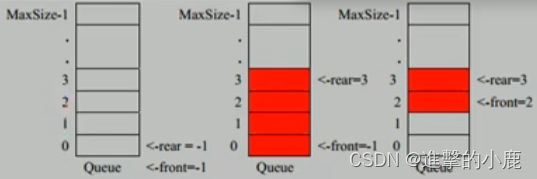
Array-Based Queue Implementation
Design Considerations
- Use
frontandrearvariables to track queue boundaries. frontchanges with dequeues,rearwith enqueues.
Enqueue Operation:
- Move rear pointer:
rear + 1. - If
rear < maxSize - 1, store data atarr[rear]. - Conditions:
front == rear(empty),rear == maxSize - 1(full).
Code Example: Basic Array Queue
class SimpleQueue {
    private int maxSize;
    private int front = -1;
    private int rear = -1;
    private int[] data;

    public SimpleQueue(int capacity) {
        maxSize = capacity;
        data = new int[maxSize];
    }

    public boolean isFull() { return rear == maxSize - 1; }
    public boolean isEmpty() { return front == rear; }

    public void enqueue(int value) {
        if (isFull()) {
            System.out.println("Queue full");
            return;
        }
        data[++rear] = value;
    }

    public int dequeue() {
        if (isEmpty()) {
            throw new RuntimeException("Queue empty");
        }
        return data[++front];
    }

    public void display() {
        if (isEmpty()) {
            System.out.println("Queue empty");
            return;
        }
        for (int i = 0; i < data.length; i++) {
            System.out.printf("data[%d]=%d\n", i, data[i]);
        }
    }
}
Circular Queue Optimization
Basic array queues become unusable after one full usage cycle. Circular queues solve this using modulo arithmetic.
Design Adjustments
frontpoints to the first element (initial 0).rearpoints to the position after the last element (initial 0).- Full condition:
(rear + 1) % maxSize == front. - Empty condition:
rear == front. - Valid element count:
(rear + maxSize - front) % maxSize.
Code Example: Circular Queue
class CircularQueue {
    private int maxSize;
    private int front = 0;
    private int rear = 0;
    private int[] buffer;

    public CircularQueue(int capacity) {
        maxSize = capacity;
        buffer = new int[maxSize];
    }

    public boolean isFull() { return (rear + 1) % maxSize == front; }
    public boolean isEmpty() { return front == rear; }

    public void enqueue(int value) {
        if (isFull()) {
            System.out.println("Queue full");
            return;
        }
        buffer[rear] = value;
        rear = (rear + 1) % maxSize;
    }

    public int dequeue() {
        if (isEmpty()) {
            throw new RuntimeException("Queue empty");
        }
        int value = buffer[front];
        front = (front + 1) % maxSize;
        return value;
    }

    public void display() {
        if (isEmpty()) {
            System.out.println("Queue empty");
            return;
        }
        for (int i = front; i < front + size(); i++) {
            System.out.printf("buffer[%d]=%d\n", i % maxSize, buffer[i % maxSize]);
        }
    }

    public int size() { return (rear + maxSize - front) % maxSize; }
}
