A Comparison of static, extern, and const Keywords in iOS
Before diving into the three keywords, let's review some foundational knowledge.
How Addresses are Allocated in the Global Area
Consider the following code snippet.
It is easy to see that uninitGlobalA, uninitStaticA, and uninitStaticStr are uninitialized global and static variables, which reside in the BSS segment.
initGlobalB, initStaticB, and initStaticStr are initialized global and static variables, which reside in the DATA segment.
int uninitGlobalA;
int initGlobalB = 10;

static int uninitStaticA;
static NSString *uninitStaticStr;

static int initStaticB = 10;
static NSString *initStaticStr = @"data";

- (void)demonstrateMemoryLayout {
   NSLog(@"uninitGlobalA == \t%p",&uninitGlobalA);
   NSLog(@"uninitStaticA == \t%p",&uninitStaticA);
   NSLog(@"uninitStaticStr == \t%p",&uninitStaticStr);

   NSLog(@"initGlobalB == \t%p",&initGlobalB);
   NSLog(@"initStaticB == \t%p",&initStaticB);
   NSLog(@"initStaticStr == \t%p",&initStaticStr);
}
Below is the printed result, which reveals a pattern in memory allocation.
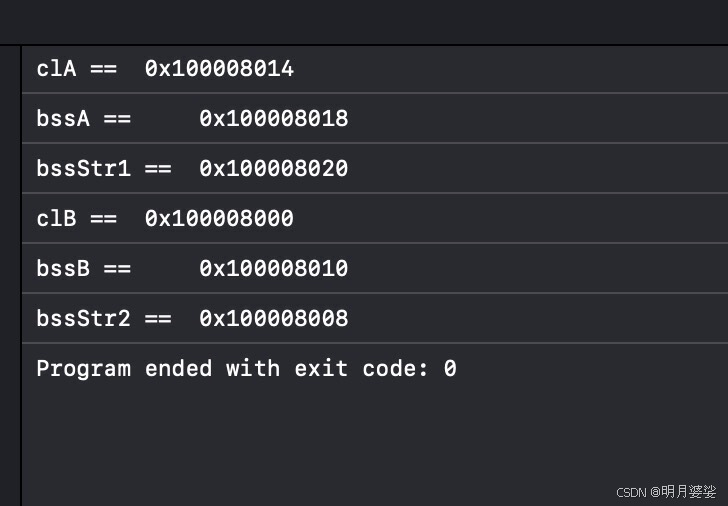
Observations:
Uninitialized global and static variables reside in the BSS segment.
Address allocation in BSS follows low address → high address.
Initialized global and static variables reside in the DATA segment.
Allocation in the DATA segment is independent of the order in which variables are defined.
Testing the Safety of the Static Area
Static variables are scoped to the current file.
In effect, when another file references a static variable, the underlying implementation creates a deep copy of that static variable within its own compilation unit. Any subsequent access or modification operates on this local copy, leaving the original in other files unaffected.
If the current file modifies a static variable, subsequent accesses within that file reflect the changed value, but the modification does not propagate to other files.
When a different file includes the same static variable, it receives the initial value. If that file then modifies it, the change remains local to that file.
The static, extern, and const Keywords
extern
The extern keyword declares that a variable or function is an external entity, informing the compiler that the definition exists in a separate file. No compilation error is raised; instead, the linker resolves the symbol by name during the linking phase.
Suppose a header file A.h defines a global variable such as int valueA;. To use valueA in other files, you would typically need to add extern int valueA; before the point of use. This approach has drawbacks: firstly, if A.h aggregates many global variables, the same extern declarations get repeated in every consumer file. Secondly, directly including A.h in multiple compilation units causes multiple definitions of the global variable, leading to a linker error.
Therefore, the recommended practice is:
1. Define the global variable in the implementation file, e.g.,
int valueA;insideA.m.
2. Declare it asextern int valueA;in the corresponding headerA.h.
3. In any file that usesvalueA(e.g.,B.m), simply includeA.h.
During compilation, the translation unit for B.m may not find the definition, but it will not report an error. The symbol is resolved at link time against the object code generated from A.m.
static
When a variable is modified by static, it cannot be declared with extern. In other words, static and extern are mutually exclusive.
A static global variable combines declaration and definition; if you place a static global variable inside a header file, its simultaneously declared and defined.
The scope of a static global variable is limited to its own compilation unit. When multiple files include a header that defines a static variable, each compilation unit receives a distinct copy of the variable. The copy is stored in separate memory, and modifications in one unit do not affect the other copies.
That is, when compilation unit A uses the static variable, the physical address differs from the one used by compilation unit B. Changes made in A are never visible in B, and vice versa.
Including a header that defines a static global variable never causes a multiple-definition error because each compilation unit allocates its own storage.
To avoid accidentally creating separate copies in every consumer, it is customary to place static global variables in the .m file rather than in a header.
Before namespaces were introduced in standard C++, developers had to mark names as
staticto confine them to a single translation unit. The use of file-level static declarations in C++ files is inherited from C, where astaticlocal entity is invisible outside the file that declares it.
Modern C++ discourages such file-level static declarations. The C++ standard deprecates this usage. Instead, you should prefer an unnamed namespace inside the source file to achieve the same file-local effect.
An unnamed namespace restricts visibility to the current file; it never spans across different files.
Concrete Examples
Regarding the extern Keyword
Writing the following in a header looks sensible:
// header.h
static NSString * const sharedCaption = @"Hello";
However, this is neither correct nor safe.
To let other classes properly share this constant string, the header should declare it like this:
// header.h
extern NSString * const sharedCaption;
And then, in the corresponding implementation file:
// implementation.m
NSString * const sharedCaption = @"Hello";
What does this achieve, and why is it safer?
Inside every compilation unit (roughly each .m file), a static const variable named sharedCaption would indeed contain the same string value. However, these would be different objects.
A static global variable’s scope is limited to its own compilation unit. When multiple files include the header that defines it, each unit simply copies the initial value into its own memory. Modifications in one unit do not affect the original.
Thus, using static and const together here is redundant. Every .m file ends up with its own copy of the sharedCaption object, instead of sharing a single instance.
By using extern, we transform the object into a truly shared external variable. Then, we must follow the rules for extern:
1. Provide the definition in an implementation file (e.g.,
A.m).
2. Add anexterndeclaration in the associated header (A.h).
3. IncludeA.hin every consumer file (B.m).
Regarding the static Keyword
To elaborate on the earlier discussion about static, here is a demonstration.
First, define a string sharedMessage in a header MessageUtils.h:
// MessageUtils.h
#ifndef MESSAGEUTILS_H
#define MESSAGEUTILS_H
static char sharedMessage[] = "ABCDEF";
void displayMessageA();
#endif
In ModuleA.cpp, use sharedMessage:
// ModuleA.cpp
#include "MessageUtils.h"
void displayMessageA() {
   cout << sharedMessage << endl;
}
In ModuleB.cpp, also use sharedMessage:
// ModuleB.cpp
#include "MessageUtils.h"
void displayMessageB() {
   cout << sharedMessage << endl;
}
If a meticulous developer steps through the code with a debugger, they might observe that both compilation units appear to share the same memory address for sharedMessage. They might then conclude that a static variable can actually span multiple modules. But this is an optical illusion created by the compiler.
Most compilers apply optimizations to generate smaller and faster executables. During the linking phase, when the linker encounters identical constant data across different translation units, it may fold them into a single memory location.
For instance, the byte sequence "ABCDEF" appears identically in both units. The linker, recognizing this, can store only one copy.
Let's expose this illusion with a more nuanced example:
In ModuleA.cpp, modify the static string:
// ModuleA.cpp
#include "MessageUtils.h"
void displayMessageA() {
   sharedMessage[0] = 'Z';
   cout << sharedMessage << endl;
}
In ModuleB.cpp, leave it untouched:
// ModuleB.cpp
#include "MessageUtils.h"
void displayMessageB() {
   cout << sharedMessage << endl;
}

int main() {
   displayMessageA(); // Outputs: ZBCDEF
   displayMessageB(); // Outputs: ABCDEF
}
Now, inspecting the addresses reveals that the two compilation units store sharedMessage in separate locations. Because we modified the array in one unit, the compiler was forced to keep two independent copies—one for each module.
Because of the properties described above, static global variables are ordinarily placed in source files rather than in headers, avoiding unnecessary duplication and pollution across modules.
About Static Variables
Global Static Variables
Advantages: They can be accessed and modified by both instance methods and class methods, yet remain hidden from external classes. Once defined, they point to a fixed memory location shared by all instances, saving space.
Drawbacks: They persist for the entire lifetime of the program, holding memory continuously.
Advice: From the perspectives of memory optimization and build speed, use global static variables sparingly. The runtime loads the global static region separately; excessive global static variables can slow down app launch.
Local Static Variables
Advantages: Only one instance ever exists; each invocation uses the same memory location without re-creation, conserving resources. They are only accessible within their enclosing code block.
Drawbacks: They live for the program’s entire lifetime and are scoped to a single block.
Advice: Fundamentally, local and global static variables differ only in scope. If a mutable value is needed by one class alone, a global static variable is fine. If multiple classes need to read and modify it, storing the value as a property of a model object is preferable. For truly immutable values, consider using a macro or, better, a constant.
Class Static Variables
In iOS, a class static variable has the following characteristics and uses:
Characteristics:
- Global uniqueness: the variable is shared among all instances of the class; only one copy exists.
- Lifetime: it exists from program start until termination.
Uses:
- Shared data: for example, configuration settings, counters, or any state that should be common across all instances.
- Implementing the singleton pattern: by making the initializer private and storing the sole instance in a static variable.
Example:
@interface DataManager : NSObject

+ (void)increaseAccessCount;
+ (NSInteger)accessCount;

@end

@implementation DataManager

static NSInteger totalAccesses = 0;  // class static variable

+ (void)increaseAccessCount {
   totalAccesses++;
}

+ (NSInteger)accessCount {
   return totalAccesses;
}

@end
In the above snippet, totalAccesses is a static variable of the DataManager class, manipulated through class methods.
const
A global constant modified by const shares characteristics with static (under certain conditions, it resides in the read-only static storage area): it is by default confined to its compilation unit. However, const can be paired with extern to make the constant visible across other compilation units.
Because a const object has internal linkage by default, identically named const objects in separate files are effectively distinct, independent definitions.
Unlike variables, constants hold a fixed, unchangeable value, typically used for read-only data.
Advantages: they can be read but never modified. Commonly used for interface-related or display strings. Combined with extern, they become globally accessible.
Drawbacks: they remain in memory for the program’s runtime. The declaration must be split across a header and an implementation file, which is slightly more code.
Advice: As a good coding practice, prefer constants over macros. Constants carry an explicit type, while a macro is merely a textual substitution that cannot be type-checked safely.
According to C++ Primer, while definitions are generally forbidden in header files, there are three exceptions: classes,
constobjects initialized with constant expressions, andinlinefunctions.
In C and C++ programming, this rule prevents multiple-definition errors. The three exceptions are:
-
Classes: Defining a class in a header is common and allowed because the class definition includes member function declarations, while the actual function definitions can reside in a source file.
For example:
class Circle { public: double area(); }; -
constobjects initialized with constant expressions: Aconstobject initialized by a constant expression can be defined in a header because all translation units will see the identical value, avoiding multiple-definition conflicts.For example:
const int MAX_RETRIES = 5; -
inlinefunctions: Sinceinlinefunctions are expanded at the call site, including their definition in multiple translation units is safe.For example:
inline int multiply(int a, int b) {
    return a * b;
}
These rules help keep headers clean and prevent subtle link-time errors. Following them tends to improve code maintainability and portability.
References
Understanding how const, extern, and static should be defined — header or source file?
C++ differences and interplay among extern, static, and const
Memory’s five major regions: stack, heap, global-static, constant, code (thread, function stack, stack frame)
Five memory regions in iOS
static const vs. extern const
