A Civil Servant Training Institution Management System Using SSM, Vue.js, and Uniapp
Technology Stack
Backend Framework: SSM
The SSM framework combines Spring, Spring MVC, and MyBatis into a unified Java web application architecture. Each component handles a distinct responsibility:
- Spring Framework – a lightweight container offering dependency injection, aspect‑oriented programming (AOP), and transaction management. It manages object lifecycles and reduces coupling between components.
- Spring MVC – implements the Model‑View‑Controller pattern. It separates request handling (controller), business logic (model), and presentation (view), enabling clean RESTful and server‑rendered endpoints.
- MyBatis – a persistence layer that maps Java objects to database tables through XML descriptors or annotations. It separates SQL from application code, offers dynamic SQL, and integrates seamlessly with Spring.
The following example shows a minimal Spring MVC controller rewritten to illustrate the SSM structure:
import org.springframework.stereotype.Controller;
import org.springframework.web.bind.annotation.RequestMapping;
import org.springframework.web.bind.annotation.ResponseBody;

@Controller
public class HealthCheckController {

    @RequestMapping("/api/status")
    @ResponseBody
    public String systemStatus() {
        return "System is operational";
    }
}
Frontend Framework: Vue.js
Vue.js provides reactive data binding, a virtual DOM, and a component‑based architecture. The virtual DOM optimises rendering by batching real DOM updates. When data changes, the view updates automatically, allowing developers to focus on state management.
A rewritten basic Vue example follows:
<html>
<head>
  <title>Reactive Demo</title>
  <script src="https://cdn.jsdelivr.net/npm/vue@2"></script>
</head>
<body>
  <div id="appRoot">
    <h2>{{ notification }}</h2>
    <button @click="changeNotification">Update Message</button>
  </div>
  <script>
    new Vue({
      el: '#appRoot',
      data: {
        notification: 'Initial message'
      },
      methods: {
        changeNotification: function() {
          this.notification = 'Reactive content loaded';
        }
      }
    });
  </script>
</body>
</html>
Persistence Layer: MyBatis
MyBatis simplifies database access by mapping SQL results to Java objects. Its key advantages include:
- Simplified database operations – SQL mapping eliminates manual JDBC code.
- Dynamic SQL – conditions and loops can be used to build flexible queries.
- Built‑in caching – first‑level and second‑level caches reduce database load.
- Plugin mechanism – custom interceptors allow extensions such as pagination or auditing.
System Testing
Testing Objectives
Testing aims to verify that every functional module adheres to the requirements specification and delivers a seamless user experience. Black‑box testing is performed by executing test cases that cover input validation, boundary values, mandatory fields, and role‑based access. Defects found during testing are corrected to ensure stability and reliability.
Functional Test Cases
Login Functionality
| Input Data | Expected Outcome | Actual Outcome | Result |
|---|---|---|---|
| Username: admin, Password: 123456, Captcha: correct | Access granted | System logged in successfully | Consistent |
| Username: admin, Password: 111111, Captcha: corrrect | Invalid password error | "Incorrect password" prompt shown | Consistent |
| Username: admin, Password: 123456, Captcha: incorrect | Captcha error | "Invalid captcha" warning displayed | Consistent |
| Username: (empty), Password: 123456, Captcha: correct | Mandatory username check | "Username is required" message | Consistent |
| Username: admin, Password: (empty), Captcha: correct | Password missing error | "Password is required" message | Consistent |
User Management – Add User
| Input Data | Expected Outcome | Actual Outcome | Result |
|---|---|---|---|
| Username: user1, Password: 123456, Role: Trainee | User created and listed | user1 appears in list | Consistent |
| Username: user2, Password: 111111, Role: Trainee | User created and listed | user2 appears in list | Consistent |
| Username: user1 (duplicate), Password: 123456, Role: Trainee | Duplicate username error | "Username already exists" shown | Consistent |
| Username: (empty), Password: 123456, Role: Trainee | Mandatory field prompt | "Username cannot be empty" alert | Consistent |
User Management – Edit User
| Input Data | Expected Outcome | Actual Outcome | Result |
|---|---|---|---|
| Select user1, change password to 654321 | Password updated | user1’s password changed to 654321 | Consistent |
| Select user2, change role to Instructor | Role updated | user2’s role changed to Instructor | Consistent |
| Select user1, clear username field | Validation error | "Username cannot be empty" shown | Consistent |
User Management – Delete User
| Input Data | Expected Outcome | Actual Outcome | Result |
|---|---|---|---|
| Delete confirmed for user1 | User removed after confirmation | user1 deleted from list | Consistent |
| Delete cancelled for user2 | User not removed | user2 remains in the list | Consistent |
Test Summary
Black‑box testing validated all core workflows. The system consistently matched the expected behaviours defined in the requirements. User‑oriented scenarios confirmed that the system provides intuitive operation, correct data handling, and appropriate error feedback. After issue resolution, the system meets functional and performance goals.
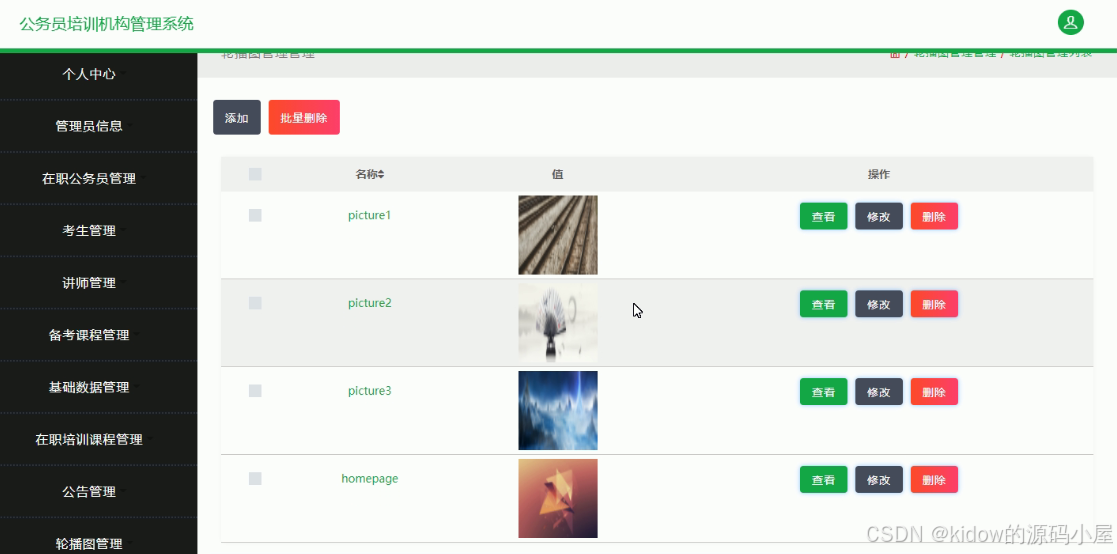
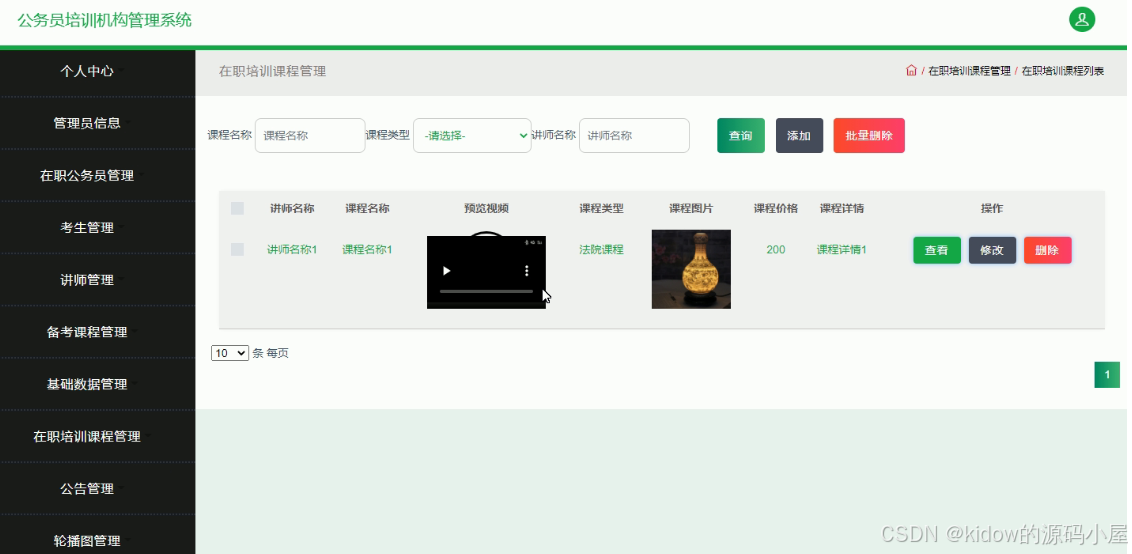
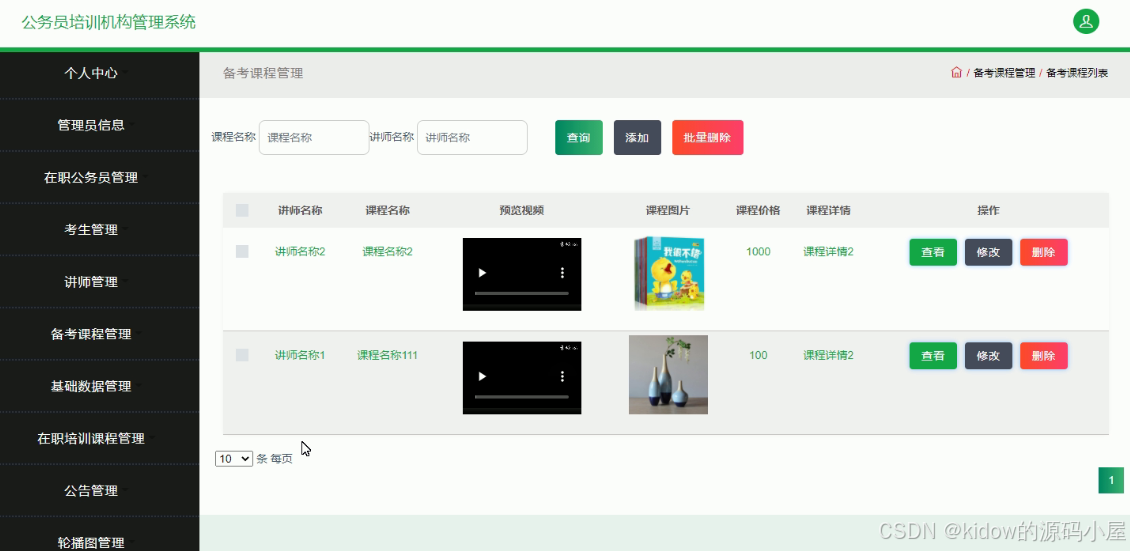
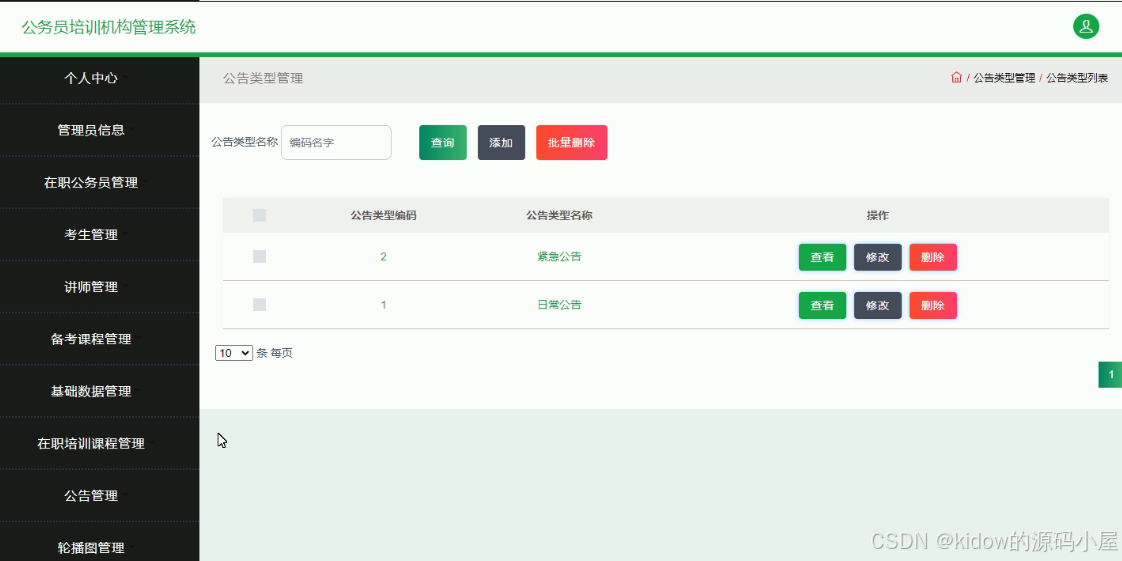
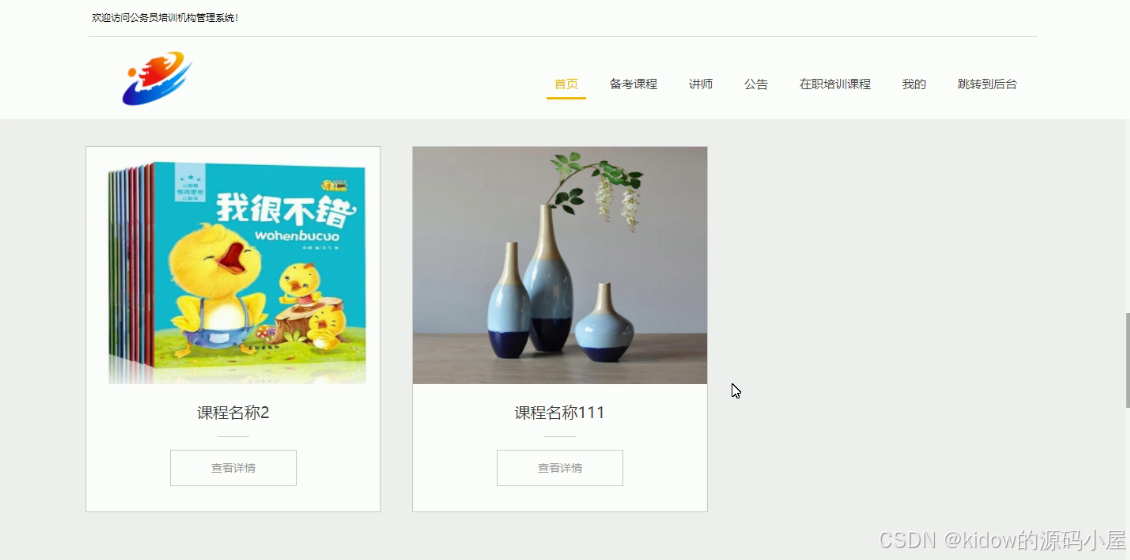
System Screenshots
Core Code Reference
The authentication and token management implementation has been restructured for clarity. The login endpoint returns a signed token, and an interceptor protects subsequent requests.
// Custom annotation to skip authentication
@SkipAuthorization
@PostMapping(value = "/api/login")
public R authenticateUser(String username, String password, String captcha, HttpServletRequest request) {
   EmployeeEntity employee = employeeService.selectOne(new EntityWrapper<EmployeeEntity>().eq("username", username));
   if(employee == null || !employee.getPassword().equals(password)) {
      return R.error("Invalid username or password");
   }
   String token = sessionService.generateToken(employee.getId(), username, "employees", employee.getRole());
   return R.ok().put("token", token);
}

// Token generation logic
@Override
public String generateToken(Long userId, String username, String tableName, String role) {
   SessionToken existingToken = this.selectOne(new EntityWrapper<SessionToken>().eq("user_id", userId).eq("role", role));
   String randomToken = CommonUtil.randomString(32);
   Calendar calendar = Calendar.getInstance();
   calendar.setTime(new Date());
   calendar.add(Calendar.HOUR_OF_DAY, 1);
   if(existingToken != null) {
      existingToken.setToken(randomToken);
      existingToken.setExpiresAt(calendar.getTime());
      this.updateById(existingToken);
   } else {
      this.insert(new SessionToken(userId, username, tableName, role, randomToken, calendar.getTime()));
   }
   return randomToken;
}

/**
 * Authorization interceptor that validates Token from request header
 */
@Component
public class AuthInterceptor implements HandlerInterceptor {

    public static final String AUTH_HEADER = "Authorization";

    @Autowired
    private SessionService sessionService;

    @Override
    public boolean preHandle(HttpServletRequest request, HttpServletResponse response, Object handler) throws Exception {
        response.setHeader("Access-Control-Allow-Methods", "POST, GET, OPTIONS, DELETE");
        response.setHeader("Access-Control-Max-Age", "3600");
        response.setHeader("Access-Control-Allow-Credentials", "true");
        response.setHeader("Access-Control-Allow-Headers", "x-requested-with, Authorization, Origin, Content-Type, Accept");
        response.setHeader("Access-Control-Allow-Origin", request.getHeader("Origin"));

        if (request.getMethod().equals(RequestMethod.OPTIONS.name())) {
            response.setStatus(HttpStatus.OK.value());
            return false;
        }

        SkipAuthorization annotation = null;
        if (handler instanceof HandlerMethod) {
            annotation = ((HandlerMethod) handler).getMethodAnnotation(SkipAuthorization.class);
        } else {
            return true;
        }

        if(annotation != null) {
            return true;
        }

        String token = request.getHeader(AUTH_HEADER);
        SessionToken sessionToken = null;
        if(StringUtils.isNotBlank(token)) {
            sessionToken = sessionService.findByToken(token);
        }

        if(sessionToken != null) {
            request.getSession().setAttribute("userId", sessionToken.getUserId());
            request.getSession().setAttribute("role", sessionToken.getRole());
            request.getSession().setAttribute("tableName", sessionToken.getTableName());
            request.getSession().setAttribute("username", sessionToken.getUsername());
            return true;
        }

        response.setCharacterEncoding("UTF-8");
        response.setContentType("application/json; charset=utf-8");
        PrintWriter writer = response.getWriter();
        writer.print(JSONObject.toJSONString(R.error(401, "Please login first")));
        writer.close();
        return false;
    }
}
Database Design Example
Below is a rewritten inventory table suitable for tracking training materials. The structure follows the same design principles applied in the system.
-- ----------------------------
-- Table structure for inventory_item
-- ----------------------------
DROP TABLE IF EXISTS `inventory_item`;
CREATE TABLE `inventory_item` (
  `item_id` bigint(20) NOT NULL AUTO_INCREMENT COMMENT 'Primary key',
  `item_name` varchar(100) NOT NULL COMMENT 'Item name',
  `unit_price` decimal(10, 2) NOT NULL COMMENT 'Price per unit',
  `brief_description` varchar(200) DEFAULT NULL COMMENT 'Short description',
  `quantity_on_hand` int(11) NOT NULL COMMENT 'Current stock',
  `created_at` timestamp NOT NULL DEFAULT CURRENT_TIMESTAMP COMMENT 'Record creation time',
  `updated_at` timestamp NOT NULL DEFAULT CURRENT_TIMESTAMP ON UPDATE CURRENT_TIMESTAMP COMMENT 'Last update time',
  PRIMARY KEY (`item_id`) USING BTREE
) ENGINE=InnoDB AUTO_INCREMENT=1 DEFAULT CHARSET=utf8 ROW_FORMAT=COMPACT COMMENT='Training material inventory';

-- Sample data
INSERT INTO `inventory_item` (`item_name`, `unit_price`, `brief_description`, `quantity_on_hand`)
VALUES ('Course Notebook', 12.99, 'A4 size, 200 pages', 300);

INSERT INTO `inventory_item` (`item_name`, `unit_price`, `brief_description`, `quantity_on_hand`)
VALUES ('Whiteboard Marker Set', 24.50, 'Set of 4 assorted colors', 80);

INSERT INTO `inventory_item` (`item_name`, `unit_price`, `brief_description`, `quantity_on_hand`)
VALUES ('Reference Textbook', 59.90, 'Official exam preparation guide', 150);
