JavaScript Objects and Simple Game Development
JavaScript Objects
Objects
A object is a concrete, describable entity that can be manipulated in a specific way. It is analogous to a class in Java. An object is a collecsion of properties and methods. Each property has a name and a value, e.g., name: 'Zhang San'. Properties can be of any type, such as strings, arrays, or even other objects.
In JavaScript, all values are objects except for strings, numbers, true, false, null, and undefined.
<!DOCTYPE html>
<html lang="en">
<head>
    <meta charset="UTF-8">
    <meta name="viewport" content="width=device-width, initial-scale=1.0">
    <title>Objects</title>
</head>
<body>

</body>
<script>
    var person;
    person = {
        name: 'tom',
        age: 20,
        sex: 'male',
        university: 'Northeast Normal University' // no comma needed after last property
    };
    console.log(person);
</script>
</html>
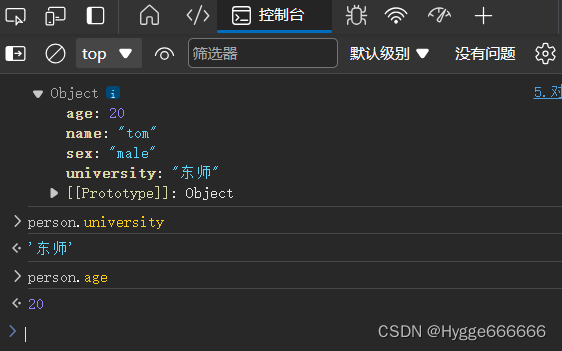
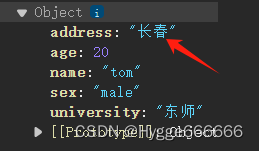
JavaScript allows adding new properties or modifying existing ones directly. Note that inside the object literal, properties are defined with a colon, but when adding a property externally, we use the assignment operator (=).
<script>
    var person = {
        name: 'tom',
        age: 20,
        sex: 'male',
        university: 'Northeast Normal University'
    };
    console.log(person);

    // Add or modify properties directly
    person.address = 'Changchun';
</script>
We can also define an object using the new keyword, similar to Java:
<script>
    var obj = new Object();
    obj.name = 'mq';
    obj.age = '18';
    console.log(obj);
</script>
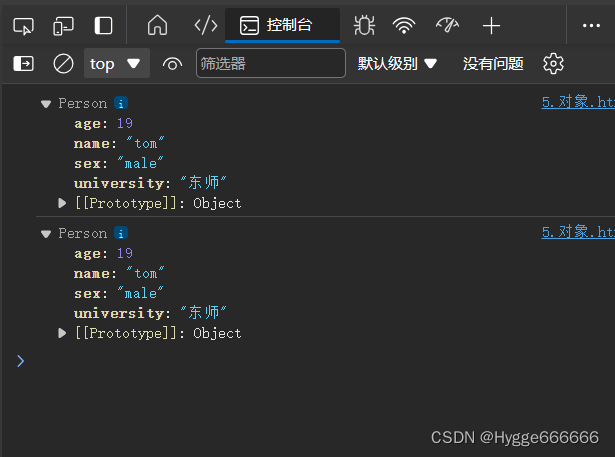
Below is an example using a constructor function:
<script>
    // Constructor function
    function Person() {
        this.name = 'tom';
        this.age = 19;
        this.sex = 'male';
        this.university = 'Northeast Normal University';
        // Note the difference: inside the constructor, we use assignment with '='
        // Each statement ends with a semicolon
    }

    // Create instances using the constructor
    var person1 = new Person();
    var person2 = new Person();

    console.log(person1);
    console.log(person2);
</script>
To access a property, we can use dot notation or bracket notation:
<script>
    function Person() {
        this.name = 'tom';
        this.age = 19;
        this.sex = 'male';
        this.university = 'Northeast Normal University';
    }

    var person1 = new Person();

    console.log(person1.age);       // Method 1
    console.log(person1["name"]);   // Method 2
</script>
Iterating Over Object Properties with for...in
<script>
    function Person() {
        this.name = 'tom';
        this.age = 19;
        this.sex = 'male';
        this.university = 'Northeast Normal University';
    }

    var person1 = new Person();
    var person2 = new Person();

    // for...in loop to iterate over properties
    for (var prop in person1) {
        console.log(prop);
        console.log(prop + ": " + person1[prop]);
    }
</script>
Properties can also hold arrays or functions:
<script>
    function Person() {
        this.name = 'tom';
        this.age = 19;
        this.sex = 'male';
        this.university = 'Northeast Normal University';
    }

    var person1 = new Person();
    var array = ['a', 'b', 'c'];
    function func() {
        console.log('this is a function');
    }

    person1.arr = array;
    person1.fun = func;
    console.log(person1.arr);
</script>
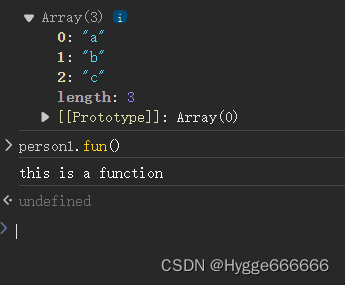
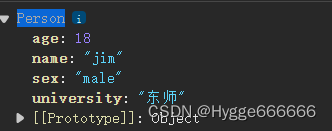
A property can also be another object:
<script>
    function Person() {
        this.name = 'tom';
        this.age = 19;
        this.sex = 'male';
        this.university = 'Northeast Normal University';
    }

    var son = new Person();
    son.name = 'jim';
    son.age = 18;

    var person1 = new Person();
    person1.son1 = son;
    console.log(person1.son1);
</script>
Passing by Reference
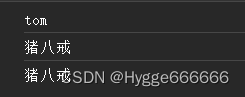
When assigning an object to a variable, it passes a reference (address), not a copy.
<script>
    function Person() {
        this.name = 'tom';
        this.age = 19;
        this.sex = 'male';
        this.university = 'Northeast Normal University';
    }

    var person1 = new Person();
    console.log(person1.name); // Output: tom

    var person2 = person1; // Pass reference
    person2.name = 'Pig';

    console.log(person2.name); // Output: Pig
    console.log(person1.name); // Also outputs Pig because person2 points to the same object
</script>
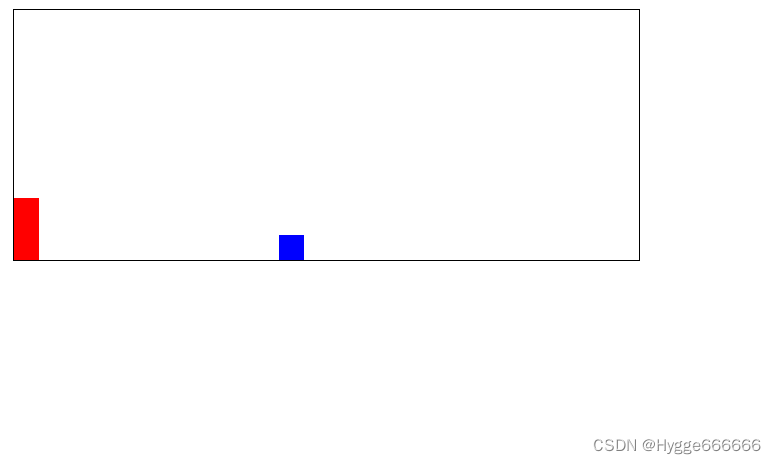
JS Mini Game Demo
Here is a simple game demo found online:
<!DOCTYPE html>
<html lang="en">
<head>
    <meta charset="UTF-8">
    <meta name="viewport" content="width=device-width, initial-scale=1.0">
    <title>Game</title>
    <link href="style.css" rel="stylesheet" type="text/css">
</head>
<body>
    <div id="game">
        <div id="mario"></div> <!-- Mario character -->
        <div id="block"></div> <!-- Obstacle -->
    </div>
</body>
</html>
import './style.css';

const mario = document.querySelector("#mario");
const block = document.querySelector("#block");

window.addEventListener('keydown', event => {
    console.log(event);

    if (event.code === 'Space') {
        console.log('Space key pressed');
        mario.classList.add('jumpClass');

        setTimeout(() => {
            mario.classList.remove('jumpClass');
        }, 300);
    }
});

setInterval(() => {
    const marioBottom = parseFloat(getComputedStyle(mario).getPropertyValue('bottom'));
    const blockLeft = parseFloat(getComputedStyle(block).getPropertyValue('left'));
    if (blockLeft < 20 && blockLeft > -20 && marioBottom <= 20) {
        console.log('Game Over');
    }
}, 10);
body {
    padding: 20px;
    background-color: white;
}

#game {
    width: 500px;
    height: 200px;
    border: 1px solid black;
    position: relative;
}

#mario {
    width: 20px;
    height: 50px;
    background-color: red;
    position: absolute;
    bottom: 0px;
}

.jumpClass {
    animation: jump 0.3s infinite;
}

@keyframes jump {
    0% { bottom: 0px; }
    30% { bottom: 100px; }
    70% { bottom: 100px; }
    100% { bottom: 0px; }
}

#block {
    width: 20px;
    height: 20px;
    background-color: blue;
    position: absolute;
    bottom: 0px;
    left: 450px;
    animation: block 1s linear infinite;
}

@keyframes block {
    0% { left: 450px; }
    100% { left: -20px; }
}