Using Room with ViewModel and LiveData in Android
The Room persistence library supports LiveData, which automatical observes database changes. When the database is modified, the onChanged callback is envoked to update the UI.
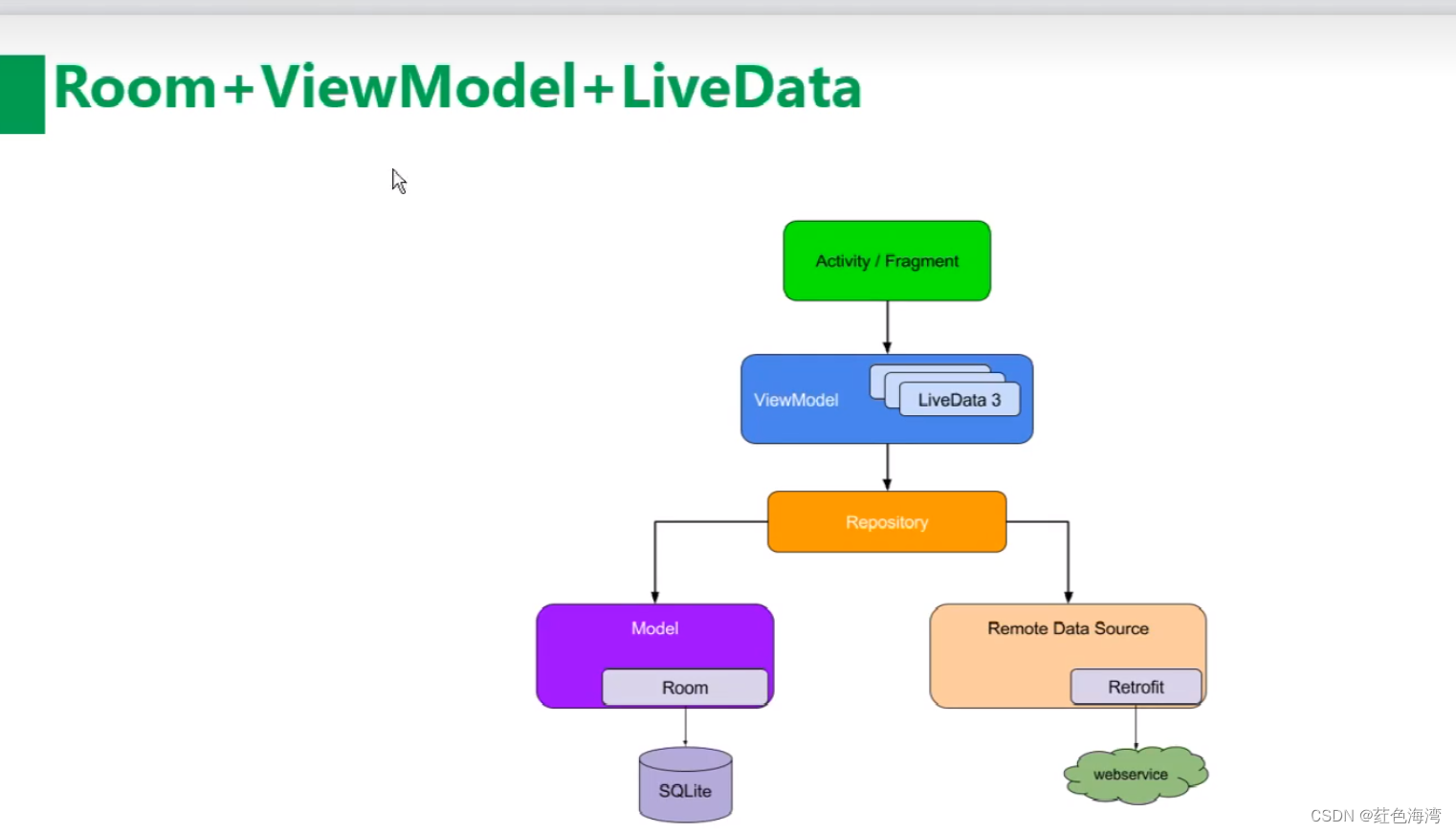
1. MainActivity
package com.example.roomdemo

import android.os.Bundle
import android.view.View
import androidx.appcompat.app.AppCompatActivity
import androidx.lifecycle.Observer
import androidx.lifecycle.ViewModelProvider
import androidx.recyclerview.widget.LinearLayoutManager
import androidx.recyclerview.widget.RecyclerView
import com.example.roomdemo.databinding.ActivityMainBinding

class MainActivity : AppCompatActivity() {
    private lateinit var adapter: StudentAdapter
    private lateinit var viewModel: StudentViewModel
    private lateinit var binding: ActivityMainBinding

    override fun onCreate(savedInstanceState: Bundle?) {
        super.onCreate(savedInstanceState)
        binding = ActivityMainBinding.inflate(layoutInflater)
        setContentView(binding.root)

        val recyclerView: RecyclerView = binding.recyclerView
        recyclerView.layoutManager = LinearLayoutManager(this)
        adapter = StudentAdapter(emptyList())
        recyclerView.adapter = adapter

        viewModel = ViewModelProvider(this).get(StudentViewModel::class.java)
        val liveData = viewModel.getAllStudentsLive()
        liveData.observe(this, Observer { students ->
            adapter.updateStudents(students)
            adapter.notifyDataSetChanged()
        })
    }

    fun onInsert(view: View) {
        viewModel.insertStudent(Student(name = "John", age = 20), Student(name = "Jane", age = 23))
    }

    fun onDelete(view: View) {
        viewModel.deleteStudent(Student(id = 1))
    }

    fun onUpdate(view: View) {
        val updated = Student(id = 3, name = "UpdatedName", age = 30)
        viewModel.updateStudent(updated)
    }

    fun onClear(view: View) {
        viewModel.deleteAllStudents()
    }
}
2. AppDatabase (formerly MyDataBase)
package com.example.roomdemo

import android.content.Context
import androidx.room.Database
import androidx.room.Room
import androidx.room.RoomDatabase

@Database(entities = [Student::class], version = 1, exportSchema = false)
abstract class AppDatabase : RoomDatabase() {
    abstract fun studentDao(): StudentDao

    companion object {
        @Volatile
        private var INSTANCE: AppDatabase? = null

        fun getInstance(context: Context): AppDatabase {
            return INSTANCE ?: synchronized(this) {
                INSTANCE ?: Room.databaseBuilder(
                    context.applicationContext,
                    AppDatabase::class.java,
                    "my_db.db"
                ).build().also { INSTANCE = it }
            }
        }
    }
}
3. Student Entity
package com.example.roomdemo

import androidx.room.ColumnInfo
import androidx.room.Entity
import androidx.room.Ignore
import androidx.room.PrimaryKey

@Entity(tableName = "student")
data class Student(
    @PrimaryKey(autoGenerate = true)
    @ColumnInfo(name = "id", typeAffinity = ColumnInfo.INTEGER)
    var id: Int = 0,

    @ColumnInfo(name = "name", typeAffinity = ColumnInfo.TEXT)
    var name: String = "",

    @ColumnInfo(name = "age", typeAffinity = ColumnInfo.INTEGER)
    var age: Int = 0
) {
    // Secondary constructor for insertion without id
    @Ignore
    constructor(name: String, age: Int) : this(0, name, age)

    // Constructor for deletion by id
    @Ignore
    constructor(id: Int) : this(id, "", 0)
}
4. StudentDao
package com.example.roomdemo

import androidx.lifecycle.LiveData
import androidx.room.*

@Dao
interface StudentDao {

    @Insert
    suspend fun insert(vararg students: Student)

    @Delete
    suspend fun deleteStudents(vararg students: Student)

    @Query("DELETE FROM student")
    suspend fun deleteAll()

    @Update
    suspend fun updateStudents(vararg students: Student)

    @Query("SELECT * FROM student")
    fun getAllStudentsLive(): LiveData<List<Student>>

    @Query("SELECT * FROM student WHERE id = :id")
    suspend fun getStudentById(id: Int): Student?
}
5. StudentAdapter (RecyclerView Adapter)
package com.example.roomdemo

import android.view.LayoutInflater
import android.view.ViewGroup
import android.widget.TextView
import androidx.recyclerview.widget.RecyclerView
import com.example.roomdemo.databinding.ItemStudentBinding

class StudentAdapter(private var students: List<Student>) : RecyclerView.Adapter<StudentAdapter.ViewHolder>() {

    override fun onCreateViewHolder(parent: ViewGroup, viewType: Int): ViewHolder {
        val binding = ItemStudentBinding.inflate(LayoutInflater.from(parent.context), parent, false)
        return ViewHolder(binding)
    }

    override fun onBindViewHolder(holder: ViewHolder, position: Int) {
        val student = students[position]
        holder.binding.textId.text = student.id.toString()
        holder.binding.textName.text = student.name
        holder.binding.textAge.text = student.age.toString()
    }

    override fun getItemCount() = students.size

    fun updateStudents(newStudents: List<Student>) {
        students = newStudents
    }

    class ViewHolder(val binding: ItemStudentBinding) : RecyclerView.ViewHolder(binding.root)
}
6. StudentRepository
package com.example.roomdemo

import androidx.lifecycle.LiveData
import kotlinx.coroutines.CoroutineScope
import kotlinx.coroutines.Dispatchers
import kotlinx.coroutines.launch

class StudentRepository(private val dao: StudentDao) {

    private val ioScope = CoroutineScope(Dispatchers.IO)

    fun insertStudent(vararg students: Student) {
        ioScope.launch {
            dao.insert(*students)
        }
    }

    fun updateStudent(vararg students: Student) {
        ioScope.launch {
            dao.updateStudents(*students)
        }
    }

    fun deleteStudent(vararg students: Student) {
        ioScope.launch {
            dao.deleteStudents(*students)
        }
    }

    fun deleteAllStudents() {
        ioScope.launch {
            dao.deleteAll()
        }
    }

    fun getAllStudentsLive(): LiveData<List<Student>> {
        return dao.getAllStudentsLive()
    }
}
7. StudentViewModel
package com.example.roomdemo

import android.app.Application
import androidx.lifecycle.AndroidViewModel
import androidx.lifecycle.LiveData

class StudentViewModel(application: Application) : AndroidViewModel(application) {

    private val repository: StudentRepository
    private val allStudents: LiveData<List<Student>>

    init {
        val database = AppDatabase.getInstance(application)
        repository = StudentRepository(database.studentDao())
        allStudents = repository.getAllStudentsLive()
    }

    fun insertStudent(vararg students: Student) = repository.insertStudent(*students)

    fun deleteStudent(vararg students: Student) = repository.deleteStudent(*students)

    fun updateStudent(vararg students: Student) = repository.updateStudent(*students)

    fun deleteAllStudents() = repository.deleteAllStudents()

    fun getAllStudentsLive(): LiveData<List<Student>> = allStudents
}
8. activity_main.xml
<?xml version="1.0" encoding="utf-8"?>
<androidx.constraintlayout.widget.ConstraintLayout xmlns:android="http://schemas.android.com/apk/res/android"
    xmlns:app="http://schemas.android.com/apk/res-auto"
    xmlns:tools="http://schemas.android.com/tools"
    android:layout_width="match_parent"
    android:layout_height="match_parent"
    tools:context=".MainActivity">

    <androidx.constraintlayout.widget.Guideline
        android:id="@+id/guideline3"
        android:layout_width="wrap_content"
        android:layout_height="wrap_content"
        android:orientation="horizontal"
        app:layout_constraintGuide_percent="0.2" />

    <androidx.constraintlayout.widget.Guideline
        android:id="@+id/guideline4"
        android:layout_width="wrap_content"
        android:layout_height="wrap_content"
        android:orientation="vertical"
        app:layout_constraintGuide_percent="0.5" />

    <androidx.constraintlayout.widget.Guideline
        android:id="@+id/guideline5"
        android:layout_width="wrap_content"
        android:layout_height="wrap_content"
        android:orientation="horizontal"
        app:layout_constraintGuide_percent="0.1" />

    <androidx.recyclerview.widget.RecyclerView
        android:id="@+id/recyclerView"
        android:layout_width="0dp"
        android:layout_height="0dp"
        app:layout_constraintBottom_toBottomOf="parent"
        app:layout_constraintEnd_toEndOf="parent"
        app:layout_constraintStart_toStartOf="parent"
        app:layout_constraintTop_toTopOf="@+id/guideline3" />

    <Button
        android:id="@+id/buttonInsert"
        android:layout_width="wrap_content"
        android:layout_height="wrap_content"
        android:text="Insert"
        android:onClick="onInsert"
        app:layout_constraintBottom_toTopOf="@+id/guideline5"
        app:layout_constraintEnd_toStartOf="@+id/guideline4"
        app:layout_constraintStart_toStartOf="parent"
        app:layout_constraintTop_toTopOf="parent" />

    <Button
        android:id="@+id/buttonDelete"
        android:layout_width="wrap_content"
        android:layout_height="wrap_content"
        android:text="Delete"
        android:onClick="onDelete"
        app:layout_constraintBottom_toTopOf="@+id/guideline5"
        app:layout_constraintEnd_toEndOf="parent"
        app:layout_constraintStart_toStartOf="@+id/guideline4"
        app:layout_constraintTop_toTopOf="parent" />

    <Button
        android:id="@+id/buttonUpdate"
        android:layout_width="wrap_content"
        android:layout_height="wrap_content"
        android:text="Update"
        android:onClick="onUpdate"
        app:layout_constraintBottom_toTopOf="@+id/guideline3"
        app:layout_constraintEnd_toStartOf="@+id/guideline4"
        app:layout_constraintStart_toStartOf="parent"
        app:layout_constraintTop_toTopOf="@+id/guideline5" />

    <Button
        android:id="@+id/buttonClear"
        android:layout_width="wrap_content"
        android:layout_height="wrap_content"
        android:text="Clear"
        android:onClick="onClear"
        app:layout_constraintBottom_toTopOf="@+id/guideline3"
        app:layout_constraintEnd_toEndOf="parent"
        app:layout_constraintStart_toStartOf="@+id/guideline4"
        app:layout_constraintTop_toTopOf="@+id/guideline5" />

</androidx.constraintlayout.widget.ConstraintLayout>
9. item_student.xml
<?xml version="1.0" encoding="utf-8"?>
<androidx.constraintlayout.widget.ConstraintLayout xmlns:android="http://schemas.android.com/apk/res/android"
    xmlns:app="http://schemas.android.com/apk/res-auto"
    xmlns:tools="http://schemas.android.com/tools"
    android:layout_width="match_parent"
    android:layout_height="wrap_content"
    android:paddingVertical="10dp">

    <TextView
        android:id="@+id/textId"
        android:layout_width="wrap_content"
        android:layout_height="wrap_content"
        android:textSize="18sp"
        tools:text="1"
        app:layout_constraintBottom_toBottomOf="parent"
        app:layout_constraintEnd_toStartOf="@+id/guideline"
        app:layout_constraintStart_toStartOf="parent"
        app:layout_constraintTop_toTopOf="parent" />

    <TextView
        android:id="@+id/textName"
        android:layout_width="wrap_content"
        android:layout_height="wrap_content"
        android:textSize="18sp"
        tools:text="John"
        app:layout_constraintBottom_toBottomOf="parent"
        app:layout_constraintEnd_toStartOf="@+id/guideline2"
        app:layout_constraintStart_toStartOf="@+id/guideline"
        app:layout_constraintTop_toTopOf="parent" />

    <TextView
        android:id="@+id/textAge"
        android:layout_width="wrap_content"
        android:layout_height="wrap_content"
        android:textSize="18sp"
        tools:text="20"
        app:layout_constraintBottom_toBottomOf="parent"
        app:layout_constraintEnd_toEndOf="parent"
        app:layout_constraintStart_toStartOf="@+id/guideline2"
        app:layout_constraintTop_toTopOf="parent" />

    <androidx.constraintlayout.widget.Guideline
        android:id="@+id/guideline"
        android:layout_width="wrap_content"
        android:layout_height="wrap_content"
        android:orientation="vertical"
        app:layout_constraintGuide_percent="0.2" />

    <androidx.constraintlayout.widget.Guideline
        android:id="@+id/guideline2"
        android:layout_width="wrap_content"
        android:layout_height="wrap_content"
        android:orientation="vertical"
        app:layout_constraintGuide_percent="0.8" />

</androidx.constraintlayout.widget.ConstraintLayout>
