Managing Python Virtual Environments
A Python virtual enviroment is an isolated copy of the original Python installation. It allows you to manage project-specific dependencies without interfering with the system-wide Python setup.
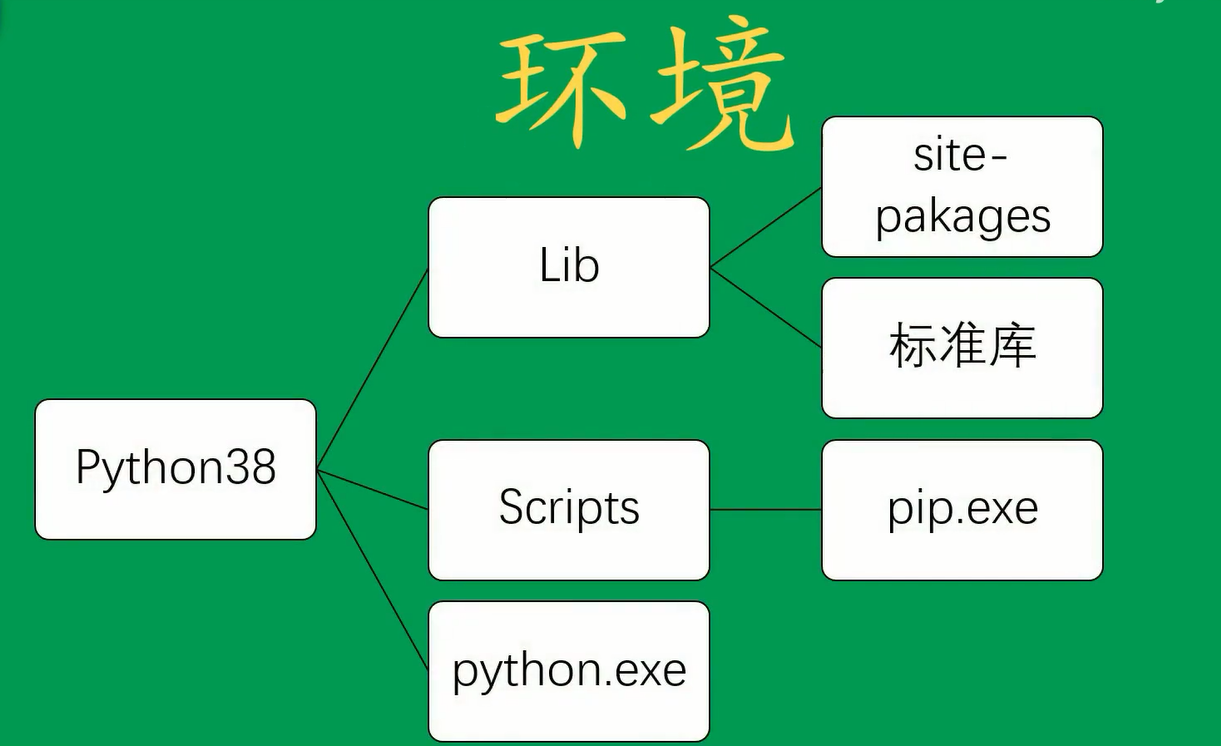
The virtual environment is essentially a copy of the base environment, as illustrated below:
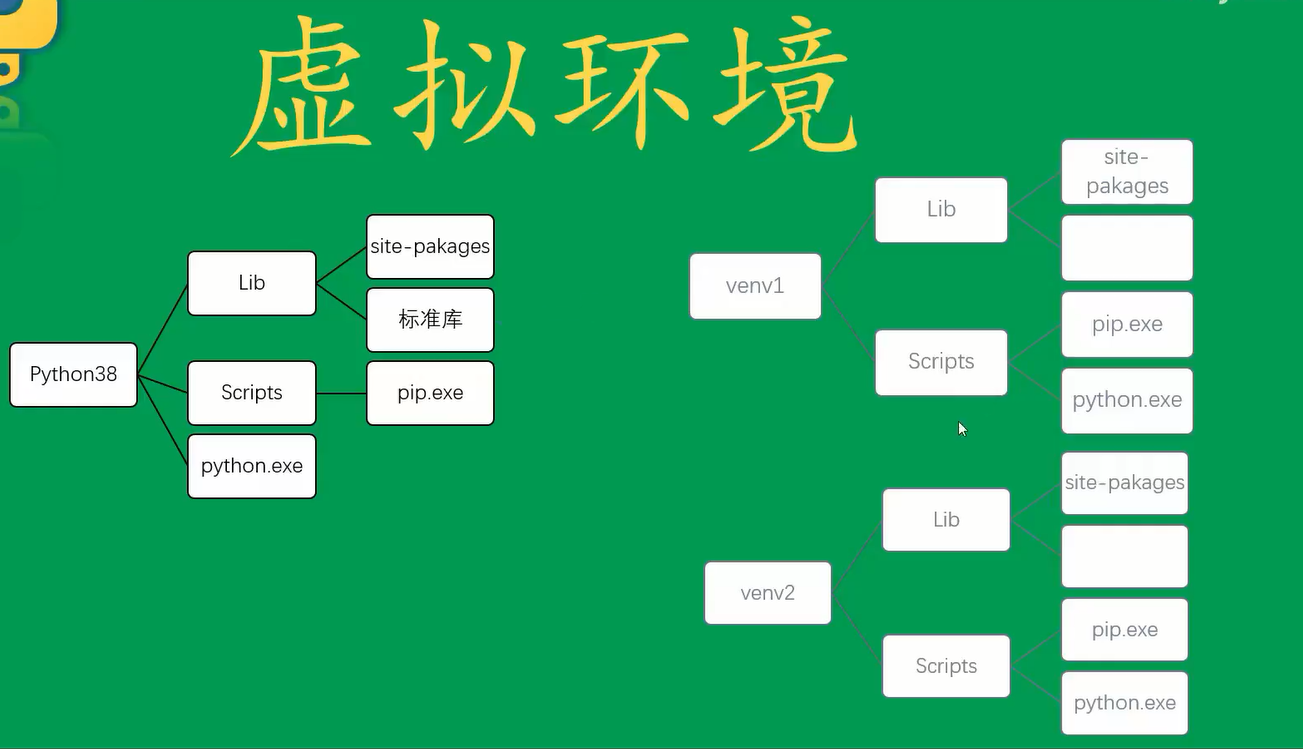
The Lib directory in a virtual environment typically contains only the folder where you will install third-party libraries. By default, standard library modules are not included, but you have the option to enclude them when creating the environment.
Note: Placing pip.exe and python.exe in the same directory simplifies environment variable management—only one path needs to be added.
C:\Users\chuan>python -m venv -h
usage: venv [-h] [--system-site-packages] [--symlinks | --copies] [--clear] [--upgrade] [--without-pip]
            [--prompt PROMPT]
            ENV_DIR [ENV_DIR ...]

Creates virtual Python environments in one or more target directories.

positional arguments:
  ENV_DIR               A directory to create the environment in.

optional arguments:
  -h, --help            show this help message and exit
  --system-site-packages
                        Give the virtual environment access to the system site-packages dir.
  --symlinks            Try to use symlinks rather than copies, when symlinks are not the default for the platform.
  --copies              Try to use copies rather than symlinks, even when symlinks are the default for the platform.
  --clear               Delete the contents of the environment directory if it already exists, before environment
                        creation.
  --upgrade             Upgrade the environment directory to use this version of Python, assuming Python has been
                        upgraded in-place.
  --without-pip         Skips installing or upgrading pip in the virtual environment (pip is bootstrapped by default)
  --prompt PROMPT       Provides an alternative prompt prefix for this environment.

Once an environment has been created, you may wish to activate it, e.g. by sourcing an activate script in its bin
directory.

C:\Users\chuan>
Creating a Virtual Environment
Use the following command to create a virtual environment:
D:\Python\venv>python -m venv venvdemo1
After creation, the environment directory contains:
D:\Python\venv\venvdemo1>dir
 Volume in drive D is New Volume
 Volume Serial Number is 2E46-6483

 Directory of D:\Python\venv\venvdemo1

2022/06/18  16:15    <DIR>          .
2022/06/18  16:15    <DIR>          ..
2022/06/18  16:15    <DIR>          Include
2022/06/18  16:15    <DIR>          Lib
2022/06/18  16:15               118 pyvenv.cfg
2022/06/18  16:15    <DIR>          Scripts
               1 File(s)            118 bytes
               5 Dir(s)  859,745,579,008 bytes free
The Lib folder is where Python libraries are stored, including any packages you install later.
The Scripts folder contains executable files:
D:\Python\venv\venvdemo1\Scripts>dir
 Volume in drive D is New Volume
 Volume Serial Number is 2E46-6483

 Directory of D:\Python\venv\venvdemo1\Scripts

2022/06/18  16:15    <DIR>          .
2022/06/18  16:15    <DIR>          ..
2022/06/18  16:15             2,273 activate
2022/06/18  16:15               966 activate.bat
2022/06/18  16:15            19,332 Activate.ps1
2022/06/18  16:15               368 deactivate.bat
2022/06/18  16:15           106,354 pip.exe
2022/06/18  16:15           106,354 pip3.8.exe
2022/06/18  16:15           106,354 pip3.exe
2022/06/18  16:15           537,776 python.exe
2022/06/18  16:15           536,752 pythonw.exe
               9 File(s)      1,416,529 bytes
               2 Dir(s)  859,745,579,008 bytes free
Exporting and Installing Dependencies
Export current environment packages to a file:
(venvdemo1) D:\Python\venv\venvdemo1\Scripts>pip freeze > pip_list.txt
This command creates a pip_list.txt file listing all installed packages and their versions.
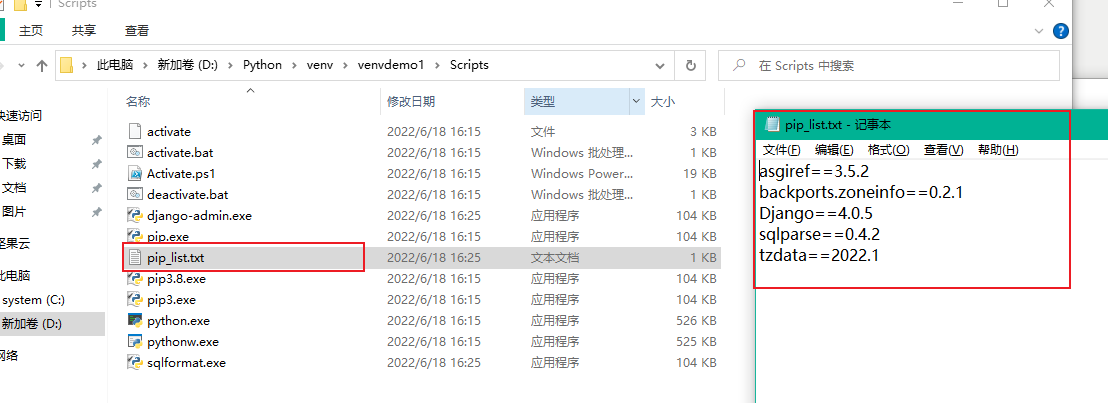
Install all package listed in a file:
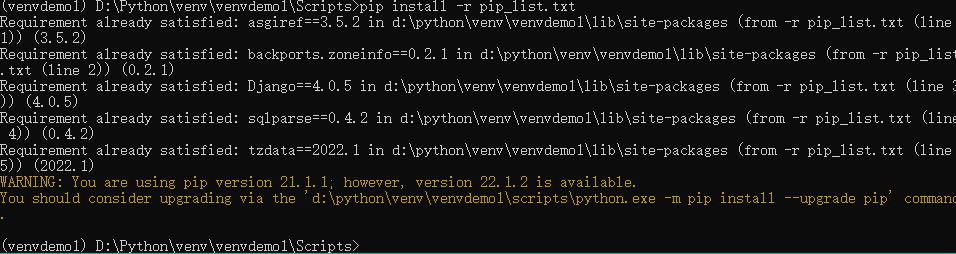
pip install -r pip_list.txt
If the packages are already installed, you will see output indicating that the requirements are already satisfied.