Qt Miscellaneous Notes
1. Qt Signals and Slots
What are Signals and Slots?
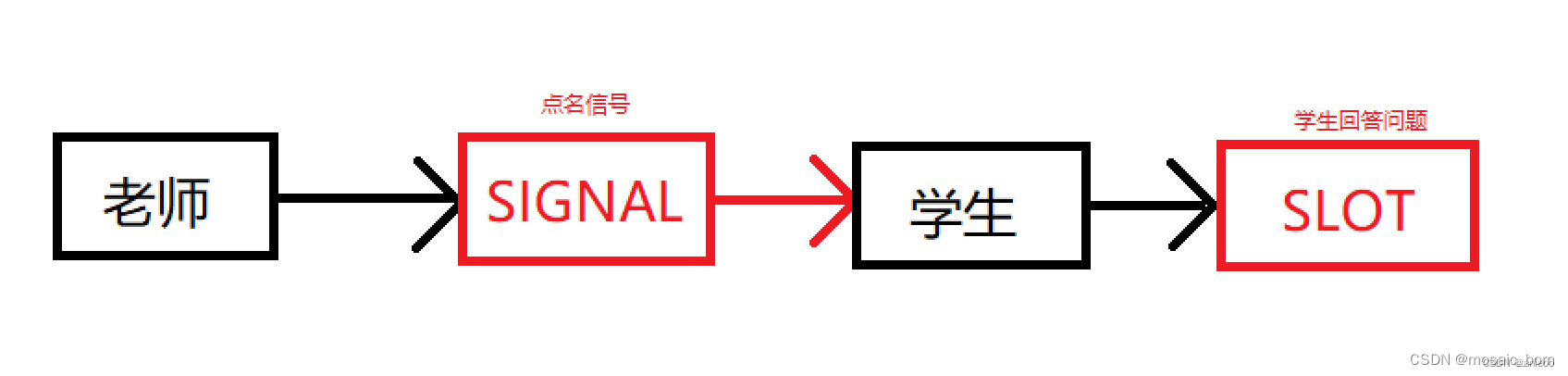
A signal is an event emitted under specific circumstances. For example, the most comon signal for a PushButton is clicked(), emitted when the mouse clicks the button.
A slot is a function that responds to a signal. A slot can be associated with a signal, and when the signal is emitted, the associated slot function is automatically executed.
Example:
Imagine a teacher who asks a student to answer a question (emits a signal), and the student responds (the slot).
1.1 Example
In ui_mainwindow.h, you may find code like:
QObject::connect(pushButton, SIGNAL(clicked()), MainWindow, SLOT(close()));
This connects the clicked() signal of the pushButton to the close() slot of the MainWindow. When the button is clicked, the window closes.
Writing Functions to Connect Signals and Slots
Connecting signals and slots uses QObject::connect(). The basic format is:
QObject::connect(sender, SIGNAL(signal()), receiver, SLOT(slot()));
Since QObject is the base class of all Qt classes, you can omit QObject:: when calling connect.
Example: Connecting pushButton to MainWindow
Modify mainwindow.cpp as follows:
#include "mainwindow.h"
#include "ui_mainwindow.h"

MainWindow::MainWindow(QWidget *parent)
    : QMainWindow(parent)
    , ui(new Ui::MainWindow)
{
    ui->setupUi(this);
    connect(ui->pushButton, SIGNAL(clicked()), this, SLOT(close()));
}

MainWindow::~MainWindow()
{
    delete ui;
}
Note: In the constructor, this points to the MainWindow instance.
1.2 The emit Keyword
emit is used to send a signal. It works with signals to enable communication between objects. When an object's state changes, you can use emit to send a signal that triggers a slot.
Example: Emitting a QString
Define a slot for a button that emits a string:
void MainWindow::on_pushButton_clicked()
{
    QString text = "hello!";
    emit my_signal(text);
}
Connect the signal to a slot:
connect(this, &MainWindow::my_signal, this, &MainWindow::show_hello);
Emit format:
emit signal(parameters);
Typical flow:
- Signal-slot: button click → signal → set text to "hello!"
- With emit: button click → signal → emit custom signal with data → set text
Use cases for emit:
- Custom signals and slots for object communication.
- Built-in signals for events like button clicks.
- Cross-thread communication.
- Event filters.
2. Qt Custom Properties: Q_PROPERTY
Qt provides a powerful property system based on the meta-object system. Q_PROPERTY is a macro to declare a property in a class that inherits from QObject.
Full structure:
Q_PROPERTY(type name
   READ getFunction
   [WRITE setFunction]
   [RESET resetFunction]
   [NOTIFY notifySignal]
   [DESIGNABLE bool]
   [SCRIPTABLE bool]
   [STORED bool]
   [USER bool]
   [CONSTANT]
   [FINAL])
Examples:
Q_PROPERTY(double minValue READ getMinValue WRITE setMinValue)
Q_PROPERTY(bool animation READ getAnimation WRITE setAnimation)
Q_PROPERTY(QColor barColor READ getBarColor WRITE setBarColor)
Commonly used: READ, WRITE, NOTIFY.
A property behaves like a data member but has additional features:
- READ accessor: required, returns the property value (const function).
- WRITE accessor: optional, sets the value (returns void, takes one parameter).
- RESET function: optional, resets to default.
- NOTIFY signal: optional, emitted when value changes (signal must have one parameter of the same type).
3. Use of const
QString key = "Hello";
key = "World"; // Modifiable

const QString key = "Hello";
// key = "World"; // Error: constant
const declares an immutable object. Choose based on whether modification is needed.
4. QVariant Overview
Definition
QVariant is a generic value container that can hold any type (int, string, list, etc.). It facilitates data exchange between functions, classes, and modules.
Usage
Storing data:
QVariant v1 = 10;              // integer
QVariant v2 = "hello";         // string
QVariant v3 = QList<int>() << 1 << 2 << 3; // integer list
Retrieving data:
int n = v1.toInt();
QString str = v2.toString();
QList<int> list = v3.toList();
Checking type:
if (v1.type() == QVariant::Int) {
    // v1 holds an integer
}
Clearing data:
v1.clear();
Complete Example
Plain variable:
QVariant var1;
var1.setValue(12);
int data1 = var1.toInt();
qDebug() << data1;

QVariant var2 = 14;
int data2 = var2.toInt();
qDebug() << data2;
Output:
12
14
Struct:
#include <QtCore/QCoreApplication>
#include <QString>
#include <QtDebug>
#include <QVariant>

struct MyClass {
    int id;
    QString name;
};
Q_DECLARE_METATYPE(MyClass)

int main(int argc, char *argv[])
{
    QCoreApplication a(argc, argv);

    MyClass myClass;
    myClass.id = 0;
    myClass.name = "LiMing";

    QVariant var3;
    var3.setValue(myClass);
    qDebug() << "var3:" << var3;

    MyClass stu;
    stu = var3.value<MyClass>();
    qDebug() << "stu:" << stu.id << stu.name;

    return a.exec();
}
Output:
var3: QVariant(MyClass, ...)
stu: 0 LiMing
Pointer:
// Store
QVariant var = QVariant::fromValue((void*)event);

// Retrieve
QPaintEvent* pointer = (QPaintEvent*)var.value<void*>();
Internal Implementation
QVariant uses a union:
struct Private
{
    union Data
    {
        char c;
        uchar uc;
        short s;
        signed char sc;
        ushort us;
        int i;
        uint u;
        long l;
        ulong ul;
        bool b;
        double d;
        float f;
        qreal real;
        qlonglong ll;
        qulonglong ull;
        QObject *o;
        void *ptr;
        PrivateShared *shared;
    } data;
    uint type : 30;
    uint is_shared : 1;
    uint is_null : 1;
};
Supported types:
enum Type {
    Invalid = QMetaType::UnknownType,
    Bool = QMetaType::Bool,
    Int = QMetaType::Int,
    UInt = QMetaType::UInt,
    LongLong = QMetaType::LongLong,
    ULongLong = QMetaType::ULongLong,
    Double = QMetaType::Double,
    Char = QMetaType::QChar,
    Map = QMetaType::QVariantMap,
    List = QMetaType::QVariantList,
    String = QMetaType::QString,
    StringList = QMetaType::QStringList,
    ByteArray = QMetaType::QByteArray,
    BitArray = QMetaType::QBitArray,
    Date = QMetaType::QDate,
    Time = QMetaType::QTime,
    DateTime = QMetaType::QDateTime,
    Url = QMetaType::QUrl,
    Locale = QMetaType::QLocale,
    Rect = QMetaType::QRect,
    RectF = QMetaType::QRectF,
    Size = QMetaType::QSize,
    SizeF = QMetaType::QSizeF,
    Line = QMetaType::QLine,
    LineF = QMetaType::QLineF,
    Point = QMetaType::QPoint,
    PointF = QMetaType::QPointF,
    RegExp = QMetaType::QRegExp,
    RegularExpression = QMetaType::QRegularExpression,
    Hash = QMetaType::QVariantHash,
    EasingCurve = QMetaType::QEasingCurve,
    Uuid = QMetaType::QUuid,
    ModelIndex = QMetaType::QModelIndex,
    PersistentModelIndex = QMetaType::QPersistentModelIndex,
    LastCoreType = QMetaType::LastCoreType,

    Font = QMetaType::QFont,
    Pixmap = QMetaType::QPixmap,
    Brush = QMetaType::QBrush,
    Color = QMetaType::QColor,
    Palette = QMetaType::QPalette,
    Image = QMetaType::QImage,
    Polygon = QMetaType::QPolygon,
    Region = QMetaType::QRegion,
    Bitmap = QMetaType::QBitmap,
    Cursor = QMetaType::QCursor,
    KeySequence = QMetaType::QKeySequence,
    Pen = QMetaType::QPen,
    TextLength = QMetaType::QTextLength,
    TextFormat = QMetaType::QTextFormat,
    Matrix = QMetaType::QMatrix,
    Transform = QMetaType::QTransform,
    Matrix4x4 = QMetaType::QMatrix4x4,
    Vector2D = QMetaType::QVector2D,
    Vector3D = QMetaType::QVector3D,
    Vector4D = QMetaType::QVector4D,
    Quaternion = QMetaType::QQuaternion,
    PolygonF = QMetaType::QPolygonF,
    Icon = QMetaType::QIcon,
    LastGuiType = QMetaType::LastGuiType,

    SizePolicy = QMetaType::QSizePolicy,

    UserType = QMetaType::User,
    LastType = 0xffffffff
};
Constructors and all methods are available in the Qt documentation.
5. QJsonObject
Overview
QJson is a Qt module to parse JSON into QVariant objects. JSON arrays map to QVariantList, and objects map to QVariantMap.
Rule of thumb: Use arrays for simple data, objects for complex data; nesting both provides a complete model.
5.1 JSON Introduction
JSON (JavaScript Object Notation) is a lightweight data interchange format. It is language-independent and used for data serialization (network transmission or persistence).
Data formats: JSON arrays ([]) and JSON objects ({}), which can be nested.
JSON Array
- Enclosed in
[]. - Elements separated by commas.
- Can contain mixed types: number, string, boolean, array, object, null.
- Strings must be double-quoted.
Examples:
[1, 2, 3]
["cat", "dog", 1]
[["nested", 2], [3, true]]
JSON Object
- Enclosed in
{}. - Contains key-value pairs (keys are strings, unique within the same level).
- Values can be any type.
Example:
{
    "name": "ACE",
    "sex": "man",
    "age": 20,
    "family": {
        "father": "yiyi",
        "brother": ["aa", "bb", "cc"]
    },
    "alive": true
}
Notes:
- No trailing comma.
- Keys must be unique.
- File extension
.jsonis recommended but not mandatory. - Only one root node.
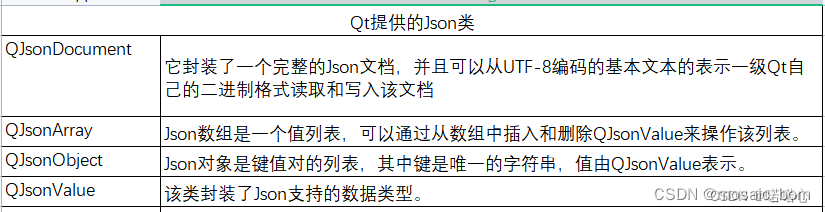
5.2 Qt JSON Classes
Four main classes:
QJsonDocumentQJsonObjectQJsonArrayQJsonValue
Relationships:
QJsonDocumentwraps the root.QJsonObjectandQJsonArraycontainQJsonValueelements.
QJsonValue Types
BoolDoubleStringArrayObjectNull
The constructor unifies these types.
QJsonObject
Stores key-value pairs (keys are strings, values are QJsonValue). Keys are unique and stored in ascending order (red-black tree).
Common operations:
- Create empty object:
QJsonObject() - Insert:
insert(key, value) - Count:
count(),size(),length() - Get value:
value(key),operator[](key) - Remove:
remove(key),take(key) - Find:
find(key),contains(key) - Iterate: using iterator,
keys()thenvalue(), or[]
QJsonArray
Stores elements in order (as inserted). Elements are QJsonValue.
Common operations:
- Create:
QJsonArray() - Add:
append(),insert(),prepend(),push_back(),push_front() - Count:
count(),size() - Remove:
erase(),pop_back(),pop_front(),removeAt(),removeFirst(),removeLast(),takeAt() - Access:
operator[],at()
Difference between QJsonObject and QJsonArray
QJsonObject: like a map; stores key-value pairs; keys are unique strings.QJsonArray: like a list; stores elements by index; elements are ordered.
5.3 Common JSON Statements
Check if key exists:
if (settingJsonObject.contains(key)) {
    // do something
}
Get nested object:
const QJsonObject jsonObject = settingJsonObject.value(key).toObject();
Return value from list:
QString getCameraName(int index) {
    return m_cameraName[index];
}
6. Miscellaneous
6.1 Function returning integer from list
int ListModel_Camera::getPosNum(const int index) {
    return m_posNum[index];
}
6.2 Generate list of positions
QList<int> ListModel_Camera::getPositionsList(const int index) {
    QList<int> positionsList;
    int posNum = m_posNum[index];
    for (int i = 1; i <= posNum; ++i) {
        positionsList.append(i);
    }
    return positionsList;
}
6.3 Return array size
return m_cameraName.size();
6.4 Model data function
QVariant ListModel_Camera::data(const QModelIndex &index, int role) const
{
    if (!index.isValid())
        return QVariant();

    if (index.row() < 0 || index.row() >= m_cameraName.count())
        return QVariant();

    switch (role) {
    case CameraNameRole:
        return m_cameraName.value(index.row());
    case PtzRole:
        return m_ptz.value(index.row());
    case IPRole:
        return m_ip.value(index.row());
    case PortRole:
        return m_port.value(index.row());
    case SerialPortRole:
        return m_serialPort.value(index.row());
    case ChnPortRole:
        return m_chn.value(index.row());
    case OutputRole:
        return m_output.value(index.row());
    case PosNumRole:
        return m_posNum.value(index.row());
    default:
        return QVariant();
    }
}
6.5 Switch without break (fall-through)
switch (value) {
    case 1:
        // do something
        // no break, continues to next case
    case 2:
        // do something else
        break;
}
6.6 QLatin1String
QLatin1String is a lightweight class for Latin-1 encoded strings. It avoids memory allocation and is immutable.
Features:
- Pointer to Latin-1 data, no allocation.
- Functions:
length(),at(),startsWith(), etc. - Implicit conversion to
QString. - Read-only.
6.7 Reserve space in container
m_orderVector.reserve(count);
Preallocates memory for count elements without changing the size.
6.8 While loop with prefix increment
while (++m_currentStep < m_enabledVector.size() + 1) {
    // loop body
}
Increments m_currentStep first, then compares.
6.9 Passing by reference (const QByteArray &byteArray)
The & means pass by reference, avoiding copy and improving performance.
6.10 Function overloading
Define multiple functions with the same name but different parameters.
6.11 String formatting with placeholders
curFile = tr("Word document %1").arg(sequenceNumber++);
%1 is replaced by the argument; sequenceNumber increments each call.
6.12 Reading file into byte array
QByteArray data = file.readAll();
Common for text file reading.
6.13 this pointer
this points to the current object, used inside member functions. It refers to the class instance.
Example:
void Date::setMonth(int mn) {
    month = mn;          // equivalent to
    this->month = mn;    // or
    (*this).month = mn;
}
this can only be used in member functions, not in static or global functions.
6.14 Common Mistake: Missing class qualifier
// Incorrect: missing class name
void newFile(){
    static int sequenceNumber=1;
    isUntitled = true;
    curFile = tr("Word document=%1").arg(sequenceNumber++);
    setWindowTitle(curFile);
}

// Correct: include class name
void MyChild::newFile(){
    static int sequenceNumber=1;
    isUntitled = true;
    curFile = tr("Word document=%1").arg(sequenceNumber++);
    setWindowTitle(curFile);
}
Without the class name, the function is a free function and cannot access private members.
6.15 Common Compilation Errors
Error: "base of member reference is a function; perhaps you meant to call it with no arguments?"
This happens when a variable is mistakenly declared as a function. Remove the parentheses.
// Wrong: static QFile file();
// Correct: static QFile file;
Error: "reference to non-static member function must be called"
Add static to the function definition.
// Wrong: QFile file;
// Correct: static QFile file;
Error: "undefined reference to XXX"
Static member variables need definition outside the class.
// In .h: static QFile file;
// In .cpp: QFile MyChild::file;
Error: Missing return value
Ensure all paths return a value matching the function's return type. For void functions, no return is needed.
6.16 setWindowModality(false) Error
setWindowModality() expects Qt::WindowModality enum, not bool. To set non-modal, use:
setWindowModality(Qt::NonModal);
6.17 Function with no parameters
if(isWindowModified()) has no parameters because isWindowModified() is a member function that takes no arguments and returns a boolean.
7. Common Qt Classes
7.1 QByteArray
Handles byte arrays. Can store any binary data. Dynamic size, efficient access.
Common operations: size(), append(), prepend(), insert(), indexOf(), toStdString(), etc.
7.2 QCryptographicHash
Computes hash values (MD5, SHA1, SHA256, etc.).
Example:
#include <QtCore/QCryptographicHash>

QString data = "Hello, world!";
QCryptographicHash hash(QCryptographicHash::Md5);
hash.addData(data.toUtf8());
QByteArray result = hash.result();
QString hashString = result.toHex();
qDebug() << "MD5:" << hashString;
7.3 QApplication
Manages application's main event loop and global settings.
Usage:
int main(int argc, char *argv[]) {
    QApplication app(argc, argv);
    // set up UI
    return app.exec();
}
7.4 QAction
Represents an action that can be added to menus, toolbars, etc. Connects to slots for user interaction.
Example:
QAction *action = new QAction("&Open", this);
action->setShortcut(QKeySequence::Open);
connect(action, &QAction::triggered, this, &MainWindow::openFile);
menu->addAction(action);
8. Common Qt Functions
8.1 QString::arg()
Replaces placeholders %1, %2, etc., with arguments.
Example:
QString status = QString("Processing file %1 of %2: %3")
                     .arg(i).arg(total).arg(fileName);
For formatting numbers with width, base, and fill character:
QString text = QString("%1:%2").arg(123, 5, 10, QChar('0')).arg(456, 5, 10, QChar('0'));
// result: "00123:00456"
8.2 setAlignment()
Sets text alignment for widgets.
void setAlignment(Qt::Alignment alignment);
Alignment constants: Qt::AlignLeft, Qt::AlignRight, Qt::AlignHCenter, Qt::AlignJustify, Qt::AlignTop, Qt::AlignBottom, Qt::AlignVCenter, Qt::AlignCenter.
Example:
void MyChild::setAlign(int align) {
    if (align == 1)
        setAlignment(Qt::AlignLeft | Qt::AlignAbsolute);
    else if (align == 2)
        setAlignment(Qt::AlignHCenter);
    else if (align == 3)
        setAlignment(Qt::AlignRight | Qt::AlignAbsolute);
    else if (align == 4)
        setAlignment(Qt::AlignJustify);
}
8.3 addAction() for Menus
Adds an action to a menu with optional shortcut and slot connection.
QAction *addAction(const QString &text, const QObject *context, Functor functor, const QKeySequence &shortcut = 0);
Example:
menu->addAction("View", this, &MainWindow::onActionView);
8.4 Common Function Signatures
void fontChanged(const QFont *f);void colorChanged(const QColor &c);void alignmentChanged(Qt::Alignment a);void textAlign(QAction *a);void setAlign(int align);void setStyle(int style);void textStyle(int styleIndex);void textFamily(const QString &f);void textSize(const QString &p);void textColor();void updateMenus();void updateWindowMenu();void setActiveSubWindow(QWidget *window);bool saveFile(QString fileName);void setCurrentFile(const QString &fileName);QString strippedName(const QString &fullFileName);QString userFriendlyCurrentFile();QString currentFile() { return curFile; }void mergeFormatOnWordOrSelection(const QTextCharFormat &format);void closeEvent(QCloseEvent *event);void documentWasModified();bool maybeSave();
9. Programming Concepts
9.1 File Processing Logic
- Read:
QByteArray data = file.readAll(); - Detect encoding:
QTextCodec *codec = Qt::codecForHtml(data); - Convert to Unicode:
QString str = codec->toUnicode(data);
9.2 Dialog Logic
QString fileName = QFileDialog::getSaveFileName(this, tr("Save As"), curFile, tr("HTML files (*.html *.htm);;All files (*.*)"));
if (fileName.isEmpty()) {
    // user cancelled
}
10. Common Programming Errors
10.1 Boundaries and Special Cases
Example: Checking for prime numbers. The number 2 is prime but even, so the code must handle it specially.
int isPrime(int n) {
    if (n % 2 == 0)
        return 0; // but 2 is prime -> error
    for (int i = 3; i <= sqrt(n); i += 2) {
        if (n % i == 0)
            return 0;
    }
    return 1;
}
Fixed version:
int isPrime(int n) {
    if (n < 2) return 0;
    if (n == 2) return 1;
    if (n % 2 == 0) return 0;
    for (int i = 3; i * i <= n; i += 2) {
        if (n % i == 0) return 0;
    }
    return 1;
}
10.2 Uninitialized Variables
- Global variables: initialized to 0 by default.
- Local variables: undefined; using them causes erratic behavior.
10.3 Array Index Out of Bounds
For an array of size n, valid indices are 0 to n-1. Off-by-one errors lead to crashes or undefined behavior.
int arr[5];
for (int i = 0; i <= 5; ++i) // error: last iteration i=5, out of bounds
    arr[i] = i;
When copying strings, ensure destination has enough space including the null terminator.
char s[4];
strcpy(s, "test"); // error: "test" needs 5 characters (including '\0')
10.4 Program Crashes
Common causes: address errors, uninitialized pointers, array out-of-bounds. Debugging tools or commenting out suspicious code can help.
10.5 Reference vs Pointer
- Reference (
&): an alias for an existing variable, no separate memory. Cannot be null. - Pointer (
*): stores address, can be null, can be reassigned.
Example:
void MyChild::setCurrentFile(const QString &fileName) // reference
{
    curFile = fileName; // no copy, works on original
}
11. Qt Creator Shortcuts
Ctrl + I: Auto-indent selected code.Ctrl + /: Toggle comment.F1: Open Qt documentation for selected function.