Python Conditional Statements: if-else Practice Exercises
Practice 1: ATM Withdrawal Issue
balance = 1000
withdraw = int(input("Enter withdrawal amount: "))
if withdraw <= balance:
    balance = balance - withdraw
    print("Withdrawal successful, remaining balance:", balance)
else:
    print("Insufficient funds")
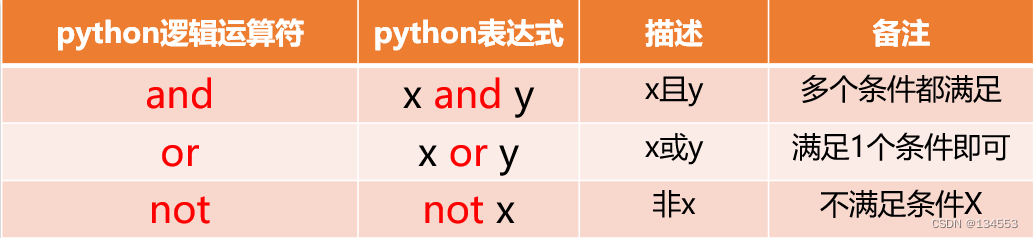
Python Logical Operators
Practice 2: Pesronality Quiz
Each question: A = 2 points, B = 3 points, C = 4 points, D = 5 points. The example below demonstrates one question.
Note: if choice == "A" is case-insensitive check for character "A".
total_score = 0
print("1. Are you a quiet person?")
print("A. Very quiet B. Occasionally quiet C. Talkative D. Extremely talkative")
choice = input()
if choice.upper() == "A":
    total_score = total_score + 2
elif choice.upper() == "B":
    total_score = total_score + 3
elif choice.upper() == "C":
    total_score = total_score + 4
else:
    total_score = total_score + 5
print(total_score)
Practice 3: Leap Year Check
A leap year is divisible by 4 (year % 4 == 0) but not by 100, or divisible by 400.
yr = int(input())
if (yr % 4 == 0 and yr % 100 != 0) or yr % 400 == 0:
    print("It is a leap year")
else:
    print("It is not a leap year")
Practice 4: Triangle Side Lengths
x = int(input())
y = int(input())
z = int(input())
if x + y > z and x + z > y and y + z > x:
    print("These sides can form a triangle")
else:
    print("These sides cannot form a triangle")
Reminder: The original snippet used a nested if, which is simplified here into a single condition as a best practice to avoid unnecessary nesting.
Simple Branching Structrue Programs
Practice 5: Tiered Pricing Problem
distance = int(input("Enter distance in km: "))
if 0 <= distance <= 3:
    fare = 13
    print("Total fare:", fare)
elif 3 < distance <= 15:
    fare = 13 + (distance - 3) * 2.3
    print("Total fare:", fare)
else:
    fare = 13 + 12 * 2.3 + (distance - 15) * 3.4
    print("Total fare:", fare)
Practice 6: Rock-Paper-Scissors Game
import random
computer_pick = random.randint(0, 2)
player_pick = int(input("Scissors(0), Rock(1), Paper(2): "))

# Determine computer's move
if computer_pick == 0:
    cpu_move = "Scissors"
elif computer_pick == 1:
    cpu_move = "Rock"
else:
    cpu_move = "Paper"

# Determine player's move
if player_pick == 0:
    user_move = "Scissors"
elif player_pick == 1:
    user_move = "Rock"
else:
    user_move = "Paper"

# Decide and display game outcome
if (player_pick - computer_pick + 2) % 3 == 0:
    print(f"Player: {user_move}, Computer: {cpu_move}, Draw")
elif (player_pick - computer_pick + 2) % 3 == 1:
    print(f"Player: {user_move}, Computer: {cpu_move}, Player loses")
else:
    print(f"Player: {user_move}, Computer: {cpu_move}, Player wins")
Practice 7: Push-Button LED
URL: https://wokwi.com/projects/new/arduino-uno
No need to fully understand the code; focus on how the if statement operates.
void setup() {
  pinMode(3, OUTPUT);
  pinMode(5, INPUT_PULLUP);
}

void loop() {
  if (digitalRead(5) == 0) {
    digitalWrite(3, HIGH);
    delay(3000);
    digitalWrite(3, LOW);
  }
}
Demonstration video of the push-button LED omitted.
