Understanding Deep and Shallow Copy in Python
In Python, there are differences between object assignment, shallow copy, and deep copy. If not used carefully, unexpected results may occur. This article explains these concepts with simple examples.
Object Assignment
Consider the following code:
original_list = ["Alice", 30, ["Python", "Java", "JavaScript"]]
assigned_list = original_list
print(id(original_list))
print(original_list)
print([id(element) for element in original_list])
print(id(assigned_list))
print(assigned_list)
print([id(element) for element in assigned_list])

original_list[0] = "Bob"
original_list[2].append("CSS")
print(id(original_list))
print(original_list)
print([id(element) for element in original_list])
print(id(assigned_list))
print(assigned_list)
print([id(element) for element in assigned_list])
Output:
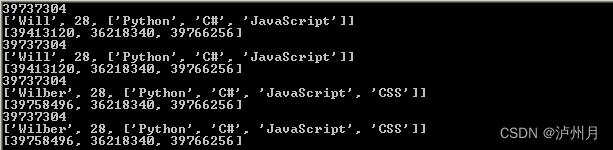
Analysis:
- A variable
original_listis created, pointing to a list object. - Assignign
original_listtoassigned_listmakesassigned_listreference the same object (same memory address). In Python, object assignment passes object references. - Since both variables point to the same object, modifications to
original_listeffectassigned_list. - Note: Strings are immutable, so modifying
original_list[0]creates a new string object at a different address.
Shallow Copy
Now, let's examine shallow copy:
import copy

original_list = ["Alice", 30, ["Python", "Java", "JavaScript"]]
shallow_copied_list = copy.copy(original_list)

print(id(original_list))
print(original_list)
print([id(element) for element in original_list])
print(id(shallow_copied_list))
print(shallow_copied_list)
print([id(element) for element in shallow_copied_list])

original_list[0] = "Bob"
original_list[2].append("CSS")
print(id(original_list))
print(original_list)
print([id(element) for element in original_list])
print(id(shallow_copied_list))
print(shallow_copied_list)
print([id(element) for element in shallow_copied_list])
Output:
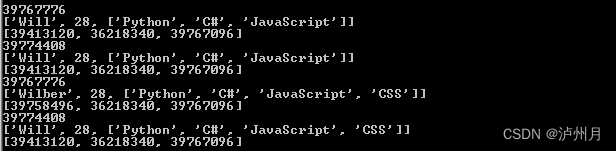
Analysis:
original_listpoints to a list object.- Using
copy.copy()performs a shallow copy, creating a new list object assigned toshallow_copied_list. Thus,shallow_copied_list is not original_list. - However, elements within the list are referenced by their original memory addresses, meaning
shallow_copied_list[i] is original_list[i]. - Modifications:
- The first element (string) is immutable, so changing it creates a new object.
- The third element (list) is mutable, so changes to
original_list[2]affectshallow_copied_list[2].
Shallow copy can also be achieved with:
- Slice operation
[:] - Factory functions (e.g.,
list(),dict(),set()) copy.copy()
Deep Copy
Finally, deep copy:
import copy

original_list = ["Alice", 30, ["Python", "Java", "JavaScript"]]
deep_copied_list = copy.deepcopy(original_list)

print(id(original_list))
print(original_list)
print([id(element) for element in original_list])
print(id(deep_copied_list))
print(deep_copied_list)
print([id(element) for element in deep_copied_list])

original_list[0] = "Bob"
original_list[2].append("CSS")
print(id(original_list))
print(original_list)
print([id(element) for element in original_list])
print(id(deep_copied_list))
print(deep_copied_list)
print([id(element) for element in deep_copied_list])
Output:
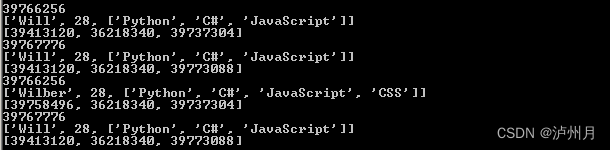
Analysis:
original_listpoints to a list object.- Using
copy.deepcopy()performs a deep copy, creating a new list object assigned todeep_copied_list. Thus,deep_copied_list is not original_list. - Elements are recursively copied, not just referenced. For example,
deep_copied_list[2] is not original_list[2]. - Modifications:
- Changing the immutable first element creates a new object in
original_list. - Modifying the mutable third element in
original_listdoes not affectdeep_copied_listbecause they are separate objects.
- Changing the immutable first element creates a new object in
Special Cases in Copying
There are special cases to consider:
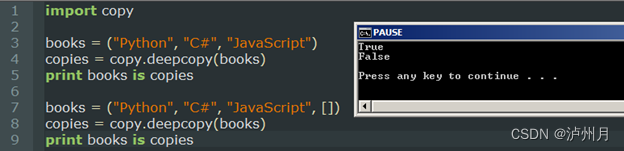
- Non-container types (e.g., numbers, strings, atomic objects) are not copied;
obj is copy.copy(obj)andobj is copy.deepcopy(obj)hold true. - Tuples containing only atomic objects cannot be deep copied.
Example:
Summary
This article explains object assignment, shallow copy, and deep copy in Python:
- Object assignment passes object references.
- Shallow copy (
copy.copy()) creates a new object but references the original elements. - Deep copy (
copy.deepcopy()) recursively copies the container object and all its elements. - Non-container types are not copied.
- Tuples with only atomic objects cannot be deep copied.
