Introduction to the C Programming Language: Fundamentals and Core Concepts
Tible of Contents
- What is C Language?
- First C Program
- Data Types
- Variables and Constants
- Strings, Escape Characters, and Comments
- Selection Statements
- Loop Statements
- Functions
- Arrays
- Operators
- Common Keywords
- Defining Constants and Macros with
#define - Pointers
- Structures
1. What is C Language?
C is a general-purpose computer programming language widely used in low-level development. Its design goals include providing a language that compiles easily, handles low-level memory, generates minimal machine code, and runs without requiring any runtime environment support. Despite offering many low-level processing capabilities, C maintains excellent cross-platform characteristics. Programs written to the C standard can be compiled on many computer platforms, including embedded processors (microcontrollers or MCUs) and supercomputers.
In the 1980s, to prevent syntax differences among various development vendors, the American National Standards Institute established a complete set of American national standards for C, known as ANSI C, as the initial standard for the language. On December 8, 2011, the International Organization for Standardization (ISO) and the International Electrotechnical Commission (IEC) released the C11 standard, the third official and latest standard for C. This standard better supports Chinese function names and identifiers, enabling Chinese programming to some extent.
C is a procedural programming language, differing from object-oriented languages like C++ and Java. Its main compilers include Clang, GCC, WIN-TC, SUBLIME, MSVC, and Turbo C.
2. First C Program
#include <stdio.h> // This statement will be explained later

int main() {
    printf("hello world\n");
    printf("hello hei\n");
    return 0;
}
Explanation:
- The
mainfunction, also known as the main function, is unique per program/project and is called by the operating system during program execution. returnis a function termination statement that returns a value to the function's caller. In themainfunction above,return 0returns the value0to the operating system, indicating normal program termination.
3. Data Types
char        // Character data type
short       // Short integer
int         // Integer
long        // Long integer
long long   // Longer integer
float       // Single-precision floating-point
double      // Double-precision floating-point
// C does not have a dedicated string type; strings are represented using multiple character data type elements.
Let's examine the size (in bytes) of each type:
#include <stdio.h>

int main() {
    printf("%d\n", sizeof(char));
    printf("%d\n", sizeof(short));
    printf("%d\n", sizeof(int));
    printf("%d\n", sizeof(long));
    printf("%d\n", sizeof(long long));
    printf("%d\n", sizeof(float));
    printf("%d\n", sizeof(double));
    printf("%d\n", sizeof(long double));
    return 0;
}
sizeofis a C keyword and operator used to determine the size (in bytes) of a data type or object.- The
\symbol is an escape character; combined withnas\n, it represents a newline.
Why are there so many types?
- These diverse types exist to better represent various real-world values.
3.1 Variables and Constants
Some values in life are constant (e.g., pi, gender, ID numbers, blood type), while others are variable (e.g., age, weight, salary). In C, constants represent immutable values, and variables represent mutable values.
3.2 Defining Variables
Syntax: type variable_name;
Example:
// Declaring variables
char letter;
int user_age;
float user_weight;

// Declaring and initializing variables (defining a variable)
char letter = 'a';
int user_age = 18;
float user_weight = 45.5f;
Note: Variable names are user-defined but must adhere to C's identifier naming conventions.
3.3 Variable Classification
- Global Variables
- Local Variables
Explanation: Variables defined inside a function (encluding compound statements) are local variables, while those defined outside functions are global variables.
Scope:
- Local variable scope extends from the point of definition to the end of the function. They are accessible only within this range.
- Global variable scope extends from the point of definition to the end of the file/project.
Precedence Rule for Variable Name Conflicts: Proximity Principle (nearest variable takes precedence).
#include <stdio.h>
int global_age = 20; // Global variable

int main() {
    int local_age = 18; // Local variable
    printf("age = %d", local_age); // The nearest 'age' is referenced
    return 0;
}
// Output: age = 18
3.4 Input and Output Functions
printf Function:
A standard C library function that formats specified data into a string and outputs it to the standard output device (e.g., console window, file), providing a visual representation for developers.
Syntax:
printf("format control string", argument_list);
scanf Function:
Similar to printf, this standard C library function performs the opposite operation: it assigns externally input data (typically from the keyboard) to variables according to a specified format.
Syntax:
scanf("format control string", &variable1, &variable2, ...);
// The '&' symbol is the address-of operator, which retrieves a variable's address.
int value = 10;
int *pointer = &value; // Assign the address of 'value' to pointer variable 'pointer'
3.5 Variable Scope and Lifetime
Scope:
Scope is a programming concept. Typically, names used in a segment of program code are not always valid/available. The code range that limits the availability of a name is its scope.
- Local variable scope is the local range where the variable is defined.
- Global variable scope is the entire project.
Lifetime:
A variable's lifetime is the period from its creation to its destruction.
- Local variable lifetime: begins upon entering the scope and ends upon exiting the scope.
- Global variable lifetime: spans the entire program's execution.
3.6 Constants
Constent definitions in C differ from variable definitions. C constants are categorized as follows:
- Literal Constants
const-Modified Constant Variables#define-Defined Identifier Constants- Enumeration Constants
Example:
#include <stdio.h>

// Enumeration definition
enum Gender {
    MALE,
    FEMALE,
    SECRET
};

int main() {
    // Literal constant demonstration
    3.14;   // Literal constant
    200;    // Literal constant

    // const-modified constant variable
    const float PI = 3.14f; // 'PI' is a const-modified constant variable
    // PI = 5.14; // Error: cannot modify directly!

    // #define identifier constant demonstration
    #define MAX_VALUE 100
    printf("max = %d\n", MAX_VALUE);

    // Enumeration constant demonstration
    printf("%d\n", MALE);
    printf("%d\n", FEMALE);
    printf("%d\n", SECRET);

    return 0;
}
// MALE, FEMALE, SECRET within the braces are enumeration constants.
Note: In the example above, PI is called a const-modified constant variable. In C, const only syntactically restricts direct modification of PI, but PI remains essentially a variable, hence the term "constant variable."
4. Strings, Escape Characters, and Comments
4.1 Strings
"hello world!"
A sequence of characters enclosed in double quotes is called a string literal, or simply a string.
Note: The string termination marker is the escape character
\0. When calculating string length,\0serves as the termination marker and is not counted as part of the string content.
Example:
#include <stdio.h>

int main() {
    char str1[] = "bit";
    char str2[] = {'b', 'i', 't'};
    char str3[] = {'b', 'i', 't', '\0'};
    printf("%s\n", str1);
    printf("%s\n", str2);
    printf("%s\n", str3);
    return 0;
}
4.2 Escape Characters
Suppose you want to print a directory path: c:\code\test.c. How would you write the code?
#include <stdio.h>
int main() {
    printf("c:\code\test.c\n");
    return 0;
}
Actual output:
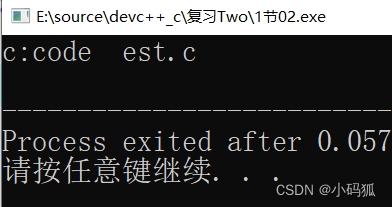 This introduces the concept of escape characters, which alter the meaning of subsequent characters.
Common escape characters:
| Escape Character | Description |
|---|---|
\? |
Used when writing consecutive question marks to prevent interpretation as a trigraph |
\' |
Represents a single quote within a character constant |
\" |
Represents a double quote inside a string |
\\ |
Represents a backslash, preventing interpretation as an escape sequence |
\a |
Alert (bell) character |
\b |
Backspace |
\f |
Form feed (page break) |
\v |
Vertical tab |
\n |
Newline |
\r |
Carriage return |
\t |
Horizontal tab |
\ddd |
ddd represents 1–3 octal digits (e.g., \130 → X) |
\xdd |
dd represents 2 hexadecimal digits (e.g., \x30 → 0) |
5. Comments
C supports two comment styles:
- Single-line comments:
// comment - Multi-line (block) comments:
/* comment */
6. Selection and Loop Statements
- Conditional selection statements:
ifandelse - Loop statements:
while,for
7. Functions
A function is a reusable code segment designed to perform a specific task independently. It may or may not accept user-passed data. Functions that accept data are defined with parameters; those that do not are parameterless. The process of encapsulating code into a function is called function definition.
8. Arrays
To store numbers 1 through 10, C provides arrays. An array is a collection of elements of the same data type.
8.1 Array Syntax
type array_name[array_length];
8.2 Array Initialization Methods
- Static Initialization: Initialize the array upon declaration.
int numbers[5] = {1, 2, 3, 4, 5}; // Declares a 5-element array initialized with values.
// If all elements are initialized, the length specifier can be omitted.
- Dynamic Initialization: Assign values individually after declaration.
int numbers[5];
numbers[0] = 1;
numbers[1] = 2;
// ...
- Partial Initialization: Uninitialized elements default to the base type's default value (e.g.,
0for integers).
int partial[5] = {1, 2, 3}; // Remaining elements default to 0.
9. Operators
Arithmetic Operators:
+ - * / %
Shift Operators:
>> <<
Bitwise Operators:
& ^ |
Common Assignment Operators (right-to-left associativity):
= += -= *= /= &= ^= |= >>= <<= %=
Unary Operators (right-to-left associativity):
!   Logical NOT
~   Bitwise complement
++  Increment
--  Decrement
-   Unary minus
(type) Type cast
*   Pointer dereference
&   Address-of
sizeof Size of operand
Conditional (Ternary) Operator (right-to-left associativity):
? :
// Usage: condition ? expression_if_true : expression_if_false
Logical Operators:
&&  Logical AND (both expressions must be true for result to be true)
    // expression1 && expression2
    // expression2 is evaluated only if expression1 is true.

||  Logical OR (result is true if at least one expression is true)
    // expression1 || expression2
    // expression2 is evaluated only if expression1 is false.

!   Logical NOT
Operator Precedence (highest to lowest):
- Primary operators:
()[]->. - Unary operators
- Arithmetic operators
- Relational operators
- Logical operators (excluding
!) - Conditional operator
- Assignment operators
- Comma operator
Note: Bitwise operator precedence varies: some precede arithmetic operators (e.g., ~), some precede relational operators (e.g., >>, <<), and some follow relational operators (e.g., &, ^).
10. Common Keywords
auto    break   case    char    const
continue default do      double  else
enum    extern  float   for     goto
if      inline  int     long    register
restrict return short   signed  sizeof
static  struct  switch  typedef union
unsigned void   volatile while   _Bool
_Complex _Imaginary
11. Defining Constants and Macros with #define
(To be covered separately.)
12. Pointers
(To be covered separately.)
13. Structures
(To be covered separately.)
