Two Primary Methods for Java Applications to Connect to Oracle Databases
There are two main approacehs for JDBC to connect to an Oracle database:
1. Using the Thin Driver
The Thin driver is implemented entirely in Java and establishes a connection to the Oracle database using TCP/IP via Java Sockets. Thiss makes the Thin driver platform-independent. It does not require the Oracle Client software to be installed; you only need to add the Thin driver's JAR file to your application's classpath.
While the Thin driver offers platform independence and avoids client installation, it has a significant drawback: its performance is generally not on par with enterprice-level requirements, such as those met by the OCI method. Furthermore, for a single Oracle database instance on one host, the Thin driver works directly. However, for an Oracle database configured on a cluster of four or five hosts, you must copy the entire connection descriptor string for the relevant database from the tnsnames.ora file when using the Thin driver to connect to the clustered database. This specific requirement for clustered environments was discovered through discussions with colleagues and extensive research, as it was previously a common misconception that the Thin driver did not support clustered databases.
Here is the standard format for the connection string when using the Thin driver:
Class.forName("oracle.jdbc.driver.OracleDriver");
Connection conn = DriverManager.getConnection(
    "jdbc:oracle:thin:@10.87.134.107:1521:ora9",
    "sms",
    "zzsms"
);
Important Notes:
- (1) For a non-clustered database: After the
@symbol, directly specify thehost:port:service_name(or SID).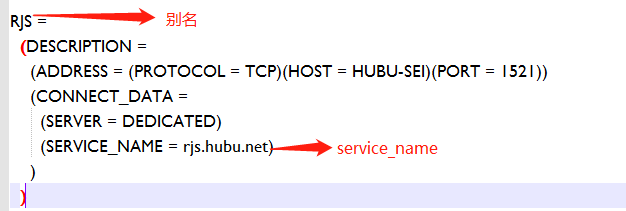
- (2) For a clustered database: After the
@symbol, you must provide the entire connection descriptor string from thetnsnames.orafile (typically all content after the=sign).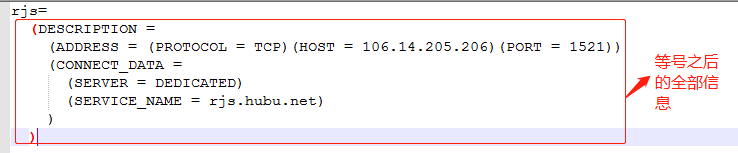
2. Using the OCI Driver (Oracle Call Interface)
Using the OCI driver is considered the enterprise-standard approach. It is suitable for both single-instance and clustered databases and offers superior performance, especially when leveraging connection pooling to enhance application performance and concurrency. The primary requirement is that the Oracle Client software must be installed on the machine where the application runs.
After installing the Oracle Client, the JDBC drivers (both OCI and Thin) are located in the jdbc/lib directory. Key JAR files include classes12.jar and nls_charset12.jar. Drivers with 12 in the filename are compatible with JDK 1.1 and above, while those with 11 are for older versions. The JAR files containing classes in their names are the core drivers, and those with nls contain classes related to internationalization.
You must add the absolute paths of these classes and nls JAR files to your application's classpath (e.g., the CLASSPATH environment variable) to avoid ClassNotFoundException errors.
Once the environment is configured, using the OCI driver is straightforward. The standard connection string format is as follows:
Class.forName("oracle.jdbc.driver.OracleDriver");
Connection dbConnection = DriverManager.getConnection(
    "jdbc:oracle:oci:@xxzc",
    "duansiyuan",
    "oracle_password"
);
These two lines are sufficient to connect to the database, whether it's a single instance or a cluster. Here, xxzc represents the database name (or TNS alias), duansiyuan is the username, and oracle_password is the password. This method is somewhat analogous to connection practices in languages like C#.
Key Considerations:
- The
oracle_home/jdbcdirectory contains numerous code samples and comprehensive documentation. It is highly recommended to review these materials carefully, as they contain detailed instructions on JDBC installation and usage that are difficult to ascertain through experimentation alone. - For high performance, use the OCI driver. To avoid installing the Oracle Client, use the Thin driver.
