Integrating Live2D Anime Characters into Your Blog
Live2D Overview
Live2D is a drawing rendering technology developed by the Japanese company Cybernoids, primarily used in electronic games. It generates 2D images resembling 3D models through a series of continuous images and character modeling.
The official Live2D SDK supports multiple platforms, including iOS, Android, Flash, Unity, and OpenGL.
For more information, visit the official website: https://www.live2d.com/
Model repositories:
- https://github.com/xiazeyu/live2d-widget-models
- https://gitee.com/dht66/live2d-widget-models/tree/master/packages
- https://unpkg.com/browse/live2d-widget-model-chitose@1.0.5/
Live2D uses canvas for real-time rendering, transforming a static image model into a dynamic character. Its compatible with both mobile devices and web browsers.
Implementing Anime Characters
Direct JavaScript Loading
First, include the official WebGL JavaScript files L2Dwidget.0.min.js and L2Dwidget.min.js in your webpage. You can use the code below or find alternative sources online.
It is recommended to load these scripts at the bottom of the page with a delay, as their large size can significantly impact your website's loading speed and performance if loaded synchronous.
Implementation Code:
<!-- Live2D Widget Configuration -->
<script type="text/javascript" charset="utf-8" src="https://blog-static.cnblogs.com/files/blogs/710653/L2Dwidget.0.min.js"></script>
<script type="text/javascript">
    const characterModels = [
        'chitose',    // Senior Student
        'hibiki',     // Beautiful Girl
        'hijiki',     // Black Cat
        'izumi',      // Pure Girl
        'miku',       // Hatsune Miku
        'tororo',     // White Cat
        'tsumiki',    // School Uniform
        'unitychan',  // Bee Girl
        'nico',       // Fox Girl
        'wanko',      // Dog
        'nipsilon',   // Long-haired Girl
        'nito',       // Short-haired Loli
        'ni-j',       // Electronic Music Girl
        'haruto',     // Cute Short-haired Nurse
        'koharu',     // Cute Long-haired Nurse
        'shizuku',    // AC Girl
        'z16'         // Pajama Girl
    ];
    const randomIndex = Math.floor(Math.random() * characterModels.length);
    const selectedModel = characterModels[randomIndex];
    console.log('Currently loading character: ' + selectedModel);

    L2Dwidget.init({
        "model": {
            jsonPath: "https://unpkg.com/live2d-widget-model-" + selectedModel + "@1.0.5/assets/" + selectedModel + ".model.json",
            "scale": 1
        },
        "display": {
            "superSample": 1,     // Supersampling level
            "position": "right",  // Position: left or right
            "width": 100,
            "height": 200,
            "hOffset": -20,       // Horizontal offset
            "vOffset": -20        // Vertical offset
        },
        "mobile": {
            "show": true,         // Show on mobile devices (recommended to disable)
            "scale": 0.5,         // Scale on mobile devices
            "motion": true        // Enable motion sensor on mobile
        },
        "react": {
            "opacityDefault": 1,  // Default opacity
            "opacityOnHover": 1   // Opacity on hover
        }
    });
</script>
NPM Installation
You can install Live2D models via NPM. For example:
npm install live2d-widget-model-tororo
Other available models include:
live2d-widget-model-chitose
live2d-widget-model-haru
live2d-widget-model-haruto
live2d-widget-model-hibiki
live2d-widget-model-hijiki
live2d-widget-model-izumi
live2d-widget-model-koharu
live2d-widget-model-miku
live2d-widget-model-ni-j
live2d-widget-model-nico
live2d-widget-model-nietzsche
live2d-widget-model-nipsilon
live2d-widget-model-nito
live2d-widget-model-shizuku
live2d-widget-model-tororo
live2d-widget-model-tsumiki
live2d-widget-model-unitychan
live2d-widget-model-wanko
live2d-widget-model-z16
Configuration Explanation
/**
 * Initialization function
 * @param {Object}   [userConfig] User's custom configuration
 * @param {String}   [userConfig.model.jsonPath = ''] Path to the Live2D model's main JSON file (e.g., `https://test.com/miku.model.json`)
 * @param {Number}   [userConfig.model.scale = 1] Scaling factor between the model and the canvas
 * @param {Number}   [userConfig.display.superSample = 2] Supersampling rate
 * @param {Number}   [userConfig.display.width = 150] Canvas width
 * @param {Number}   [userConfig.display.height = 300] Canvas height
 * @param {String}   [userConfig.display.position = 'right'] Display position: 'left' or 'right'
 * @param {Number}   [userConfig.display.hOffset = 0] Horizontal offset of the canvas
 * @param {Number}   [userConfig.display.vOffset = -20] Vertical offset of the canvas
 * @param {Boolean}  [userConfig.mobile.show = true] Whether to show on mobile devices
 * @param {Number}   [userConfig.mobile.scale = 0.5] Scaling factor on mobile devices
 * @param {String}   [userConfig.name.canvas = 'live2dcanvas'] ID of the canvas element
 * @param {String}   [userConfig.name.div = 'live2d-widget'] ID of the div element
 * @param {Number}   [userConfig.react.opacity = 0.7] Opacity
 * @param {Boolean}  [userConfig.dev.border = false] Whether to show a border around the canvas
 * @param {Boolean}  [userConfig.dialog.enable = false] Enable character dialog
 * @param {Boolean}  [userConfig.dialog.hitokoto = false] Enable Hitokoto API
 * @return {null}
 */
Example Configuration:
const defaultConfig = {
  model: {
    jsonPath: 'https://unpkg.com/live2d-widget-model-shizuku@latest/assets/shizuku.model.json',
    scale: 1,
  },
  display: {
    superSample: 2,
    width: 200,
    height: 400,
    position: 'right',
    hOffset: 0,
    vOffset: -20,
  },
  mobile: {
    show: true,
    scale: 0.8,
    motion: true,
  },
  name: {
    canvas: 'live2dcanvas',
    div: 'live2d-widget',
  },
  react: {
    opacity: 1,
  },
  dev: {
    border: false
  },
  dialog: {
    enable: false,
    script: null
  }
};
Model Showcase
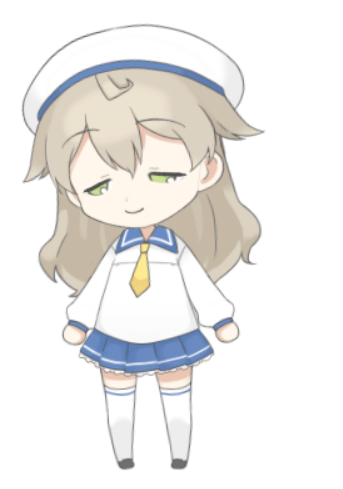
Koharu: Cute Long-haired Nurse
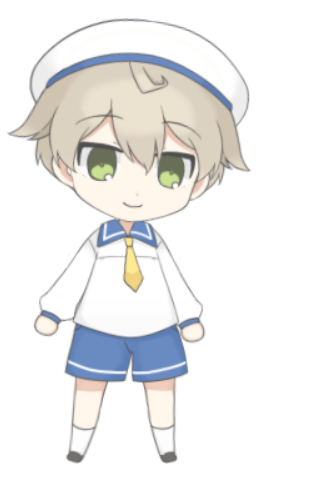
Haruto: Cute Short-haired Nurse
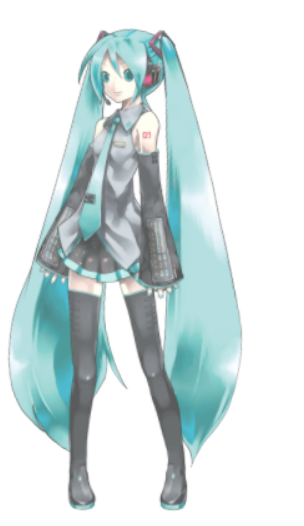
Miku: Hatsune Miku
Shizuku: AC Girl
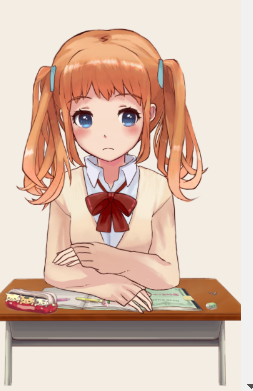
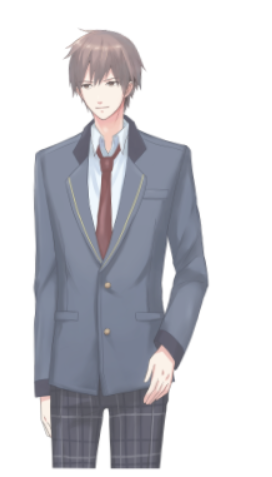
Chitose: Senior Student